Context, resources, and the Android process
Understand what Context gives you, how Android selects resources, and which objects must never be kept alive accidentally.
Context is one of the most frequently passed objects in Android and one of the least precisely explained. It is not simply “the app.” A Context is an interface to environment-specific services and resources. The environment may be an Activity, the application, a service, or a wrapped context with a different theme or configuration.
This distinction matters because the object you choose controls what is available, which theme is used, and how long a reference can safely live.
Learning goals
- Explain what
Contextprovides without calling it a global variable. - Choose an
Activitycontext or application context based on lifetime and capability. - Read resource qualifiers and predict which resource Android selects.
- Distinguish an app process from an Activity, task, and application object.
- Find common memory leaks caused by long-lived references.
What Context actually provides
A Context is a gateway to capabilities associated with an Android environment:
- Resources through
resources,getString(), andgetColor(). - System services through
getSystemService(). - Application files, preferences, databases, and cache directories.
- Component operations such as
startActivity(),startService(), and broadcasts. - A theme, configuration, package identity, and
ContentResolver.
Common concrete contexts include:
| Context | Lifetime | Theme-aware | Typical use |
|---|---|---|---|
Activity | Activity instance | Yes | Inflate UI, show a dialog, start UI flows |
Application | App process | Usually no screen theme | Process-wide dependencies, files, system services |
Service | Service instance | No Activity window | Service work and notifications |
ContextThemeWrapper | Wrapper-defined | Yes | Apply a specific theme while inflating UI |
The application context is not automatically the safest choice. It is safer to retain because it normally lives as long as the process, but it cannot replace an Activity when an operation needs an Activity window, Activity Result registration, or a screen theme.
class AvatarLoader(
    context: Context,
) {
    // Safe when this object may outlive an Activity.
    private val appContext = context.applicationContext

    fun cacheDir(): File = File(appContext.cacheDir, "avatars")
}
fun Fragment.showDeleteDialog() {
// The dialog needs the Activity-backed themed context.
MaterialAlertDialogBuilder(requireContext())
.setTitle(R.string.delete_title)
.setPositiveButton(R.string.delete) { _, _ -> delete() }
.show()
}The Android process is a disposable container
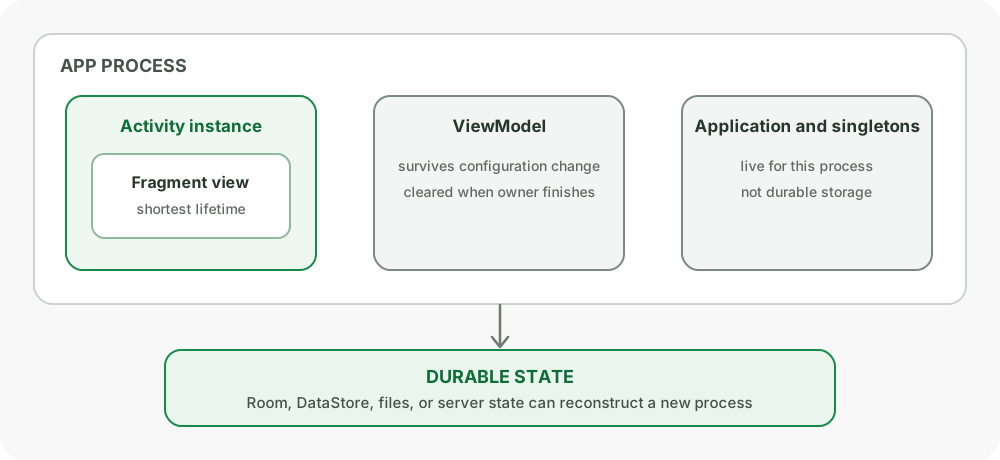
By default, Android runs an app’s components in one Linux process with a dedicated UID. The process contains the runtime, application object, loaded classes, heap, and threads. Android may terminate a background process to reclaim memory. It does not need to call Activity.onDestroy() first.
That gives you three different lifetimes:
- UI instance lifetime: an Activity, Fragment view, or composition exists.
- Process lifetime: static fields, singletons, and the
Applicationobject exist. - Durable lifetime: data survives process termination because it is stored in Room, DataStore, files, or a server.
Do not confuse process memory with durable storage. A singleton cache can disappear at any time after the process becomes eligible for termination.
Application is not a permanent object
Android creates your Application subclass when it starts the app process, before other app components in that process. Use it for lightweight process-wide initialization and dependency graph setup.
Avoid expensive disk reads, network calls, large dependency graphs, or SDK initialization on the startup critical path. Application.onCreate() runs on the main thread by default and contributes to cold-start latency.
@HiltAndroidApp
class DevKitApplication : Application()
An application-scoped object lives for the process, not forever. It must still handle empty caches and reconstruction after process death.
Resource selection is a runtime decision
Android resources separate meaning from a particular device configuration. You provide alternatives in qualified directories and Android selects the best match for the current Configuration.
Examples:
res/values/strings.xml               default
res/values-es/strings.xml            Spanish
res/values-night/colors.xml          night mode
res/layout-sw600dp/detail.xml         width at least 600dp
res/drawable-xxhdpi/avatar.png        high-density bitmap
The unqualified resource is the fallback. Omitting a required default can cause a Resources.NotFoundException on configurations that do not match any qualified alternative.
Configuration can change while the app runs
Locale, orientation, font scale, UI mode, and window size can change. Android commonly recreates an Activity so resources are resolved again. Manually declaring android:configChanges transfers responsibility to your code and is not a general recreation-avoidance technique.
Do not cache a translated string in a process-wide singleton:
// Wrong: may stay in the old locale after a configuration change.
object Labels {
    lateinit var retry: String
}
Prefer storing a resource ID or resolving the string close to the UI:
data class ErrorUi(
    @StringRes val message: Int,
)dp, sp, and pixels
dpexpresses physical layout size relative to a baseline density.spbehaves likedpbut also respects the user’s font scale. Use it for text.pxis the actual pixel unit used during drawing.
Do not disable font scaling by converting text sizes from dp. Large text is an accessibility requirement and exposes layouts that were built around fixed heights.
In Compose, density conversions are available inside a density scope:
val widthPx = with(LocalDensity.current) { 48.dp.toPx() }Use conversions only when an API truly requires pixels. Keep layout declarations in dp and text in sp.
Strings, plurals, and formatting
Never build user-visible sentences by concatenating translated fragments. Word order changes across languages.
<string name="welcome_user">Welcome, %1$s</string>

<plurals name="message_count">
    <item quantity="one">%d message</item>
    <item quantity="other">%d messages</item>
</plurals>
val title = resources.getString(R.string.welcome_user, user.name)
val count = resources.getQuantityString(
R.plurals.message_count,
messages.size,
messages.size,
)Plural categories are language-specific. Do not assume every language only has singular and plural.
System services and nullable capabilities
Services such as ConnectivityManager, NotificationManager, and InputMethodManager are obtained from a context. Prefer typed access:
val connectivity = context.getSystemService(ConnectivityManager::class.java)The presence of a manager does not prove that the device supports every related capability. Android runs on phones, tablets, TVs, cars, watches, foldables, and devices without telephony or a camera. Query feature availability and handle absence.
val hasCamera = context.packageManager
.hasSystemFeature(PackageManager.FEATURE_CAMERA_ANY)ContentResolver, URIs, and scoped access
ContentResolver communicates with content providers by content:// URI. A URI is not necessarily a filesystem path. Open it through resolver APIs:
context.contentResolver.openInputStream(uri)?.use { input ->
    copyIntoAppStorage(input)
}
Trying to turn every content URI into a raw path is brittle and often fails with document providers, cloud-backed files, or scoped storage. If long-term access is granted through the Storage Access Framework, call takePersistableUriPermission() only when the returned grant supports it.
Memory leaks are lifetime mismatches
A garbage collector can reclaim an object only when it is no longer strongly reachable. A leak happens when a long-lived object retains a shorter-lived object that is no longer useful.
Common paths:
- A singleton stores an Activity, Fragment, View, adapter, or callback.
- A delayed
Runnablecaptures an Activity after recreation. - A Fragment binding is not cleared in
onDestroyView(). - A listener is registered but never unregistered.
- A coroutine outlives its UI owner and captures a View.
// Wrong: repository may live for the process.
class UserRepository(private val activity: Activity)

// Better: pass a narrow dependency or application context only if required.
class UserRepository(
    private val dao: UserDao,
    private val clock: Clock,
)
The useful interview rule is: compare the lifetime of the owner with the lifetime of every object it stores.
Common pitfalls
- Calling application context and Activity context interchangeable.
- Keeping an Activity in a singleton or companion object.
- Treating in-memory state as durable because it survives rotation.
- Caching strings across configuration changes.
- Treating a
content://URI as a file path. - Assuming a hardware feature exists because an API exists.
- Doing heavy initialization in
Application.onCreate().
How interviewers probe this
- “What is Context?”
- “Application context vs Activity context?”
- “Why does keeping an Activity in a singleton leak it?”
- “How does Android select
values-nightorsw600dpresources?” - “Does a singleton survive process death?”
- “Why can a content URI not be treated as a file path?”
Practice checklist
- Audit one project for classes that store
Contextand justify each lifetime. - Add a locale resource and a plural resource, then test with large font scale.
- Rotate a screen while watching Activity and ViewModel identity in logs.
- Open a document through the Storage Access Framework without resolving a raw path.
- Use LeakCanary or a heap dump to inspect one retained Activity path.
What you should be able to explain
Contextas an environment-specific capability boundary.- Activity, process, and durable-storage lifetimes.
- Resource qualification and configuration changes.
- Why memory leaks are usually ownership mistakes.
Next: UI rendering, lists, and accessibility, where these resources and lifetimes become visible on screen.
Discussion
Comments are powered by GitHub Discussions. Sign in with GitHub to join in.