0 wordsStructure → trade-off → example
How close was your answer?
Build a 10–20 question run, answer under pressure, and leave with a score - not another open tab you meant to study later.
How close was your answer?
Think of the Activity lifecycle as three questions: Does the Activity exist? Is it visible? Can the user interact with it? The main callbacks are:
onCreate - create this Activity instance and set up its UI.onStart - activity becomes visible.onResume - activity is in the foreground and interactive.onPause - losing focus (a dialog, another activity in front). Keep this fast.onStop - no longer visible.onDestroy - being torn down (finished or recreated).On rotation, Android normally destroys the current Activity instance and creates a new one. You will usually see a sequence like this:
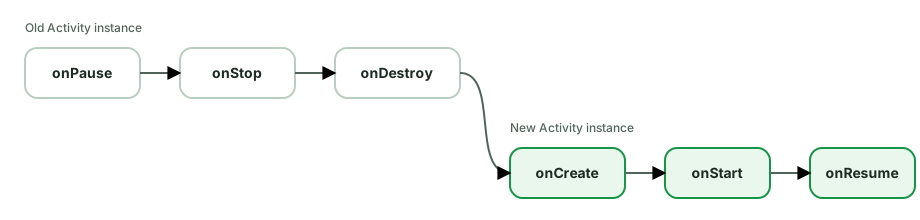
The exact timing of state-saving callbacks can vary, so do not write logic that depends on one precise callback order. The important point is that Activity fields belong to the old instance and are lost.
ViewModel keeps screen data across configuration changes.onSaveInstanceState, SavedStateHandle, or rememberSaveable keep small
pieces of restorable UI state, such as a selected tab or search query.Common follow-up: Process death also removes the ViewModel because the whole app process is gone. Restore the minimum state needed to rebuild the screen and load durable data again from a database or network source.
An ANR (Application Not Responding) happens when the main thread is blocked too long and can’t process input or draw. The system thresholds:
BroadcastReceiver.onReceive not finished (foreground).ContentProvider timeouts, including a foreground service that
fails to call startForeground() within the system deadline after
startForegroundService().Common causes:
Thread.sleep, synchronous network, runBlocking on Main, a lock held by a slow thread.onReceive.Prevention:
Dispatchers.IO/Default, WorkManager for background.onCreate/onBind/onReceive.StrictMode in debug to catch accidental disk/network on the main thread.goAsync() or hand off in receivers; don’t block.Diagnosis:
/data/anr/traces.txt (or the bug report) shows the main-thread stack at the moment of the ANR - read it to find what was blocking..aab) you upload to Play. It’s not installed directly; Play uses it to generate and serve optimized APKs per device via Play Feature/Dynamic Delivery.The win - smaller downloads. With an AAB, Play’s split APKs ship only what a given device needs:
So a user doesn’t download xxhdpi assets, French strings, and x86 libraries they’ll never use. AAB is required for new apps on Google Play (since Aug 2021).
Related capabilities AAB enables:
Play Feature Delivery), shrinking the base install.What to remember:
bundletool) for sideloading/testing.The three startup types, by how much already exists:
Application object, then the first Activity. Slowest and the one you optimize.What runs at cold start (and where time goes):
Application.onCreate() → Activity onCreate → first frame drawn (time-to-initial-display).
Optimizations:
Application.onCreate - it runs on every cold start and blocks the first frame. Lazy-initialize SDKs; defer non-critical init off the critical path.ContentProvider-based library auto-initializers into one, and initialize lazily.onCreate; load data async (coroutines) and show content progressively.androidx.core.splashscreen) - a system splash you keep on screen until content is ready; avoid a separate splash Activity that adds a hop.MultiDex impact on older devices, and avoid synchronous disk/network.Measure with:
adb shell am start -W (reports TotalTime), Macrobenchmark (StartupTimingMetric), Perfetto/system traces, and Android vitals (startup time in production).reportFullyDrawn().Android has steadily tightened background execution to save battery. The major mechanisms:
Doze mode (Android 6+) - when the device is unplugged, stationary, and screen off for a while, the system enters Doze: it batches and defers background work into periodic maintenance windows. During Doze:
AlarmManager non-exact), jobs/syncs deferred.Background service limits (Android 8+) - apps in the background can’t start background services; the system kills them shortly after the app leaves the foreground. Implicit broadcasts are mostly disallowed in the manifest.
Background location limits (Android 8/10+) - background apps get location updates only a few times per hour; background access needs a separate permission.
App Standby Buckets (Android 9+) - the system buckets apps (active / working set / frequent / rare / restricted) by usage and throttles their jobs/alarms accordingly.
How to work with the system (not fight it):
canScheduleExactAlarms() before calling exact APIs and provide
an inexact fallback when special access is unavailable.What to avoid: holding wakelocks, polling, or expecting precise background timing - the OS will defer or kill it. Requesting battery-optimization exemption is heavily restricted by Play and should be a last resort.
startActivityForResult + onActivityResult had real problems:
onActivityResult when(requestCode), far from the call site.The Activity Result API replaces it with type-safe, lifecycle-aware contracts:
// Register at construction time (not after STARTED)
private val pickImage = registerForActivityResult(
    ActivityResultContracts.GetContent()
) { uri: Uri? ->
    uri?.let { showImage(it) }      // result handled right here
}

// Launch from anywhere
button.setOnClickListener { pickImage.launch("image/*") }Benefits:
GetContent, TakePicture, RequestPermission, RequestMultiplePermissions, StartActivityForResult, or a custom ActivityResultContract with typed input/output. No requestCodes, no manual Intent parsing.onCreate).ActivityResultRegistry.Common contracts: runtime permissions (RequestPermission), picking content/photos, taking a picture, and StartIntentSenderForResult.
The Application object is a singleton created before any Activity/Service, living for the whole process lifetime. It’s the global entry point and the holder of application-wide state.
class MyApp : Application() {
    override fun onCreate() {
        super.onCreate()
        // app-wide, must-happen-early init
    }
}Register it in the manifest (<application android:name=".MyApp">).
Legitimate uses:
Application integration), logging.ProcessLifecycleOwner / registerActivityLifecycleCallbacks for app-wide foreground/background awareness.What NOT to do (the important part - onCreate runs on every cold start and blocks the first frame):
What to remember:
android:process), each with its own Application instance.onCreate lean; defer everything you can - startup time is a real metric (Android vitals).A BroadcastReceiver responds to system-wide or app broadcast events (connectivity change, boot completed, battery low, or your own custom broadcasts).
Two ways to register:
BOOT_COMPLETED, LOCKED_BOOT_COMPLETED).registerReceiver() in code; only active while your component is alive. You must unregisterReceiver() (e.g. in onStop/onDestroy) or you leak.val receiver = object : BroadcastReceiver() {
override fun onReceive(context: Context, intent: Intent) { /* handle */ }
}
// API 33+: must specify exported flag
registerReceiver(receiver, IntentFilter(ACTION), RECEIVER_NOT_EXPORTED)Key constraints interviewers probe:
onReceive runs on the main thread and must return quickly - no heavy
work. Enqueue durable work in WorkManager. For a brief asynchronous handoff,
goAsync() returns a PendingResult, but you must call finish() within the
receiver’s limited execution window; it is not a way to run indefinitely.LocalBroadcastManager is
deprecated; use explicit state holders, callbacks, or Flows for in-process
communication.Modern guidance: for in-app eventing use Flows; for reacting to system conditions (network, charging) prefer WorkManager constraints; reserve receivers for the few cases that genuinely need them (e.g. BOOT_COMPLETED to reschedule work).
Three related concepts let you produce multiple versions of an app from one codebase:
debug and release; differ in signing, minifyEnabled, debuggable, applicationIdSuffix, etc. You can add custom ones (e.g. staging).free/paid, or dev/prod (different API endpoints, app names, feature sets). Grouped by flavor dimensions.free/paid and types debug/release you get four: freeDebug, freeRelease, paidDebug, paidRelease.android {
flavorDimensions += "tier"
productFlavors {
create("free") { dimension = "tier"; applicationIdSuffix = ".free" }
create("paid") { dimension = "tier" }
}
buildTypes {
getByName("release") { isMinifyEnabled = true; signingConfig = ... }
create("staging") { initWith(getByName("debug")); applicationIdSuffix = ".staging" }
}
}What you control per variant:
applicationId/suffix - so debug/staging/free can install alongside release (different package names).buildConfigField and resValue - inject constants (API base URL, feature flags) and resources per variant.src/free/, src/debug/ directories override/add code and resources for that variant.Common real-world use: dev/prod flavors pointing at different backends, a staging build type for QA, and applicationIdSuffix so testers keep prod + staging installed simultaneously.
Bitmaps are the #1 cause of OutOfMemoryError because they’re huge in memory: a bitmap’s RAM ≈ width × height × bytesPerPixel. A 4000×3000 photo at ARGB_8888 (4 bytes/px) is ~48 MB - regardless of the file’s compressed size on disk.
Techniques:
1. Downsample when decoding - never decode full-res for a thumbnail. Use inSampleSize to load a scaled version:
val opts = BitmapFactory.Options().apply { inJustDecodeBounds = true }
BitmapFactory.decodeFile(path, opts)              // read dimensions only
opts.inSampleSize = calculateInSampleSize(opts, reqWidth, reqHeight)
opts.inJustDecodeBounds = false
val bitmap = BitmapFactory.decodeFile(path, opts) // decode scaled2. Pick the right config - RGB_565 (2 bytes/px) halves memory vs ARGB_8888 when you don’t need alpha; HARDWARE bitmaps keep pixels in GPU memory.
3. Use an image library - Coil (Compose-native) or Glide handle all of this: automatic downsampling to the target view/size, memory + disk LRU caches, bitmap pooling/reuse, request cancellation when a view is recycled, and lifecycle awareness. In practice you almost never hand-decode.
AsyncImage(model = url, contentDescription = null, modifier = Modifier.size(96.dp))4. Other practices:
BitmapRegionDecoder (tiles) for pan/zoom.A ContentProvider exposes structured data across app boundaries behind a content:// URI, with a CRUD interface (query, insert, update, delete). It’s the standard mechanism for sharing data between apps and is the backend for system data like contacts, calendar, and MediaStore.
val cursor = contentResolver.query(
    ContactsContract.Contacts.CONTENT_URI, null, null, null, null,
)When you actually need to build one:
FileProvider (granting temporary URI permissions instead of exposing file paths).FileProvider is the common real-world case - sharing a photo/PDF with another app safely.When you do NOT need one:
What to remember:
onCreate runs before Application.onCreate finishes) - which is why libraries like WorkManager and App Startup historically used a stub ContentProvider to auto-initialize. That early-init behavior is itself a common trivia question.android:exported, permissions, and path-permissions; never expose raw file paths.Context is the handle to app/system resources and services. The main flavors:
applicationContext / getApplication(). Use for things that must outlive any single screen: singletons, databases, WorkManager, DataStore, app-wide managers.The golden rule - match the context’s lifetime to the object that holds it:
// ✅ singleton holds app context - same lifetime, no leak
class Analytics(context: Context) {
    private val appContext = context.applicationContext
}

// ❌ singleton (or static/ViewModel) holding an Activity context → leaks the Activity
object Cache { lateinit var ctx: Context } // if assigned an Activity, it leaksWhy it matters: holding an Activity context in something longer-lived (a static field, singleton, ViewModel, or a long-running thread) prevents the Activity from being garbage-collected after it’s destroyed - a classic memory leak.
Things that need a specific context:
Extend View (fully custom drawing) or an existing widget/ViewGroup (compose existing ones). A typical fully-custom view overrides three things plus constructors.
class RatingView @JvmOverloads constructor(
    context: Context, attrs: AttributeSet? = null, defStyle: Int = 0,
) : View(context, attrs, defStyle) {

    private val paint = Paint(Paint.ANTI_ALIAS_FLAG)   // allocate ONCE, not in onDraw

    init {
        // Read custom XML attributes
        context.obtainStyledAttributes(attrs, R.styleable.RatingView).use { a ->
            paint.color = a.getColor(R.styleable.RatingView_starColor, Color.YELLOW)
        }
    }

    override fun onMeasure(wSpec: Int, hSpec: Int) {
        // Resolve desired size honoring the MeasureSpec
        val size = resolveSize(desiredSize, wSpec)
        setMeasuredDimension(size, size)
    }

    override fun onDraw(canvas: Canvas) {
        canvas.drawCircle(width / 2f, height / 2f, radius, paint)
    }
}What you must handle:
@JvmOverloads - XML inflation calls the (Context, AttributeSet) constructor; missing it crashes on inflate.<declare-styleable> in attrs.xml, read via obtainStyledAttributes (and recycle it).onMeasure - respect the parent’s MeasureSpec (EXACTLY/AT_MOST/UNSPECIFIED); use resolveSize. A ViewGroup also needs onLayout to place children.onDraw - render with Canvas; never allocate (Paint/Path/objects) here - it runs every frame.onSaveInstanceState/onRestoreInstanceState for view state that should survive recreation.onTouchEvent / gesture detectors; call invalidate() to redraw, requestLayout() if size changed.AccessibilityNodeInfo for custom controls.What to remember:
onDraw/onMeasure causes jank and GC churn.invalidate() for redraw vs requestLayout() for size changes.onDraw unless you genuinely need custom rendering.The short answer is that modern Android uses ART. Dalvik is useful history, but Junior and Mid candidates should focus on why current apps use a mix of JIT, AOT, and profiles.
Dalvik was Android’s original runtime before Android 5. It compiled code as the app ran using JIT, or Just-In-Time compilation.
ART (Android Runtime) replaced it (Android 5+) and has evolved:
The terms:
Baseline Profiles list important code paths such as startup and scrolling. Shipping that list lets ART compile those paths earlier instead of waiting to learn them from usage. The result can be faster first launches and smoother critical interactions. Macrobenchmark tooling can generate and verify them.
Other ART facts:
.class → .dex (via D8) → optimized by R8.SharedPreferences is the old key-value store; DataStore (Jetpack) is its modern replacement, designed to fix SharedPreferences’ flaws.
SharedPreferences problems:
apply() is async but commit() does synchronous disk I/O on the calling thread - easy to block the main thread (and a known ANR source).getString etc. can return on the main thread after blocking.DataStore advantages:
Flow; writes are suspend. No main-thread I/O.IOException) through the Flow.val EXAMPLE_KEY = booleanPreferencesKey("dark_mode")
val darkMode: Flow<Boolean> = context.dataStore.data
.map { it[EXAMPLE_KEY] ?: false }
suspend fun setDarkMode(on: Boolean) {
context.dataStore.edit { it[EXAMPLE_KEY] = on }
}When to use which:
SharedPreferencesMigration).A Fragment has two lifecycles - the fragment instance and its view - and the gap between them is the source of most fragment bugs.
Fragment callbacks:
onAttach → onCreate → onCreateView → onViewCreated → onStart → onResume → … → onPause → onStop → onDestroyView → onDestroy → onDetach.
The key insight: onCreateView/onDestroyView can run multiple times while the fragment instance stays alive. When a fragment goes on the back stack, its view is destroyed (onDestroyView) but the fragment object survives. Coming back, onCreateView runs again - a new view.
Consequences interviewers probe:
viewLifecycleOwner, not this (the fragment), when observing LiveData/flows in a fragment. Observing with the fragment lifecycle in onCreateView leaks: after onDestroyView the old view is gone but the observer (tied to the longer-lived fragment) keeps firing and may touch a dead view, or you get duplicate observers when the view is recreated.
viewModel.data.observe(viewLifecycleOwner) { render(it) }onDestroyView (_binding = null) - the binding references the destroyed view and leaks it otherwise.onViewCreated with viewLifecycleOwner.lifecycleScope + repeatOnLifecycle.Why fragments at all: reusable UI chunks with their own lifecycle, used by Navigation, ViewPager, and multi-pane (tablet) layouts. Modern apps often use a single-Activity architecture with fragment (or Compose) destinations.
This trio is the message-passing machinery behind Android’s main thread.
MessageQueue - a queue of Message/Runnable tasks to be processed, ordered by time.Looper - an infinite loop bound to a thread that pulls messages off the queue and dispatches them, one at a time. One Looper per thread (Looper.prepare() + Looper.loop()).Handler - the interface to post messages/runnables onto a Looper’s queue and to handle them when they’re dispatched. A Handler is bound to the Looper of the thread that created it (or one you pass).val mainHandler = Handler(Looper.getMainLooper())
mainHandler.post { textView.text = "Done" } // run on main thread
mainHandler.postDelayed({ /* ... */ }, 1000) // schedule for laterThe main (UI) thread is a thread running a Looper. The framework calls Looper.loop() for you; every lifecycle callback, touch event, and View.invalidate is a message dispatched through the main MessageQueue. That’s why:
Handler (or, in coroutines, Dispatchers.Main).Where it still matters today: even though you use coroutines now, Dispatchers.Main is built on the main Looper, and HandlerThread (a thread with its own Looper) backs some libraries (e.g. camera/sensor callbacks). Understanding it explains why runOnUiThread, View.post, and Dispatchers.Main exist.
Launch modes control how an Activity instance relates to the task back stack. Set them in the manifest (android:launchMode) or via intent flags.
standard (default) - a new instance every time it’s launched, even if one already exists. Can have multiple copies in the stack.singleTop - if an instance is already at the top of the stack, reuse it and deliver the intent to onNewIntent() instead of creating a new one. If it’s not on top, a new instance is created.singleTask - at most one instance in the task. If it exists, it’s brought to the front and everything above it is cleared (onNewIntent is called). Common for an app’s entry/root activity.singleInstance - like singleTask, but the activity is the only one in its task - nothing else can be added to that task. Rare (e.g. a launcher or a separate-window screen).Equivalent intent flags (set at launch time, no manifest change):
FLAG_ACTIVITY_NEW_TASK - start in a new/ existing task.FLAG_ACTIVITY_SINGLE_TOP - like singleTop for this launch.FLAG_ACTIVITY_CLEAR_TOP - if the activity exists in the stack, clear everything above it.FLAG_ACTIVITY_CLEAR_TASK (with NEW_TASK) - wipe the task and start fresh (e.g. after logout).onNewIntent() is the callback you must handle when an existing instance is reused - the new Intent arrives there, not in onCreate. Forgetting it means you process the old intent’s data.
Practical uses: singleTask/CLEAR_TOP for “go home” buttons and notification taps that shouldn’t stack duplicates; singleTop for a search activity re-launched with a new query; CLEAR_TASK + NEW_TASK to reset the stack on logout.
A deep link is a URI that opens a specific screen in your app. There are tiers:
1. Basic deep link - an intent filter on ACTION_VIEW with a custom scheme or http(s):
<intent-filter>
    <action android:name="android.intent.action.VIEW"/>
    <category android:name="android.intent.category.DEFAULT"/>
    <category android:name="android.intent.category.BROWSABLE"/>
    <data android:scheme="https" android:host="example.com" android:pathPrefix="/item"/>
</intent-filter>Problem: for a plain web link, Android may show a disambiguation chooser (“open with browser or app?”).
2. Android App Links (verified http(s) links) - the upgrade. Add
android:autoVerify="true" and host an assetlinks.json Digital Asset Links
file at https://example.com/.well-known/assetlinks.json listing your app’s
package and signing fingerprint. Android verifies the domain-to-app
association, allowing your app to become the default handler without the
generic chooser. Verification can fail, and users can change supported-link
preferences, so the website must remain a valid fallback.
3. Custom scheme (myapp://) - works, but any installed app can claim the
same scheme. Prefer claimed HTTPS redirects (App Links) for security-sensitive
flows such as OAuth when the provider supports them; otherwise use a
high-entropy redirect and validate the returned state.
Handling them:
Intent.data URI in the target Activity (and handle onNewIntent for singleTop).navDeepLink { uriPattern = ... }), routing the URI to the right destination and building a proper back stack.What to remember:
assetlinks.json domain verification; plain deep links may prompt.TaskStackBuilder / nav graph) so Back works.adb shell am start -a android.intent.action.VIEW -d "https://example.com/item/42".An Intent is a messaging object to request an action from a component (start an Activity/Service, deliver a broadcast).
Explicit intent - names the exact target component. Used within your app.
startActivity(Intent(this, DetailActivity::class.java).putExtra("id", 42))Implicit intent - describes an action, and the system finds a component (often in another app) that can handle it via intent filters.
startActivity(Intent(Intent.ACTION_VIEW, Uri.parse("https://example.com")))
startActivity(Intent(Intent.ACTION_SEND).apply {
    type = "text/plain"; putExtra(Intent.EXTRA_TEXT, "Hi")
})Intent filters (in the manifest) declare what implicit intents a component accepts, matched on action, category, and data (scheme/host/mimeType):
<activity android:name=".ShareActivity">
    <intent-filter>
        <action android:name="android.intent.action.SEND"/>
        <category android:name="android.intent.category.DEFAULT"/>
        <data android:mimeType="text/plain"/>
    </intent-filter>
</activity>What to remember:
resolveActivity / wrap in try-catch) or no app may handle it.queryIntentActivities(). Add a narrow <queries> declaration when your app
must discover matching handlers; do not request broad package visibility just
to call startActivity() for a known implicit action.ACTION_VIEW intents with a <data> URL filter; verified App Links open your app directly without a chooser.putExtra/getXxxExtra; complex objects need Parcelable.Lifecycle-aware components observe an owner’s lifecycle and react automatically, instead of you manually wiring start/stop logic into Activity/Fragment callbacks.
The pieces (from androidx.lifecycle):
Lifecycle - holds the current state (INITIALIZED, CREATED, STARTED, RESUMED, DESTROYED) and dispatches events (ON_CREATE, ON_START, …).LifecycleOwner - anything with a Lifecycle (Activity, Fragment, viewLifecycleOwner, NavBackStackEntry, the process via ProcessLifecycleOwner).LifecycleObserver - an object that observes those events; implement DefaultLifecycleObserver for clean callbacks.class LocationTracker(private val client: LocationClient) : DefaultLifecycleObserver {
override fun onStart(owner: LifecycleOwner) = client.start()
override fun onStop(owner: LifecycleOwner) = client.stop()
}
// In the Activity/Fragment:
lifecycle.addObserver(LocationTracker(client)) // auto start/stop with the lifecycleWhy it matters:
start()/stop() across onStart/onStop and risk forgetting one.LiveData (only updates active observers), lifecycleScope, repeatOnLifecycle, and viewModelScope.Related:
ProcessLifecycleOwner observes the whole app going to foreground/background (e.g. lock the app when backgrounded).DefaultLifecycleObserver over the old annotation-based @OnLifecycleEvent (deprecated).A memory leak on Android usually means a long-lived object holds a reference to a short-lived one (often an Activity/Fragment/View), preventing GC after it’s destroyed.
The usual culprits:
Handler.postDelayed of 60s pins the Activity.)Context, View, or callback. Use application context for app-lifetime objects.BroadcastReceiver, LocationListener, LiveData.observeForever, RxJava/Flow subscriptions, ViewTreeObserver.GlobalScope/unscoped jobs capturing UI.ViewBinding in onDestroyView, or observing with the fragment instead of viewLifecycleOwner.Detection tools:
The fix pattern: break the reference chain - use weak references or app context, unregister in the symmetric lifecycle callback, scope coroutines to a lifecycle, and null out view-bound fields on destroy.
Posting a notification requires a few things on modern Android:
1. A notification channel (Android 8+, mandatory). Every notification belongs to a channel; the user controls importance, sound, vibration, and can mute a channel - you can’t override their choice. Create channels once (e.g. in Application.onCreate).
val channel = NotificationChannel(
    "messages", "Messages", NotificationManager.IMPORTANCE_HIGH,
)
notificationManager.createNotificationChannel(channel)2. Build and post:
val n = NotificationCompat.Builder(context, "messages")
    .setSmallIcon(R.drawable.ic_msg)
    .setContentTitle("New message")
    .setContentText(body)
    .setContentIntent(pendingIntent)        // tap action (PendingIntent)
    .setAutoCancel(true)
    .build()
NotificationManagerCompat.from(context).notify(id, n)3. Runtime permission (Android 13+). POST_NOTIFICATIONS is a runtime
permission for non-exempt notifications. Ask at a moment where the benefit is
clear, handle denial as a normal product state, and do not assume that creating
a channel means the app may post.
What to remember:
IMPORTANCE_HIGH = heads-up; LOW/MIN = quiet.PendingIntent powers tap and action buttons - use FLAG_IMMUTABLE (except direct-reply, which needs MUTABLE).BigTextStyle, MessagingStyle, MediaStyle), actions, direct reply (RemoteInput), progress, grouping/summary, and foreground service notifications.NotificationCompat for backward compatibility.Both let you pass objects between components (in Intent extras / Bundle), but they work very differently.
Serializable - Java’s general-purpose object serialization mechanism.
It is convenient, but reflective graph serialization adds overhead and its
long-term format carries compatibility and security concerns.Parcelable - Android’s compact, IPC-oriented flattening contract. Its
generated or explicit read/write order avoids reflective graph traversal and
matches what Bundle and Binder APIs expect.The pain point Parcelable used to have was boilerplate (writeToParcel, CREATOR, describeContents). Kotlin removes it with @Parcelize:
@Parcelize
data class User(val id: Int, val name: String) : Parcelable
// that's it - writeToParcel/CREATOR are generatedWhat to remember:
Parcelable (@Parcelize) for a small structured value that genuinely
must cross an Android component or Binder boundary.Parcel is for in-memory IPC / transient transport, not persistence - never write a Parcel to disk or rely on its format across versions.TransactionTooLargeException) - don’t pass large objects/bitmaps through Intents; pass an ID and load the data, or use a shared repository.A PendingIntent is a token that wraps an Intent plus your app’s permission to perform it, handed to another app or the system so they can execute the action as you, later. It’s used for notifications, alarms (AlarmManager), app widgets, and Service/Activity callbacks.
val pi = PendingIntent.getActivity(
    context, requestCode, intent,
    PendingIntent.FLAG_IMMUTABLE or PendingIntent.FLAG_UPDATE_CURRENT,
)
notificationBuilder.setContentIntent(pi)Why mutability is a security issue: the receiving app holds your PendingIntent and could fill in the blank fields of the wrapped Intent if it’s mutable, then have it executed with your app’s identity/permissions. A mutable PendingIntent with an unspecified component is an intent-redirection vulnerability.
The flags:
FLAG_IMMUTABLE - the other app can’t modify the Intent. Default choice - use it unless you have a specific reason not to. Required thinking on Android 12+ (you must explicitly pass IMMUTABLE or MUTABLE).FLAG_MUTABLE - allows modification. Only when a system feature needs to fill in data - e.g. direct reply notifications (the system inserts the typed text), or Bubbles. When you do, make the Intent explicit (named component) to avoid redirection.FLAG_UPDATE_CURRENT - update the extras of an existing matching PendingIntent.FLAG_CANCEL_CURRENT / FLAG_NO_CREATE / FLAG_ONE_SHOT - manage lifecycle/reuse.Equality gotcha: PendingIntents are matched by requestCode + Intent (action/data/component, not extras). Reusing the same requestCode can hand back an old one - vary the requestCode or use UPDATE_CURRENT for notifications.
Two different ways your UI state can be destroyed - and they need different tools.
Configuration change (rotation, locale, dark mode, multi-window): the system destroys and recreates the Activity immediately, but the process stays alive. So in-memory objects that survive recreation are intact.
ViewModel - it survives config changes (it’s retained across the recreate), so your data and in-flight coroutines aren’t lost.Process death (the system reclaims your app’s memory while it is in the background): the entire process is killed. The ViewModel, static fields, singletons - everything in memory is gone. When the user returns through the retained task, Android creates a new process and Activity and can restore saved UI state.
onSaveInstanceState, rememberSaveable, or
SavedStateHandle - for small transient values needed to reconstruct the
screen. Android keeps that serialized state outside your process; it is not a
durable database and is cleared when the user fully dismisses the task.class SearchViewModel(private val handle: SavedStateHandle) : ViewModel() {
// Survives BOTH config change AND process death
val query: StateFlow<String> = handle.getStateFlow("query", "")
fun setQuery(q: String) { handle["query"] = q }
}| Config change | Process death | |
|---|---|---|
| Process | survives | killed |
| ViewModel | survives | lost |
SavedStateHandle / saved-state Bundle | survives | restored after system-initiated death |
Rules:
SavedStateHandle/rememberSaveable so it survives process death too.adb shell am kill <package> - because destroying Activities is not the same
event as killing the process.R8 is the default code shrinker/optimizer (it replaced ProGuard, reading the same proguard-rules.pro config). Enabled with minifyEnabled true on release builds, it does four things:
a, b) - smaller and harder to reverse-engineer.shrinkResources true) - drops unused resources.buildTypes {
release {
isMinifyEnabled = true
isShrinkResources = true
proguardFiles(getDefaultProguardFile("proguard-android-optimize.txt"), "proguard-rules.pro")
}
}The catch - reflection breaks under R8. R8 does static analysis; code accessed only via reflection, JNI, or by name (Gson/Moshi models, deserialized classes, reflective DI, Class.forName) looks “unused” and gets removed or renamed. That’s what -keep rules are for:
-keep class com.app.model.** { *; }          # don't remove/rename my JSON models
-keepclassmembers class ... { @SerializedName <fields>; }
-keepattributes Signature, *Annotation* # keep generics/annotations for reflectionWhat to remember:
NoSuchMethodException, broken JSON parsing).build/outputs/mapping) - upload it to Play to de-obfuscate crash stack traces; without it, production crashes are unreadable.RecyclerView efficiently displays large lists by recycling a small pool of item views instead of creating one per data item. The pieces:
ViewHolder - caches the views for one row so you don’t findViewById repeatedly.Adapter - onCreateViewHolder (inflate, called rarely) + onBindViewHolder (bind data to a recycled holder, called often). The recycling is the whole point: as you scroll, off-screen holders are rebound with new data.LayoutManager - positions items (Linear, Grid, StaggeredGrid).ItemAnimator, ItemDecoration - animations and dividers/spacing.DiffUtil computes the minimal set of changes between an old and new list (using a Myers diff) so you can dispatch precise notifyItemInserted/Removed/Changed instead of notifyDataSetChanged().
class MyDiff : DiffUtil.ItemCallback<Item>() {
    override fun areItemsTheSame(a: Item, b: Item) = a.id == b.id        // same entity?
    override fun areContentsTheSame(a: Item, b: Item) = a == b           // same content?
}
class MyAdapter : ListAdapter<Item, MyVH>(MyDiff()) { ... }
adapter.submitList(newList) // diff + granular updates, with animationsWhy it matters:
notifyDataSetChanged() rebinds everything and kills animations/scroll position - wasteful.areItemsTheSame = same identity (by id); areContentsTheSame = same data (drives the “changed” animation). Getting these wrong causes flicker or missed updates.ListAdapter wraps DiffUtil and runs it on a background thread via AsyncListDiffer - the recommended adapter base class.Compose parallel: LazyColumn is the Compose equivalent; its items(key = {}) plays the role of DiffUtil’s identity matching.
Android picks the best-matching resource for the current device configuration at runtime, using qualified resource directories. You provide alternatives; the system selects.
res/
├── values/strings.xml            # default
├── values-es/strings.xml         # Spanish
├── values-night/colors.xml       # dark mode
├── drawable-hdpi/ic.png          # density buckets
├── drawable-xxhdpi/ic.png
├── layout/activity_main.xml      # default layout
├── layout-sw600dp/activity_main.xml   # tablets (smallest width ≥ 600dp)
└── mipmap-xxhdpi/ic_launcher.png # launcher iconsCommon qualifiers (in precedence order): locale (-es, -fr), layout direction (-ldrtl), smallest width (-sw600dp), screen width/orientation (-w820dp, -land), night mode (-night), density (-hdpi/-xxhdpi), and API level (-v29).
Why it matters:
values-<lang> folders; never hardcode strings (use @string/... and getString()).values-night / -night resources are auto-selected; no code branching.-sw600dp/-w600dp for tablets and foldables.-v29 for resources only valid on newer APIs.What to remember:
values/) when no qualified match exists.R.string.x, R.drawable.y; the qualifier resolution is automatic.Room is Jetpack’s persistence library - an abstraction over SQLite that adds compile-time safety and coroutine/Flow support. Three core pieces:
@Entity - a table; each instance is a row.@Dao - Data Access Object; methods annotated @Query/@Insert/@Update/@Delete define database operations.@Database - ties entities + DAOs together and exposes the DB instance.@Entity data class User(@PrimaryKey val id: Int, val name: String)
@Dao interface UserDao {
@Query("SELECT * FROM User WHERE id = :id")
suspend fun getUser(id: Int): User?
@Query("SELECT * FROM User")
fun observeAll(): Flow<List<User>> // emits on every change
@Insert(onConflict = OnConflictStrategy.REPLACE)
suspend fun upsert(user: User)
}
@Database(entities = [User::class], version = 1)
abstract class AppDb : RoomDatabase() { abstract fun userDao(): UserDao }Why Room over raw SQLite:
@Query strings are checked against the schema at build time (typos/bad columns fail the build).Cursor parsing or ContentValues; rows map straight to objects.suspend DAO methods run off the main thread; Flow return types make the DB observable, emitting whenever the data changes - the basis of “DB as single source of truth.”Migration objects (or autoMigrations) version your schema safely.@Relation), type converters (@TypeConverter), full-text search, and testability.What to remember:
Flow-returning query is the idiomatic single source of truth - write to Room, observe Room, UI updates automatically (pairs with Paging’s RemoteMediator for offline-first).fallbackToDestructiveMigration wipes data and is for dev only.Since Android 6 (Marshmallow), dangerous permissions (location, camera, contacts, microphone) must be requested at runtime, not just declared in the manifest. Normal permissions (internet, vibrate) are granted at install.
The flow with the modern Activity Result API:
val launcher = registerForActivityResult(RequestPermission()) { granted ->
    if (granted) startCamera() else showRationaleOrSettings()
}

when {
    checkSelfPermission(CAMERA) == PERMISSION_GRANTED -> startCamera()
    shouldShowRequestPermissionRationale(CAMERA) -> showRationale { launcher.launch(CAMERA) }
    else -> launcher.launch(CAMERA)
}Key behaviors & best practices:
shouldShowRequestPermissionRationale can tell you that an educational
explanation is appropriate after a denial. A false result is ambiguous: it
can mean the permission has never been requested or that the system will no
longer show the dialog. Track whether you requested it, and offer Settings
only when the user deliberately tries the blocked feature again.ACCESS_COARSE/FINE, and background location (ACCESS_BACKGROUND_LOCATION) must be requested separately and is heavily scrutinized.READ_MEDIA_IMAGES/VIDEO/AUDIO replace READ_EXTERNAL_STORAGE; Android 14 adds partial photo access (selected photos).Scoped storage (enforced from Android 10/11) restricts an app’s broad access to shared external storage. An app can freely access its own directories but needs specific mechanisms (and often user consent) for shared files - improving privacy and removing the need for the broad READ/WRITE_EXTERNAL_STORAGE permission in most cases.
Where data goes:
filesDir, cacheDir) - private, no permission, wiped on uninstall.getExternalFilesDir) - private to your app, no permission needed.MediaStore.How to access shared media/files:
MediaStore - query/insert into the media collections. Your own media needs no permission; reading others’ media needs the granular permissions (READ_MEDIA_IMAGES/VIDEO/AUDIO on Android 13+).ACTION_PICK_IMAGES / PickVisualMedia) - system UI to pick images/videos with no permission at all. The recommended way to let users choose photos.ACTION_OPEN_DOCUMENT / ACTION_CREATE_DOCUMENT for user-chosen documents in any provider (Drive, local). Returns a content:// URI you have grant to.FileProvider - share your files with other apps via temporary URI permissions instead of file paths.What to remember:
MediaStore/SAF).MANAGE_EXTERNAL_STORAGE (“All files access”) is heavily restricted by Play - only for genuine file-manager apps.A Service runs without a UI. Three usage patterns:
Started service - launched with startService/startForegroundService, runs until it stops itself (stopSelf) or is stopped. For ongoing work not tied to a UI.
Bound service - components bindService to get a client-server interface (IBinder) and call into it. Lives while clients are bound; great for in-process APIs (e.g. a media playback controller).
Foreground service - a started service that shows a persistent notification and is far less likely to be killed. Required for user-visible ongoing work (music, navigation, active location, calls). On Android 14+ you must declare a foregroundServiceType and have a matching permission/justification.
val notification = buildNotification()
startForeground(ID, notification, FOREGROUND_SERVICE_TYPE_MEDIA_PLAYBACK)The big modern caveat - background limits. Since Android 8 (Oreo), apps can’t freely run background services; the system kills them. So:
WorkManager, not a Service.viewModelScope), not a Service.Other points:
onStartCommand return value (START_STICKY etc.) controls restart behavior after the system kills it.Single-Activity architecture means the app has one Activity that hosts all screens as fragments (or composables), with the Navigation component managing movement between them - instead of one Activity per screen.
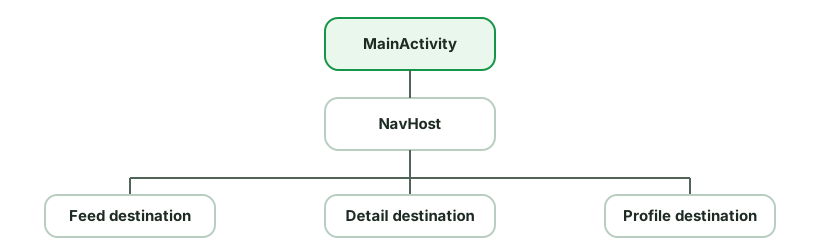
Why it’s recommended (Google’s guidance since ~2018, and the default with Compose):
Trade-offs / when multiple Activities still make sense:
launchMode needs).With Compose: the same idea - a single Activity with a NavHost of composable destinations. Multiple Activities become the exception, not the rule.
Use the androidx.core:core-splashscreen library / the SplashScreen API (standardized in Android 12), not a dedicated splash Activity.
class MainActivity : AppCompatActivity() {
    override fun onCreate(savedInstanceState: Bundle?) {
        val splash = installSplashScreen()    // BEFORE super.onCreate / setContentView
        super.onCreate(savedInstanceState)

        // Keep the splash visible until data is ready
        splash.setKeepOnScreenCondition { viewModel.isLoading.value }
    }
}Configure the icon/background via a theme:
<style name="Theme.App.Starting" parent="Theme.SplashScreen">
    <item name="windowSplashScreenBackground">@color/brand</item>
    <item name="windowSplashScreenAnimatedIcon">@drawable/logo</item>
    <item name="postSplashScreenTheme">@style/Theme.App</item>
</style>Why not a splash Activity (the old anti-pattern):
postDelayed) wastes the user’s time.Best practices:
setKeepOnScreenCondition to hold it only while genuinely loading critical data.A touch event (MotionEvent) travels down the view tree from the root and can be consumed or passed back up. Three methods govern it:
dispatchTouchEvent - every View/ViewGroup has it; it routes the event. The tree traversal starts here.onInterceptTouchEvent (ViewGroup only) - a parent can intercept an event before it reaches a child. Return true to steal it (e.g. a scroll container deciding a drag is a scroll, not a child tap).onTouchEvent - where a view actually handles the event. Return true to consume it (and receive subsequent events in the gesture).The flow for a gesture (starting with ACTION_DOWN):
dispatchTouchEvent → ViewGroup onInterceptTouchEvent.onTouchEvent runs first. If it returns true (consumes), it becomes the target for the rest of the gesture (MOVE/UP).false, the event bubbles up to its parent’s onTouchEvent.ACTION_DOWN, that view (and its descendants) won’t receive the rest of the gesture.Key mechanisms interviewers probe:
requestDisallowInterceptTouchEvent(true) - a child tells parents not to intercept (e.g. a ViewPager inside a scroll view, so swipes go to the pager).ACTION_CANCEL and stops receiving the gesture.NestedScrollingChild/interception rules.A View is rendered in three passes, traversing the view tree top-down:
onMeasure) - each parent passes MeasureSpec (a mode + size: EXACTLY, AT_MOST, UNSPECIFIED) to children; each child reports its desired size via setMeasuredDimension. Determines how big.onLayout) - parents position children by calling child.layout(l, t, r, b). Determines where.onDraw) - each view renders itself onto a Canvas, parents before children.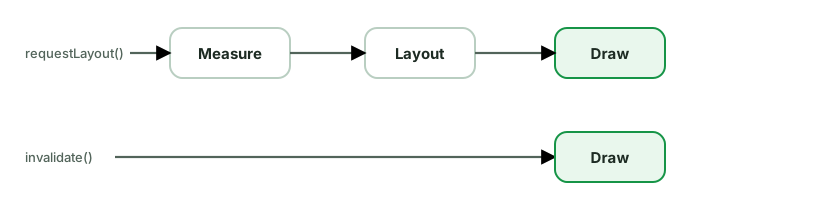
invalidate() vs requestLayout() - the key distinction:
invalidate() - “I need to redraw, but my size/position is unchanged.” Schedules only the draw pass for that view. Use when only appearance changes (color, text content of same size).requestLayout() - “My size or position may have changed.” Triggers a full measure + layout (+ draw) pass, walking up to the root and back down. More expensive.Using the wrong one is a classic bug: change content that affects size but only call invalidate() → the view redraws but is clipped/wrong size because it wasn’t re-measured.
Performance points:
ConstraintLayout to flatten, merge tags, ViewStub).onDraw/onMeasure - they run on every frame/pass; allocate paints/objects once.RelativeLayout, weight in LinearLayout) is costly in lists.Compose parallel: Compose’s phases are the same idea (composition → layout → drawing), but layout is single-pass by design.
Three ways to reference views in the View system, increasingly capable:
findViewById - the original: look up a view by id at runtime.
View Binding - generates a binding class per layout with typed, non-null references to all id’d views.
val binding = ActivityMainBinding.inflate(layoutInflater)
setContentView(binding.root)
binding.titleText.text = "Hi" // typed, non-null, no findViewByIdfindViewById.Data Binding - a superset that also supports binding expressions in XML, linking layouts directly to data/observables.
<TextView android:text="@{viewModel.title}" />
<Button android:onClick="@{() -> viewModel.submit()}" />How to choose:
Note: View Binding ≠ Data Binding - View Binding only generates references (no XML expressions), which is exactly why it’s faster and simpler.
WorkManager is the recommended API for persistent, deferrable background work. An enqueued request is stored and scheduled to run after its constraints are met, including across ordinary process death and device reboot.
val work = OneTimeWorkRequestBuilder<UploadWorker>()
    .setConstraints(Constraints.Builder()
        .setRequiredNetworkType(NetworkType.CONNECTED)
        .setRequiresCharging(true)
        .build())
    .setBackoffCriteria(BackoffPolicy.EXPONENTIAL, 10, TimeUnit.SECONDS)
    .build()
WorkManager.getInstance(context).enqueue(work)What it gives you:
beginWith().then()), unique work, and observable status (LiveData/Flow).When to use which:
| Need | Use |
|---|---|
| In-app async while app is alive (load data) | Coroutines (viewModelScope) |
| Deferrable work that must complete eventually (sync, upload, backup) | WorkManager |
| Immediate, ongoing, user-visible task (music, navigation) | Foreground Service |
| User-visible action that genuinely requires an exact time | AlarmManager, after checking exact-alarm access |
Key distinctions:
canScheduleExactAlarms() and degrade gracefully when it is unavailable.JobScheduler/FirebaseJobDispatcher/AlarmManager+Receiver combos for most background jobs.A ViewModel holds and manages UI-related state and survives configuration changes, so data and in-flight work aren’t lost on rotation.
How it survives: the ViewModel is stored in a ViewModelStore owned by the Activity/Fragment/NavBackStackEntry. On a configuration change, the Activity is recreated but its ViewModelStore is retained (via onRetainNonConfigurationInstance internally) and handed to the new instance. So you get the same ViewModel back. It’s cleared (onCleared()) only when the owner is permanently gone (finished, popped) - not on rotation.
class FeedViewModel(private val repo: FeedRepository) : ViewModel() {
    private val _state = MutableStateFlow(FeedUiState())
    val state = _state.asStateFlow()
    // viewModelScope cancelled in onCleared()
}What a ViewModel must NOT hold:
Context of an Activity, Views, Fragments, or anything view-bound - these outlive a config change while the ViewModel persists, so holding them leaks the old Activity. If you need a context, use AndroidViewModel’s application context.Key points:
SavedStateHandle for state that must.viewModelScope ties coroutines to the ViewModel lifecycle (cancelled in onCleared).viewModels() (Activity/Fragment), activityViewModels() (share across fragments), or hiltViewModel() (per nav destination).The ones interviewers love to hear you call out:
God Activity/Fragment - an Activity doing UI, networking, persistence, and business logic. Violates SRP, untestable, unmaintainable. Fix: move logic to ViewModel/use cases/repositories; keep the UI thin.
God ViewModel - a 1000-line ViewModel handling many unrelated features. Fix: split by responsibility, extract use cases.
Leaking Context/View in singletons, ViewModels, static fields, or long-running coroutines. Fix: app context only, lifecycle scoping, weak refs.
Business logic in the UI - validation, formatting, or decisions in composables/Activities. Fix: push into ViewModel/domain; keep UI a function of state.
Mutable shared state without a single source of truth - multiple components caching/mutating the same data, drifting out of sync. Fix: one owner (repository/DB), observe it.
Two-way / circular data flow - UI mutating ViewModel state directly, or ViewModel referencing the View. Fix: UDF (state down, events up); expose read-only state.
Overusing GlobalScope - unscoped coroutines that leak and aren’t cancelled. Fix: lifecycle scopes.
Event bus everywhere (EventBus, LocalBroadcastManager) - implicit, hard-to-trace global messaging. Fix: explicit Flow/callbacks, scoped state.
Over-engineering - three model layers + a use case per trivial call + five modules for a tiny app. Fix: match architecture to complexity; YAGNI.
Stringly-typed everything - string keys for navigation/args, magic strings. Fix: type-safe routes, sealed types, constants.
Mock-heavy tests mirroring implementation - brittle, break on refactor. Fix: prefer fakes, test behavior.
The meta-point: most anti-patterns are violations of separation of concerns, single source of truth, UDF, or lifecycle correctness - or the opposite sin, over-engineering. Naming the underlying principle is what impresses.
Assisted injection is for objects that need both DI-provided dependencies and runtime parameters only known at the call site (an item id, a config object). DI provides some constructor args; the caller “assists” with the rest.
class DetailViewModel @AssistedInject constructor(
    private val repo: ItemRepository,      // provided by DI
    @Assisted private val itemId: String,  // provided at runtime
) : ViewModel() {

    @AssistedFactory
    interface Factory {
        fun create(itemId: String): DetailViewModel
    }
}The @AssistedFactory interface is what you inject; you call factory.create(itemId) with the runtime value.
Why you need it: Dagger/Hilt can only provide what’s in the graph. A pure @Inject constructor can’t have a parameter the graph doesn’t know (itemId). Without assisted injection you’d resort to ugly workarounds (passing the id through a setter after creation, or a manual factory).
Common Android use cases:
SavedStateHandle often covers nav args - Hilt populates it from the back stack, so prefer SavedStateHandle when the value is a navigation argument).Worker needing injected deps + runtime WorkerParameters - Hilt’s @HiltWorker + @AssistedInject handle exactly this.@HiltWorker
class SyncWorker @AssistedInject constructor(
@Assisted ctx: Context,
@Assisted params: WorkerParameters,
private val repo: SyncRepository, // injected
) : CoroutineWorker(ctx, params)The Builder pattern constructs a complex object step by step, avoiding telescoping constructors (many overloads) and making optional parameters readable.
// Java: classic builder
Notification n = new NotificationCompat.Builder(context, channelId)
    .setContentTitle("Hi")
    .setContentText("Body")
    .setSmallIcon(R.drawable.ic)
    .setAutoCancel(true)
.build();Where it appears in Android: NotificationCompat.Builder, AlertDialog.Builder, Retrofit.Builder, OkHttpClient.Builder, Room.databaseBuilder, WorkRequest.Builder, Intent (chained putExtra). These predate Kotlin or come from Java APIs.
Is it still needed in Kotlin? Often not - Kotlin’s default and named arguments replace most builders:
data class RequestConfig(
    val url: String,
    val timeout: Long = 30_000,
    val retries: Int = 3,
    val headers: Map<String, String> = emptyMap(),
)
RequestConfig(url = "...", retries = 5) // no builder neededFor more builder-like ergonomics, Kotlin uses:
apply { } to configure an object fluently.buildString { }, Modifier chains, Gradle Kotlin DSL) - the idiomatic Kotlin “builder.”When a builder still earns its place in Kotlin:
Two structural patterns that are easy to confuse.
Adapter - converts one interface into another the client expects. It wraps an incompatible type to make it usable.
// Adapt a domain list to what RecyclerView expects
class UserAdapter(val users: List<User>) : RecyclerView.Adapter<UserVH>() { ... }
Android examples: RecyclerView.Adapter (the name says it - adapts data to view-holders), PagerAdapter, wrapping a third-party SDK’s interface behind your own (AnalyticsClient interface adapting Firebase/Amplitude), or a Retrofit CallAdapter. Use it to make incompatible interfaces work together, especially to wrap libraries you don’t control behind your own abstraction (an anti-corruption layer).
Decorator - adds behavior to an object dynamically by wrapping it in another object with the same interface, without changing the original.
interface DataSource { suspend fun load(key: String): String }

class CachingDataSource(private val wrapped: DataSource) : DataSource {
    private val cache = mutableMapOf<String, String>()
    override suspend fun load(key: String) =
        cache.getOrPut(key) { wrapped.load(key) }   // adds caching, same interface
}

class LoggingDataSource(private val wrapped: DataSource) : DataSource {
    override suspend fun load(key: String): String {
        Log.d("DS", "load $key"); return wrapped.load(key)
    }
}
Android examples: OkHttp Interceptors (each wraps the chain, adding logging/auth/caching), ContextWrapper (and ContextThemeWrapper), input stream wrappers (BufferedInputStream). You can stack decorators (Logging(Caching(real))) to compose behavior.
The distinction:
Caching is layered; pick per data type and freshness need.
Cache tiers (fastest → most durable):
MutableStateFlow/LruCache in a repository or singleton. Fastest, lost on process death, bounded by size. Good for hot data within a session.Cache-Control/ETag for network responses.Read strategies:
Invalidation (the hard part - “two hard things in CS”):
304 Not Modified to save bandwidth.Decisions to make:
LruCache, Room cleanup) so they don’t grow unbounded.Clean Architecture protects high-level policy from volatile details. The useful idea is the dependency rule: source-code dependencies point toward stable business rules, while UI, database, and network code remain replaceable details.
A strict Android interpretation often uses:
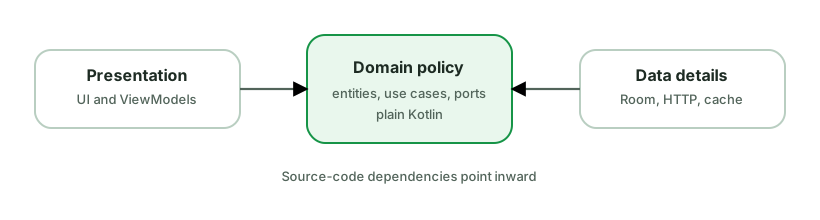
For example, the domain can define UserRepository, and the data module can
implement it. Business logic knows that users can be loaded but does not know
whether the implementation uses Room, HTTP, or a test fake. DI wires the
implementation at the application boundary.
Why teams use it:
Keep it practical:
A strong answer names which business rules need protection, which details are likely to change, and why the extra boundaries are worth their maintenance cost.
The classic circles describe dependency direction, not mandatory package names. A practical Android mapping is:
Entities or enterprise rules: stable business concepts and invariants, such
as Money, Order, or eligibility rules. They should not depend on Android,
Room, Retrofit, or UI models.
Use cases or application rules: operations the application supports, such as
PlaceOrder, ObserveFeed, or ChangeSubscription. They coordinate domain
rules and ports, and expose an API suitable for presentation or other entry
points.
Interface adapters: ViewModels, presenters, repository implementations, and mappers. They translate between the shapes expected by inner policy and outer frameworks.
Frameworks and drivers: Compose, Activities, Room, Retrofit, WorkManager, FCM, and the Android framework. These are replaceable details at the outside.
The dependency rule says outer code can depend inward. Inner policy must not import an outer framework. Data may implement an interface owned by domain, and DI connects that implementation at the application boundary.
Not every app needs all four circles as Gradle modules. Small applications can keep UI and data packages in one module while following the same dependency discipline. Create a module boundary when independent compilation, encapsulation, ownership, or reuse pays for the extra wiring.
Also distinguish this from Google’s recommended architecture. Both encourage separation and testability, but Google’s guidance does not require every repository interface to be owned by a domain module.
Clean Architecture becomes over-engineering when its ceremony costs more than the volatility or complexity it protects against.
Warning signs include:
Start with clear UI and data layers, immutable state, repositories, and explicit construction. Add a use case when it coordinates repositories, is reused, owns an important rule, or makes a state holder materially simpler. Split models when their meanings, lifetimes, trust boundaries, or rates of change differ. Add a module when it provides measurable encapsulation, ownership, reuse, or build benefit.
Removing a layer is not abandoning architecture. Good architecture minimizes the cost of change. Sometimes the cleanest design is a ViewModel calling a well-designed repository directly.
In an interview, state the current constraints and the trigger that would make you add the next boundary. That shows more judgment than drawing the maximum number of layers from the start.
Place an abstraction with the policy that owns the contract, not automatically next to its implementation.
In strict Clean Architecture, a domain or application module defines the port it needs:
// :domain
interface Orders {
    fun observeOrder(id: OrderId): Flow<Order>
    suspend fun submit(command: SubmitOrder): OrderId
}

// :data
class OfflineFirstOrders(
    private val api: OrdersApi,
    private val dao: OrdersDao,
) : Orders {
    // Network and Room details stay outside the domain contract.
}The data module depends on the domain contract and implements it. The use case
depends only on Orders. Hilt or a manual composition root binds
OfflineFirstOrders to that contract.
This inversion is useful when:
It can be unnecessary when the repository itself is already the stable public API of a small data layer and no independent domain module exists. In Google’s recommended architecture, UI or use cases can depend on a repository class from the data layer. That is still a valid layered design.
Do not shape the interface around Retrofit endpoints or DAO methods. Shape it around application operations and domain types. Otherwise the abstraction only hides a class name while leaking the same volatile details.
Two measures of code quality that good architecture optimizes in opposite directions: low coupling, high cohesion.
Coupling - how much one module depends on another. Low (loose) coupling is the goal: modules interact through small, stable interfaces, so a change in one doesn’t ripple into many others.
RetrofitClient and RoomDatabase - changing either breaks the ViewModel.Repository interface, injected. Swap the implementation freely.Cohesion - how focused a module is; how strongly its parts relate to a single purpose. High cohesion is the goal: a class does one well-defined job.
Utils class with networking, date formatting, and bitmap helpers thrown together.DateFormatter that only formats dates; a FeedRepository that only handles feed data.Why they matter:
How Android practices achieve them:
These two are the why behind SOLID, Clean Architecture, and DI - interviewers like seeing you connect the principle to the practice.
Dependency injection (DI) means a class receives its dependencies from outside rather than creating them itself. “Inversion of control” - something else (a framework or the caller) is responsible for constructing and wiring objects.
// Without DI: the class creates and is coupled to concrete dependencies
class UserViewModel {
    private val repo = UserRepository(RetrofitClient.create(), AppDatabase.dao())
}

// With DI: dependencies are injected and the class depends on abstractions
class UserViewModel(private val repo: UserRepository)Why it matters:
On Android specifically:
Forms of DI: constructor injection (preferred - explicit, testable), field injection (for framework-created objects like Activities), and method injection.
A scope controls how long a single instance lives and how widely it’s shared. With Hilt:
| Scope | One instance per | Use for |
|---|---|---|
@Singleton | application | DB, Retrofit, OkHttp, app-wide repos |
@ActivityRetainedScoped | survives config change | shared across an Activity + its ViewModels |
@ViewModelScoped | a ViewModel | use cases/helpers tied to one screen’s VM |
@ActivityScoped | an Activity | Activity-bound helpers |
@FragmentScoped | a Fragment | fragment-bound helpers |
| (unscoped) | every injection | stateless, cheap objects |
Matching scope to lifetime is the whole game:
Over-scoping (e.g. @Singleton on everything):
Under-scoping (unscoped where you needed sharing):
Guidance:
@Singleton.@ViewModelScoped, @ActivityRetainedScoped).Hardcoding Dispatchers.IO/Default couples your code to real threads, which makes it non-deterministic in tests. Injecting dispatchers makes threading configurable and testable.
The problem with hardcoding:
class Repo(private val api: Api) {
    suspend fun load() = withContext(Dispatchers.IO) { api.fetch() }  // Real I/O leaks into tests
}In tests you can’t control this - runTest’s virtual clock doesn’t govern a real Dispatchers.IO, so timing is unpredictable and tests can be flaky.
The fix - inject the dispatcher:
class Repo(
    private val api: Api,
    private val ioDispatcher: CoroutineDispatcher = Dispatchers.IO,
) {
    suspend fun load() = withContext(ioDispatcher) { api.fetch() }
}

// Test: pass a TestDispatcher
val repo = Repo(fakeApi, UnconfinedTestDispatcher())Provide them via DI with qualifiers so the right one is injected everywhere:
@Qualifier annotation class IoDispatcher
@Qualifier annotation class DefaultDispatcher

@Provides @IoDispatcher fun io(): CoroutineDispatcher = Dispatchers.IOA common pattern is a DispatcherProvider interface (io, default, main) injected into repositories/use cases, with a test implementation returning a single TestDispatcher.
Benefits:
runTest controls the virtual clock; advanceUntilIdle() works; no flakiness.viewModelScope already uses Main; you only switch for blocking/CPU work, and now that switch is testable.Rather than letting exceptions leak everywhere, model expected failures as values that flow through the layers and end as UI state.
A domain Result wrapper (your own sealed type or Kotlin’s Result):
sealed interface DataResult<out T> {
    data class Success<T>(val data: T) : DataResult<T>
    data class Failure(val error: AppError) : DataResult<Nothing>
}

sealed interface AppError {
    data object Network : AppError
    data object Unauthorized : AppError
    data class Unknown(val cause: Throwable) : AppError
}Repository converts exceptions → typed results at the boundary:
suspend fun getUser(id: String): DataResult<User> = try {
    DataResult.Success(api.getUser(id).toDomain())
} catch (e: IOException) { DataResult.Failure(AppError.Network) }
  catch (e: HttpException) {
      DataResult.Failure(if (e.code() == 401) AppError.Unauthorized else AppError.Unknown(e))
}ViewModel maps the result into UI state:
when (val r = getUser(id)) {
    is DataResult.Success -> _state.update { it.copy(user = r.data) }
    is DataResult.Failure -> _state.update { it.copy(error = r.error.toMessage()) }
}Principles:
Result/sealed errors and shown to the user. Unexpected (programming bugs) → let them crash/report; don’t swallow.IOException, HttpException, SQLException) into domain errors in the data layer so upper layers don’t depend on Retrofit/Room types.AppError forces the UI to handle each case (retry, re-login, generic message).catch operator mapping to an error state - never an unhandled throw in collect.CancellationException in a blanket catch - rethrow it.A Facade provides a simple, unified interface over a complex subsystem, hiding its internal parts from callers.
// Facade over several subsystems
class MediaFacade(
    private val downloader: Downloader,
    private val decoder: Decoder,
    private val cache: MediaCache,
) {
    suspend fun play(url: String) {          // one simple call...
        val bytes = cache.get(url) ?: downloader.fetch(url).also { cache.put(url, it) }
        val media = decoder.decode(bytes)    // ...hides downloader + decoder + cache
        player.start(media)
    }
}The caller uses play(url) and never touches the downloader, decoder, or cache directly.
Why use it:
How it relates to the Repository: a Repository is essentially a Facade over data sources - it hides the network client, database, cache, and the coordination logic behind a clean API (observeUser()), so the ViewModel doesn’t know whether data came from Room or Retrofit. Many Android “manager”/“controller” classes are facades too.
Other Android examples: a SessionManager wrapping token storage + refresh + auth headers; an AnalyticsFacade over multiple analytics SDKs; Retrofit itself is a facade over OkHttp + converters + call adapters.
Caution: a facade can grow into a God object if it accumulates too many responsibilities - keep it focused on simplifying access, not doing everything.
A Factory centralizes object creation, hiding the construction logic and the concrete type behind a method. Callers ask the factory for an object instead of calling a constructor directly.
// Factory method: decide the concrete type from input
object PaymentProcessorFactory {
    fun create(type: PaymentType): PaymentProcessor = when (type) {
        PaymentType.CARD   -> CardProcessor()
        PaymentType.UPI    -> UpiProcessor()
        PaymentType.WALLET -> WalletProcessor()
    }
}Why use it:
PaymentProcessor interface).Where it appears in Android:
ViewModelProvider.Factory - the common example. ViewModels need constructor args (a repository), but the framework creates them, so you provide a factory that knows how to build it:class FeedVMFactory(private val repo: FeedRepository) : ViewModelProvider.Factory {
override fun <T : ViewModel> create(c: Class<T>): T = FeedViewModel(repo) as T
}(Hilt’s @HiltViewModel generates this for you.)
Fragment.instantiate / newInstance pattern, RecyclerView.ViewHolder creation in onCreateViewHolder, LayoutInflater.Factory, Retrofit/OkHttp builders internally, and DI @Provides methods are factories.Variants: Factory Method (a method returns a type), Abstract Factory (a family of related objects), and DI frameworks are essentially generalized factories.
All three are test doubles that stand in for real dependencies, but they differ:
whenever(repo.get()).thenReturn(data)). No real behavior.save() called once with X?”). Created with frameworks like MockK/Mockito.MutableList/MutableStateFlow).// Fake: a real, simple implementation
class FakeUserRepository : UserRepository {
private val users = MutableStateFlow<List<User>>(emptyList())
override fun observeUsers() = users.asStateFlow()
override suspend fun add(user: User) { users.update { it + user } }
}Prefer fakes (Google’s guidance) because:
Flow-based code needs. Mocking a Flow’s emissions over time is painful and error-prone.When mocks are still useful:
track() was called,” “the repository’s sync() was invoked.” There’s no state to assert, so verifying the call is legitimate.Anti-pattern interviewers watch for: mock-heavy tests that mirror the implementation line-by-line - they pass even when the code is wrong and break on every refactor.
Feature flags let you toggle features without shipping a new build - for gradual rollouts, A/B tests, kill switches, and per-segment targeting.
Architecture - wrap the source behind your own abstraction:
interface FeatureFlags {
    fun isEnabled(flag: Flag): Boolean
    fun <T> value(flag: Flag, default: T): T
}

enum class Flag(val key: String, val default: Boolean) {
    NEW_CHECKOUT("new_checkout", false),
    DARK_MODE_V2("dark_mode_v2", false),
}Implement it over Firebase Remote Config (or LaunchDarkly, Statsig, your own backend). The rest of the app depends on the FeatureFlags interface, not the vendor SDK.
Why the abstraction matters:
FeatureFlags to test both branches.enum/sealed set of flags beats scattered magic strings.Design considerations:
if checks everywhere.Hilt is a DI framework built on Dagger that standardizes DI on Android with predefined components tied to Android lifecycles.
Setup: annotate the Application with @HiltAndroidApp (creates the app-level component), and inject into Android classes with @AndroidEntryPoint.
Components & scopes - Hilt generates a component hierarchy mirroring Android lifecycles; each has a scope annotation:
| Component | Scope | Lifetime |
|---|---|---|
SingletonComponent | @Singleton | Application |
ActivityRetainedComponent | @ActivityRetainedScoped | across config changes |
ViewModelComponent | @ViewModelScoped | a ViewModel |
ActivityComponent | @ActivityScoped | an Activity |
FragmentComponent | @FragmentScoped | a Fragment |
A scoped binding returns the same instance within that component’s lifetime; unscoped returns a new instance each request.
Providing dependencies:
@Inject constructor(...); Hilt knows how to build it.@Module @InstallIn(SomeComponent::class)) - for types you can’t annotate (interfaces, third-party classes):@Module
@InstallIn(SingletonComponent::class)
object NetworkModule {
@Provides @Singleton
fun provideRetrofit(): Retrofit = Retrofit.Builder()...build()
}@Binds - bind an interface to its implementation efficiently:@Binds abstract fun bindRepo(impl: UserRepositoryImpl): UserRepositoryViewModels: annotate with @HiltViewModel + @Inject constructor; retrieve with hiltViewModel() (Compose) or by viewModels().
What to remember:
@Qualifier disambiguates two bindings of the same type (@AuthClient vs @PublicClient OkHttp).@AssistedInject) for objects needing both DI-provided and runtime params.@Singleton everything) causes leaks/stale state; under-scoping recreates expensive objects.The core distinction: Dagger/Hilt resolve the graph at compile time; Koin resolves it at runtime.
Dagger / Hilt - compile-time, code-generated DI.
Koin - runtime service locator (a DSL that registers and resolves dependencies).
How to choose (the balanced interview answer):
Note: Koin is technically closer to a service locator than “true” DI, and that distinction (compile-time safety vs runtime flexibility) is the real heart of the question - not which is “better.”
Kotlin Multiplatform lets you share business logic across Android, iOS (and more) while keeping UI native (or shared via Compose Multiplatform).
What’s typically shared (commonMain):
StateFlow-based state.What stays platform-specific:
expect/actual mechanism.// commonMain
expect class PlatformContext
expect fun httpClientEngine(): HttpClientEngine
// androidMain / iosMain provide the `actual` implementationsKey architecture decisions interviewers probe:
expect/actual for platform differences - declare the contract in common, implement per platform.commonMain, androidMain, iosMain; common code can’t touch Android/iOS APIs directly.suspend/Flow need bridging (SKIE, callbacks) for ergonomic Swift consumption.Trade-offs: shared logic and consistency vs. tooling maturity, iOS interop friction, and a steeper build setup. Sweet spot for many teams: share logic, keep UI native.
In a layered architecture, the same concept (“User”) often has separate models per layer, with mappers at the boundaries:
@SerializedName), nullable fields, server quirks.@Entity; has DB concerns (@PrimaryKey, column info, denormalization)."3h ago" instead of a timestamp, a resolved color/label).fun UserDto.toDomain() = User(id = id, name = name ?: "Unknown")
fun User.toUi() = UserUiModel(name = name, initials = name.take(2).uppercase())Why separate them:
The pragmatic counterpoint (interviewers reward this balance):
Where mapping lives: typically in the data layer (DTO/Entity → Domain) and presentation layer (Domain → UI), often as extension functions or dedicated Mapper classes (easy to unit-test).
The goal is not to build the largest app. It is to deliver a small, working slice that is easy to explain, test, and extend.
Before coding: clarify required screens, data source, offline behavior, loading and error states, time limit, allowed libraries, and what reviewers will run. Write assumptions in the README if the prompt is ambiguous.
Build in vertical slices: get one end-to-end path working first.

Start with the simplest architecture that provides clear ownership. A single app module, one repository, immutable UI state, and dependency injection at a small composition root may be enough. Add Room, pagination, use cases, or more modules only when the requirements need them.
A practical order under time pressure:
Reviewers look for readable naming, lifecycle-safe collection, no main-thread I/O, cancellation, stable list identity, test seams, and sensible Git history. They also notice whether the app works after a clean clone.
Avoid speculative abstraction, copied boilerplate, a framework for every layer, and spending half the exercise on visual polish while failure states are broken. If time expires, a working narrow solution with explicit next steps is stronger than an unfinished grand architecture.
During review, explain why each boundary exists and be ready to change a requirement. The best signal is not perfection. It is controlled scope and sound engineering judgment.
Splitting a single :app module into many Gradle modules pays off as a codebase/team grows.
Benefits:
api surface and hides internals (internal + implementation deps), enforcing boundaries the compiler checks.Common structures:
:data, :domain, :ui) - simple, but every feature touches every module → poor parallelism and ownership at scale.:feature:feed, :feature:profile) - preferred for larger apps; each feature is independent and can itself be layered internally.:core modules (:core:network, :core:database, :core:designsystem, :core:common). This is the Now in Android sample’s approach.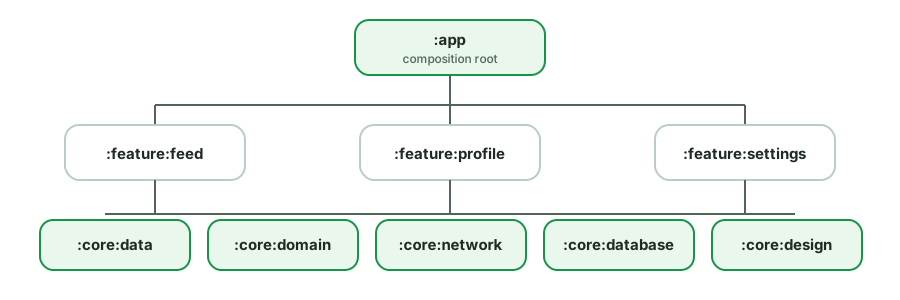
Useful design rules:
api vs implementation - use implementation to keep a dependency off the consuming module’s compile classpath (faster builds, real encapsulation); use api only when a type leaks into your public API.:core.build-logic) to share Gradle config and avoid copy-paste.Trade-offs: more boilerplate (Gradle files), a steeper setup, and cross-module navigation/DI wiring complexity. Worth it for medium/large apps; overkill for a tiny one.
The problem: in a multi-module app, :feature:checkout shouldn’t directly depend on :feature:profile - that creates tight coupling and dependency cycles. But they sometimes need to navigate to each other.
Solutions (least to most decoupled):
1. Route-based navigation (Navigation component). Features expose routes/deep links (strings or type-safe), and navigation goes through a shared NavController. A feature navigates by route without importing the destination feature’s classes.
navController.navigate("profile/$userId") // no compile dep on :feature:profileThe :app module assembles all feature nav graphs. Features depend on a tiny :core:navigation contract (route constants/keys), not on each other.
2. Navigation abstraction / API modules. Define an interface in a shared module:
// :core:navigation
interface ProfileNavigator { fun openProfile(id: String) }The :feature:profile module implements it; other features inject ProfileNavigator and call it. Implementation is wired by DI in :app. This keeps features depending on abstractions, not each other.
3. api vs impl module split. A feature exposes a small :feature:profile:api (interfaces, navigation entry points) that others depend on, while :feature:profile:impl stays private. Maximum decoupling for large codebases.
Key principles:
core/abstractions, never on each other - avoids cycles and keeps build parallelism.:app module is the composition root - it knows all features and wires the graph/DI.All separate UI from logic; they differ in how the logic talks to the view.
MVC (Model-View-Controller) - on Android, the Activity/Fragment often ended up as both View and Controller (“Massive View Controller”). Poor separation; hard to test because logic was tangled with framework classes.
MVP (Model-View-Presenter):
View interface and is passive.view.showLoading(), view.showError()).MVVM (Model-View-ViewModel):
StateFlow/LiveData); it does not reference the view.ViewModel does not hold the view, survives
configuration changes, and exposes observable state naturally to Compose or
Views. Modern Android guidance favors this state-holder approach.The key shift: MVP pushes to the view via an interface (imperative, two-way coupling); MVVM has the view pull/observe state (reactive, one-way). MVVM’s lack of a view reference is what fixes MVP’s leak and lifecycle pain.
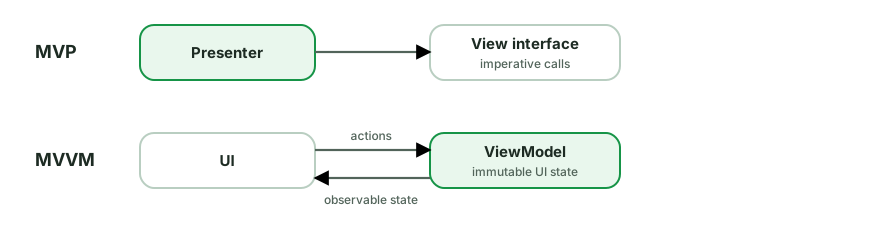
MVVM separates rendering, screen state, and application data. On modern Android, it usually works as a unidirectional loop rather than two-way data binding.
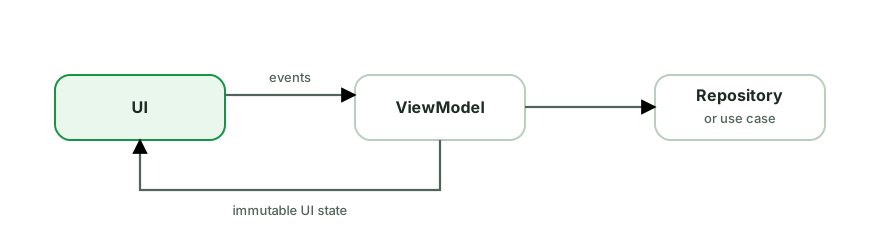
View: a composable, Activity, or Fragment renders UiState and forwards user
actions. It owns UI-only behavior such as focus, animation, and executing
navigation.
ViewModel: a screen-level state holder. It accepts actions, coordinates use
cases or repositories, and exposes immutable observable state. It must not hold
a View, Activity, Fragment, or Activity-scoped Context.
Model: not one class. It is the application data and rules exposed through repositories or use cases. Network DTOs and Room entities are data-source details, not the ViewModel’s public model by default.
A typical refresh follows this sequence:
viewModel.refresh().UiState.MVVM does not automatically guarantee good architecture. A ViewModel that owns Retrofit, SQL, navigation, and fifty mutable fields is still tightly coupled. The useful properties are clear ownership, one source of truth, lifecycle-aware collection, and state that can be tested without constructing the UI.
A ViewModel survives configuration changes. It does not survive process death.
Use SavedStateHandle for small restorable inputs and persistent storage for
durable user data.
Common MVVM failures come from unclear ownership, not from the acronym itself.
NavController, or Activity context creates leaks and mixes lifetimes.UiState when values
describe one screen state.When reviewing an MVVM feature, trace one user action from the UI to the data owner and back to rendered state. At every step, ask who can write the value, which lifetime owns it, and what happens after failure or recreation.
Expose one immutable state model, accept user actions through methods, and keep data policy behind a repository.
data class FeedUiState(
    val items: List<Post> = emptyList(),
    val loading: Boolean = true,
    val refreshing: Boolean = false,
    val message: UserMessage? = null,
)

class FeedViewModel(
    private val repository: FeedRepository,
) : ViewModel() {
    private val refreshing = MutableStateFlow(false)
    private val message = MutableStateFlow<UserMessage?>(null)

    val uiState: StateFlow<FeedUiState> = combine(
        repository.observeFeed(), refreshing, message,
    ) { posts, isRefreshing, userMessage ->
        FeedUiState(
            items = posts,
            loading = false,
            refreshing = isRefreshing,
            message = userMessage,
        )
    }.stateIn(
        scope = viewModelScope,
        started = SharingStarted.WhileSubscribed(5_000),
        initialValue = FeedUiState(),
    )

    fun refresh() = viewModelScope.launch {
        refreshing.value = true
        try {
            repository.refresh()
        } catch (e: IOException) {
            message.value = UserMessage.NetworkUnavailable
        } finally {
            refreshing.value = false
        }
    }

    fun messageShown(messageId: String) {
        message.update { current -> current?.takeUnless { it.id == messageId } }
    }
}In Compose, collect with lifecycle awareness:
@Composable
fun FeedRoute(viewModel: FeedViewModel = viewModel()) {
    val state by viewModel.uiState.collectAsStateWithLifecycle()
    FeedScreen(state = state, onRefresh = viewModel::refresh)
}Important details:
StateFlow, not MutableStateFlow.WhileSubscribed when upstream work should stop without collectors. The
timeout avoids restarting immediately across brief configuration changes.The exact operators are less important than clear ownership and deterministic state transitions.
The Observer pattern defines a one-to-many dependency: a subject maintains a list of observers and notifies them automatically when its state changes. It decouples the producer of data from its consumers.
// The essence: subscribe, get notified on change
interface Observer<T> { fun onChanged(value: T) }
class Subject<T>(initial: T) {
    private val observers = mutableListOf<Observer<T>>()
    var value: T = initial
        set(v) { field = v; observers.forEach { it.onChanged(v) } }
    fun observe(o: Observer<T>) { observers += o }
}Where it’s everywhere in Android:
LiveData - observe and get lifecycle-aware updates.Flow / StateFlow / SharedFlow - the coroutine-based reactive streams; collect is observing.State subscribes the composable; writes notify readers (recomposition).RecyclerView.AdapterDataObserver, click listeners, ViewTreeObserver, LifecycleObserver.Observable/Observer - the pattern in its named form.Why it matters architecturally: it’s the backbone of reactive, UDF apps - the UI observes state from the ViewModel and updates automatically, instead of the ViewModel reaching into the UI. This inverts the dependency (UI depends on data, not vice versa).
Trade-offs to mention:
LiveData/repeatOnLifecycle solve this.distinctUntilChanged, conflation, derivedStateOf).For data that must work offline, make a local source such as Room the single source of truth. The UI observes local data. Network work updates that source instead of returning a second competing copy directly to the screen.
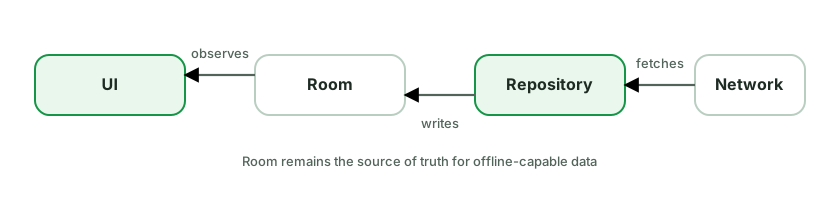
A common read flow:
Flow and shows cached data immediately.fun observeArticles(): Flow<List<Article>> =
dao.observeArticles().map { rows -> rows.map(ArticleEntity::toModel) }
suspend fun refreshArticles() {
try {
val fresh = api.getArticles()
db.withTransaction { dao.replaceAll(fresh.map(ArticleDto::toEntity)) }
} catch (e: IOException) {
// Keep cached data visible and expose refresh status separately.
}
}Key design decisions interviewers probe:
RemoteMediator implements offline-first paging: pages are written to Room, the UI pages from Room.CancellationException into a normal
failure. Catch expected I/O errors narrowly and expose cached-data plus refresh
status separately.The trade-off is additional schema, sync, and conflict complexity. Use this design when offline access, fast startup, or resilient writes justify that cost.
Start by separating input events from state changes. A tap is an event. Submitting an order is an action. “Order submitted” is a fact that should be represented in state or durable data. Navigation and a snackbar are UI reactions to those facts.
For navigation caused entirely by a UI action, the UI can often navigate directly. If navigation depends on business work, let the ViewModel expose the result as state and let the UI react:
data class CheckoutUiState(
    val submitting: Boolean = false,
    val completedOrderId: String? = null,
    val userMessage: UserMessage? = null,
)

// UI
LaunchedEffect(state.completedOrderId) {
    state.completedOrderId?.let { id ->
        navigateToConfirmation(id)
        viewModel.onOrderNavigationHandled(id)
    }
}The acknowledgement should include the value or ID being handled so it cannot accidentally clear a newer result. Model a queue in state if several user messages can be pending. Persist the underlying fact when it must survive process death, rather than trying to make UI delivery itself durable.
Channel and SharedFlow(replay = 0) remain useful for best-effort signals, but
know their contract:
SharedFlow can drop an emission when there is no subscriber.Channel can retain a limited number of elements for one receiver,
but it does not survive process death.Use them only when losing the signal while the UI is absent is acceptable, or when the surrounding design supplies acknowledgement and durability.
What to avoid:
SingleLiveEvent and generic event-wrapper types that hide delivery semantics.NavController, Context, or UI object in the ViewModel.The strongest interview answer defines the required delivery semantics first. User-visible business outcomes belong in state or storage. Ephemeral UI effects are reactions to those outcomes, not a second source of truth.
Paging 3 is the Jetpack solution for incrementally loading large lists, integrated across all three layers.
The pieces:
PagingSource - loads one page from a single source (e.g. network only). Defines how to fetch a page and the keys for next/prev.RemoteMediator - coordinates network + database for offline-first paging: it fetches pages from the network and writes them into Room, while a Room-backed PagingSource serves the UI from the DB.Pager - config (page size, prefetch) that produces a Flow<PagingData<T>>.PagingData - a stream of paged items the UI consumes.Layered flow (network + DB, the recommended setup):
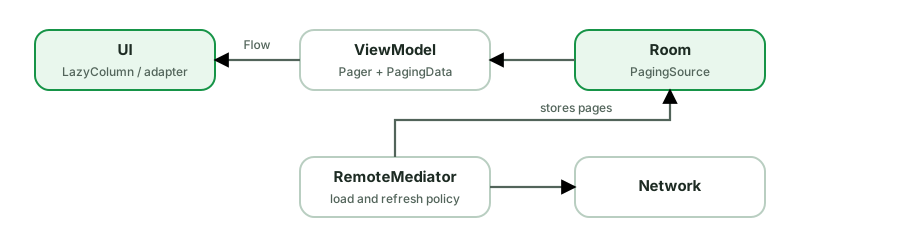
val items: Flow<PagingData<Article>> = Pager(
    config = PagingConfig(pageSize = 20),
    remoteMediator = ArticleRemoteMediator(api, db),
) { db.articleDao().pagingSource() }
    .flow
.cachedIn(viewModelScope) // survive config changesWhat Paging handles for you: page requests on scroll, prefetch distance, deduplication, placeholders, retries, and exposing LoadState (loading/error for refresh/append/prepend) so the UI can show spinners/retry footers. UI side: collectAsLazyPagingItems() (Compose) or PagingDataAdapter + DiffUtil (Views).
Why architecturally clean:
RemoteMediator, the database can own the
paged data and the UI reads from it. This enables offline reads, but freshness,
writes, errors, and conflicts still require explicit policies.cachedIn(scope) keeps paged data across recreation so scroll position/data isn’t lost on rotation.PagingData.Google’s current guidance starts with at least two layers and adds a third only when it earns its place.
Layers:
ViewModel. The UI
renders observable state and relays user actions. UI-specific logic can stay
close to the UI; application data and business rules should not live in an
Activity, Fragment, or composable.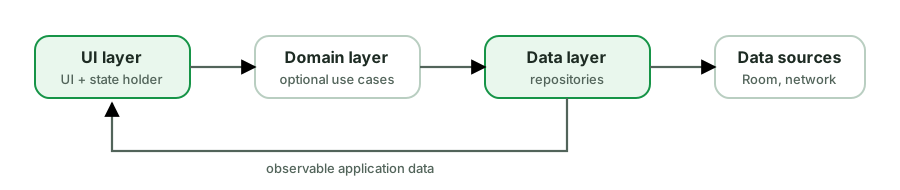
The core principles Google emphasizes:
Practical specifics:
StateFlow<UiState> and collects repository data.This is guidance, not a fixed folder template. A direct ViewModel-to-repository dependency is valid. Add layers and abstractions in response to complexity, reuse, ownership, or team boundaries.
A Repository is the public entry point to a type of application data. It coordinates data sources such as network, Room, DataStore, sensors, or memory, and owns the policy for reading, refreshing, and mutating that data.
class UserRepository(
    private val api: UserApi,
    private val dao: UserDao,
) {
    fun observeUser(id: String): Flow<User> =
        dao.observe(id).map { it.toModel() }

    suspend fun refreshUser(id: String) {
        val remote = api.fetch(id)
        dao.upsert(remote.toEntity())
    }
}What it solves:
Design choices:
SavedStateHandle is a key-value state container provided to a ViewModel.
It keeps values across configuration changes and can restore them after
system-initiated process death while the navigation entry or task is retained.
It is for the small amount of transient state needed to reconstruct a screen,
not for state that must outlive task dismissal or a force-stop.
Two main jobs:
1. Receive navigation arguments - Hilt/Navigation populate it from the back stack, so a ViewModel reads its args without the UI passing them in:
@HiltViewModel
class DetailViewModel @Inject constructor(
    handle: SavedStateHandle,
    repo: ItemRepository,
) : ViewModel() {
    private val itemId: String = requireNotNull(handle["itemId"]) {
        "Detail requires an itemId navigation argument"
    }
    val item = repo.observe(itemId).stateIn(...)
}2. Persist transient UI state across process death - query text, selected tab, scroll target:
val query: StateFlow<String> = handle.getStateFlow("query", "")
fun setQuery(q: String) { handle["query"] = q }Where it fits:
SavedStateHandle extends that to process death for the few keys that matter.onSaveInstanceState plumbing for state used
by ViewModel logic. Purely visual element state can still belong in the UI’s
own saveable-state mechanism.Bundle-able (primitives, Parcelable) and kept small - it’s for identifiers and UI state, not large data (re-fetch big data from the repository on restore).Why it’s preferred over assisted injection for nav args: Navigation already serializes args into the saved state, so Hilt can populate SavedStateHandle automatically - no custom @AssistedFactory needed.
Both manage dependencies, but the direction of control differs.
Dependency Injection - dependencies are pushed in from outside (usually the constructor). The class declares what it needs and receives it; it never asks for anything.
class FeedViewModel(private val repo: FeedRepository) // dependencies are explicitService Locator - the class pulls dependencies from a central registry on demand.
class FeedViewModel {
    private val repo = ServiceLocator.get<FeedRepository>()   // class asks the locator
}Why DI is generally preferred:
Where it’s nuanced:
get()/by inject()), though it presents a DI-like DSL - that’s a common interview “gotcha.”A Singleton ensures a class has one instance with a global access point. In Kotlin it’s trivial - object gives you a thread-safe, lazily-initialized singleton:
object AnalyticsTracker {
    fun track(event: String) { /* ... */ }
}
AnalyticsTracker.track("open") // single instance, created on first useThe compiler handles thread-safe lazy init - no double-checked-locking boilerplate like Java.
Common pitfalls:
Context/View leaks it. An object lives for the whole process. If it stores an Activity context, that Activity can never be GC’d. Store applicationContext only, or don’t hold context at all.
object Bad { lateinit var ctx: Context } // if assigned an Activity → permanent leakobject dependency can’t be swapped for a fake. This is the big one: prefer DI with @Singleton scope over a manual object, so the single instance is provided and replaceable in tests.object can’t take constructor parameters; if it needs config, you end up with an init(context) method and ordering hazards.The recommended approach: use a normal class and let Hilt/Dagger provide it as @Singleton. You get one instance and testability/injectability - the benefits without the global-state/leak downsides.
Five object-oriented design principles for maintainable code:
S - Single Responsibility. A class should have one reason to change.
Android: a ViewModel manages UI state; it shouldn’t also parse JSON or do networking. A God-Activity doing UI + networking + persistence violates this.
O - Open/Closed. Open for extension, closed for modification.
Android: add a new
RecyclerViewview type or a newPaymentMethodby adding a class, not editing a giantwheneverywhere. A sealed hierarchy + polymorphism extends behavior without rewriting existing code.
L - Liskov Substitution. Subtypes must be usable wherever the base type is, without breaking expectations.
Android: a
FakeRepositorymust honor theRepositorycontract so it can replace the real one in tests. A subclass that throws on a method the base supports breaks LSP.
I - Interface Segregation. Prefer small, focused interfaces over fat ones.
Android: don’t force a class to implement a 10-method
Callback; split intoOnClick,OnLongClick. Clients depend only on what they use.
D - Dependency Inversion. Depend on abstractions, not concretions; high-level modules shouldn’t depend on low-level details.
Android: the ViewModel depends on a
UserRepositoryinterface, notRetrofitUserRepository. This is exactly what DI (Hilt) and Clean Architecture’s “domain defines interfaces, data implements them” enforce.
Why this matters: SOLID underpins why we use repositories, interfaces, DI, and layered architecture. The strongest answers tie each principle to a concrete Android decision (the examples above), not just recite definitions.
Two common approaches, each with a place:
1. Single immutable data class of nullable/boolean fields - flexible; can represent overlapping conditions (loading while showing stale content).
data class FeedUiState(
    val isLoading: Boolean = false,
    val items: List<Post> = emptyList(),
    val errorMessage: String? = null,
    val isRefreshing: Boolean = false,
)2. Sealed hierarchy of mutually-exclusive states - clearer when the screen is in exactly one state at a time, with exhaustive when.
sealed interface FeedUiState {
    data object Loading : FeedUiState
    data class Success(val items: List<Post>, val refreshing: Boolean) : FeedUiState
    data class Error(val message: String) : FeedUiState
}How to choose:
data class whose fields include a sealed content: ContentState.Principles regardless of shape:
StateFlow<UiState>; update with copy() / update {}. Never let the UI mutate it.StateFlows that can drift out of sync.showEmptyState from existing fields rather than storing a redundant flag that can desync.The Strategy pattern defines a family of interchangeable algorithms behind a common interface, so you can swap behavior at runtime without changing the code that uses it.
fun interface SortStrategy {
    fun sort(items: List<Post>): List<Post>
}

val byDate    = SortStrategy { it.sortedByDescending(Post::date) }
val byPopular = SortStrategy { it.sortedByDescending(Post::likes) }

class FeedViewModel(private var strategy: SortStrategy = byDate) {
    fun setStrategy(s: SortStrategy) { strategy = s }
    fun display(posts: List<Post>) = strategy.sort(posts)   // behavior swappable
}Why use it:
when.Where it shows up in Android:
RecyclerView.LayoutManager - LinearLayoutManager / GridLayoutManager are interchangeable layout strategies.Interpolator (animations), ItemAnimator, DiffUtil.ItemCallback.fun interface passed in - a lightweight strategy without ceremony.Relation to DI: injecting different implementations of an interface is the Strategy pattern applied via dependency injection (debug vs prod logger, fake vs real repo).
A common open-ended interview question. Structure the answer by layers + data flow, and mention testing and trade-offs. Example: a “Saved articles” feature.
1. Data layer
ArticleDto (network), ArticleEntity (Room), Article (domain) with mappers.ArticleApi (Retrofit), ArticleDao (Room).ArticleRepository interface (domain) + impl (data). Exposes observeSaved(): Flow<List<Article>> from Room (single source of truth), with network refresh writing into Room (offline-first).2. Domain layer (if warranted)
ToggleSaveArticleUseCase, GetSavedArticlesUseCase - only if logic is reused/complex; otherwise the ViewModel calls the repository directly.3. UI layer
SavedViewModel exposes immutable StateFlow<SavedUiState>, handles user
actions such as onToggleSave, and represents user-visible outcomes in state.
The UI can acknowledge a handled message or navigation result.SavedScreen (Compose) collects state with collectAsStateWithLifecycle(), renders, sends events up (UDF).4. Wiring
@Binds interface→impl), scoped appropriately (@Singleton for DB/network, @HiltViewModel for the VM).SavedStateHandle.5. Cross-cutting
Then state the trade-offs: “I’d skip the domain layer and separate models if it’s simple, and add them if logic is shared or the API is messy - matching the architecture to the feature’s complexity.”
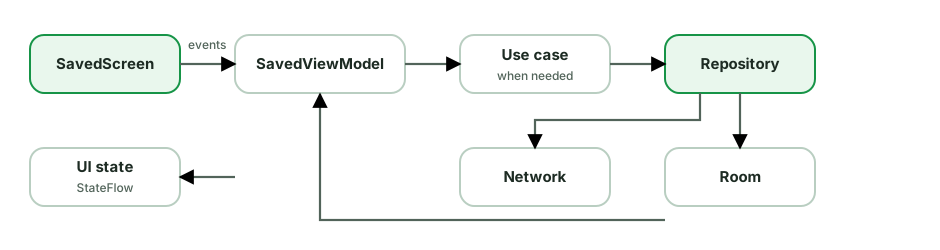
This answer demonstrates layers, UDF, a single source of truth, DI, testing, and judgment about how much architecture the feature actually needs.
The test pyramid guides where to invest: many fast tests at the bottom, few slow ones at the top.
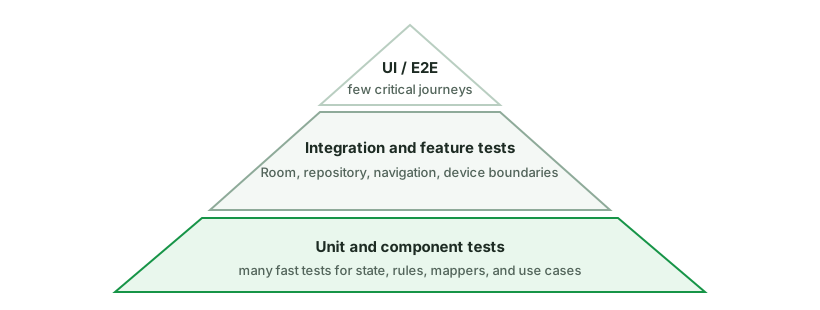
Unit tests (the base, most of your tests):
runTest for coroutines, inject dispatchers, Turbine for flows.Integration tests (middle):
UI / End-to-end (top, few):
Architecture for testability:
Other tools: screenshot tests (Paparazzi/Roborazzi) for visual regression, Macrobenchmark for performance, and Play Pre-launch reports for device coverage.
Unidirectional Data Flow means state flows down and events flow up - in one direction, forming a loop:
UiState) and exposes it as a read-only StateFlow.private val _state = MutableStateFlow(UiState())
val state: StateFlow<UiState> = _state.asStateFlow() // down (read-only)
fun onRefresh() { // up (event)
viewModelScope.launch { _state.update { it.copy(loading = true) } }
}Why it’s foundational:
copy() + atomic update {}.UI = f(state)), and Google’s recommended architecture - the acronym matters less than the one-directional discipline.Related practices: keep UiState immutable. Model business outcomes as
state and let the UI react with navigation or messages. Use an ephemeral stream
only when its best-effort delivery semantics are acceptable.
A UseCase (a.k.a. Interactor) encapsulates a single piece of business logic in the domain layer. It typically depends on repositories and is consumed by ViewModels. Convention: name it as a verb and expose a single invoke operator.
class GetVisibleFeedUseCase(
    private val feedRepo: FeedRepository,
    private val settingsRepo: SettingsRepository,
) {
    operator fun invoke(): Flow<List<Post>> =
        combine(feedRepo.observeFeed(), settingsRepo.blockedAuthors()) { posts, blocked ->
            posts.filterNot { it.author in blocked }   // the business rule
        }
}

// In the ViewModel:
val feed = getVisibleFeed().stateIn(...)When you NEED one:
When you DON’T (the pragmatic point interviewers reward):
repository.getX() add a layer for no value - boilerplate. If a ViewModel can call the repository directly with no extra logic, skip the use case.Design conventions:
operator fun invoke).withContext(defaultDispatcher)), keeping it off the main thread and testable.A ViewModel is a screen-level state holder. It turns application data and
user events into UI state, and it survives configuration changes. It is not a
place for every piece of code that does not fit in the Activity.
Good ViewModel responsibilities:
UiState, usually as StateFlow.SavedStateHandle, such as an item ID,
query, or selected tab.Keep these outside:
Activity, Fragment, or an Activity-scoped Context.data class CheckoutUiState(
val items: List<CartItem> = emptyList(),
val isSubmitting: Boolean = false,
val error: UserMessage? = null,
)
class CheckoutViewModel(
private val checkout: SubmitOrder,
savedStateHandle: SavedStateHandle,
) : ViewModel() {
val cartId: String = checkNotNull(savedStateHandle["cartId"])
// State production and user-event handling live here.
}A useful review question is: could this ViewModel be tested with plain inputs and fake dependencies, without constructing UI objects? If not, a boundary is probably misplaced. Also remember that a ViewModel survives rotation, not process death. Durable data belongs in storage, and restorable inputs belong in saved state.
A ViewModel is testable precisely because it’s a function of injected dependencies and input events → emitted state. Inject a fake repository, drive events, assert on the emitted UiState.
class FeedViewModelTest {
    private val dispatcher = StandardTestDispatcher()

    @Before fun setup() { Dispatchers.setMain(dispatcher) }   // for viewModelScope
    @After  fun tearDown() { Dispatchers.resetMain() }

    @Test fun `loads feed successfully`() = runTest {
        val repo = FakeFeedRepository(items = listOf(post1, post2))
        val vm = FeedViewModel(repo)

        vm.state.test {                        // Turbine
            assertEquals(FeedUiState(loading = true), awaitItem())
            val loaded = awaitItem()
            assertEquals(listOf(post1, post2), loaded.items)
            assertFalse(loaded.loading)
        }
    }

    @Test fun `shows error when repo fails`() = runTest {
        val vm = FeedViewModel(FakeFeedRepository(error = IOException()))
        vm.refresh()
        advanceUntilIdle()
        assertNotNull(vm.state.value.errorMessage)
    }
}The essentials:
Dispatchers.setMain(testDispatcher) in setup - viewModelScope runs on Dispatchers.Main, which doesn’t exist in unit tests; replace it. Reset in teardown.runTest gives a virtual clock (delays skipped) and advanceUntilIdle() to flush coroutines.Dispatchers.IO, so tests are deterministic.FakeRepository returning canned data/errors. Prefer fakes over mocking frameworks for state..test { awaitItem() }) or by collecting into a list.InstantTaskExecutorRule if testing LiveData.What to test: initial state, success path, error/empty paths, that events produce the right state transitions, and that one-off events are emitted.
Compose builds a semantics tree parallel to the UI tree - it’s what TalkBack reads and what UI tests query. Much of it is automatic; you fill the gaps.
// Icons/images need a contentDescription (or null if purely decorative)
Icon(Icons.Default.Favorite, contentDescription = "Add to favorites")
Image(painter, contentDescription = null)   // decorative → skipped by TalkBack

// Add or override semantics
Modifier.semantics {
    contentDescription = "Profile photo of $name"
    role = Role.Button
    stateDescription = if (selected) "Selected" else "Not selected"
}

// Merge children into one announcement (e.g. a whole card read as one node)
Modifier.semantics(mergeDescendants = true) { }
Row(Modifier.clickable {}.semantics(mergeDescendants = true)) {
    Icon(...); Text("Settings")   // announced together, not separately
}Key points:
contentDescription on Icon/Image is required for non-decorative graphics; pass null for decorative ones so they’re ignored.mergeDescendants groups child semantics into a single focusable node - important so a card isn’t read as five separate items. clickable/toggleable merge automatically.role, stateDescription, onClick label make custom controls understandable to assistive tech.Modifier.minimumInteractiveComponentSize() / sizeIn).testTag is also part of semantics (used by tests; excluded from accessibility by default).sp for text and avoid fixed heights that clip scaled text; honor dark mode and contrast.Compose animations are state-driven - you animate toward a target value and Compose interpolates.
High-level / value animations:
animate*AsState - animate a single value to a target. The simplest: animateColorAsState, animateDpAsState, animateFloatAsState.
val size by animateDpAsState(if (expanded) 200.dp else 100.dp)
Box(Modifier.size(size))updateTransition - coordinate multiple values that change together based on one state, staying in sync.AnimatedVisibility - animate a composable entering/leaving (enter/exit transitions: fade, slide, expand).AnimatedContent - animate the swap between different content for different states.Crossfade - fade between two layouts.animateContentSize() - a modifier that animates size changes automatically.Low-level / fine control:
Animatable - coroutine-driven, gives full control (e.g. fling, gesture-following, snapTo/animateTo), and is interruptible.rememberInfiniteTransition - looping animations (pulsing, loading shimmer).AnimationSpec customizes the how: tween(durationMillis, easing), spring(dampingRatio, stiffness), keyframes, repeatable.
How to choose:
animate*AsState.updateTransition.AnimatedVisibility; swap content → AnimatedContent.Animatable.rememberInfiniteTransition.Compose drawing happens in the draw phase via a DrawScope, which gives you drawLine, drawCircle, drawPath, drawRect, drawImage, etc. - all in pixels (.toPx() from dp).
Canvas composable - a dedicated drawing surface:
Canvas(Modifier.size(200.dp)) {
    drawCircle(color = Color.Red, radius = size.minDimension / 2)
    drawLine(Color.Black, start = Offset.Zero, end = Offset(size.width, size.height))
}Modifier.drawBehind { } - draw behind a composable’s content (e.g. a custom background):
Text("Hi", Modifier.drawBehind { drawRoundRect(Color.Yellow, cornerRadius = CornerRadius(8f)) })Modifier.drawWithContent { } - control ordering relative to content (drawContent() places the children’s drawing; draw before/after it). Great for overlays, scrims, masks.
Modifier.drawWithCache { } - cache expensive draw objects (paths, brushes, shaders) so they’re not recreated every draw frame:
Modifier.drawWithCache {
    val path = buildExpensivePath(size)   // computed only when size changes
    onDrawBehind { drawPath(path, Color.Blue) }
}Performance notes:
drawBehind { }) skips composition/layout - cheap for animations like progress bars.drawWithCache for anything costly to build (Paths, gradients) so it’s rebuilt only when inputs change, not every frame.graphicsLayer (and RenderEffect) offload work to the GPU.On Android, the usual choice is collectAsStateWithLifecycle():
@Composable
fun FeedRoute(viewModel: FeedViewModel = viewModel()) {
    val uiState by viewModel.uiState.collectAsStateWithLifecycle()

    FeedScreen(
        state = uiState,
        onRetry = viewModel::retry,
    )
}It converts a Flow into Compose State, so reading uiState participates in
recomposition. Collection is active only while the lifecycle is at least the
configured state, STARTED by default.
collectAsState() is tied to the composition but not to an Android lifecycle.
That makes it appropriate for platform-independent Compose code. On Android, it
can keep collecting while an Activity is stopped but its composition still
exists.
The lifecycle-aware version pairs well with a StateFlow exposed by the
ViewModel:
val uiState = repository.feed
    .map(::toUiState)
    .stateIn(
        scope = viewModelScope,
        started = SharingStarted.WhileSubscribed(5_000),
        initialValue = FeedUiState.Loading,
)When the screen stops collecting, WhileSubscribed can eventually stop the
upstream work as well.
Keep the route and content split in mind. A route collects state and connects
the ViewModel; a stateless FeedScreen receives values and callbacks. That
keeps previews and UI tests simple.
For one-off events, do not automatically put consumable flags into the state and reset them from composition. Model durable screen state as state, and handle transient events with a lifecycle-aware design suited to their delivery needs.
@Composable is not a normal function - the Compose compiler plugin transforms it. The key transformations:
$composer parameter - every composable gets a hidden Composer parameter threaded through. The Composer is how composition reads/writes the tree.startRestartGroup/endRestartGroup (and movable/replaceable groups) so Compose can track and restart just this scope.The slot table is the in-memory data structure that stores composition state - the tree of groups, remembered values, and CompositionLocals. It’s a flat, gap-buffer-backed array optimized for the common case: re-running composables in the same order.
Positional memoization is the core idea: Compose identifies each composable and each remember by its position in the execution order (call site), not by a name. That’s why:
remember { } at the same call site returns the same stored value across recompositions.if) is fine, but reordering them without key() can confuse identity - hence key() to give stable identity in loops.// The compiler turns this:
@Composable fun Greeting(name: String) { Text("Hi $name") }
// into roughly:
fun Greeting(name: String, $composer: Composer, $changed: Int) {
$composer.startRestartGroup(...)
if ($changed and 0b1 == 0 && $composer.skipping) { $composer.skipToGroupEnd() }
else { Text("Hi $name", $composer) }
$composer.endRestartGroup()?.updateScope { Greeting(name, it, $changed) }
}Why this matters: it explains why the rules exist - why composables must be side-effect-free and idempotent (they re-run), why identity is positional (slot table), and why stability enables skipping.
A composable instance has three lifecycle events:
Recomposition is not a lifecycle callback like onStart. It is the runtime
reevaluating UI that may be out of date. Compose may skip a call when its inputs
have not changed, so business logic must not depend on how often the function
runs.
This lifecycle explains the common APIs:
remember keeps a value while that call remains in the composition.LaunchedEffect starts a coroutine on entry, restarts when a key changes, and
cancels when it leaves.DisposableEffect provides onDispose for unregistering a listener or
releasing another resource.rememberCoroutineScope returns a scope cancelled when its call leaves.@Composable
fun LocationObserver(client: LocationClient) {
DisposableEffect(client) {
val listener = client.addListener { /* update state */ }
onDispose { client.removeListener(listener) }
}
}Identity is part of the story. Calls at different positions are different instances. In a changing list, stable keys help Compose keep an instance and its remembered state attached to the correct item.
For an interview, connect the lifecycle to a real bug: work launched directly
in the composable body may run again on recomposition, while a listener without
onDispose can outlive the UI that registered it.
CompositionLocal provides a value implicitly down the composition tree, so deeply nested composables can read it without passing it through every parameter. It’s how MaterialTheme, LocalContext, LocalDensity, and LocalContentColor work.
val LocalSpacing = compositionLocalOf { Spacing() }

CompositionLocalProvider(LocalSpacing provides Spacing(large = 24.dp)) {
    MyScreen()   // anything inside can read LocalSpacing.current
}

@Composable
fun MyScreen() {
    val spacing = LocalSpacing.current
    Column(Modifier.padding(spacing.large)) { ... }
}Two flavors:
compositionLocalOf - changing the value recomposes only composables that read it (tracked). Use for values that change.staticCompositionLocalOf - not tracked; changing it recomposes the entire provided subtree. Use for values that essentially never change (more efficient reads). Theme colors that rarely change often use this.When to use it: truly cross-cutting, ambient data many layers deep - theming, density, locale, a logged-in user’s display prefs.
When not to use it: it makes data flow implicit, which hurts readability and testability. Don’t use it for:
Rule of thumb: “CompositionLocal for ambient, rarely-changing, widely-needed values (theme, density). Explicit parameters for everything else.”
Constraints are the min/max width and height a parent passes to a child during the layout phase. A child must choose a size within them. They flow top-down; measured sizes flow bottom-up.
Layout(content) { measurables, constraints ->
    // constraints.maxWidth, minHeight, etc.
}The single-pass rule means a parent normally can’t know a child’s size before measuring it. Two escape hatches:
Intrinsic measurements - query a child’s “natural” size without a full measure pass. Modifier.height(IntrinsicSize.Min) makes a Row tall enough for its tallest child, etc. Used when one child’s size should depend on a sibling’s natural size (e.g. a divider matching text height). It costs an extra measurement, so use sparingly.
Row(Modifier.height(IntrinsicSize.Min)) {
    Text("Left")
    Divider(Modifier.fillMaxHeight().width(1.dp))   // matches the Row's content height
    Text("Right")
}BoxWithConstraints - exposes the incoming constraints inside the composable so you can compose different content based on available space:
BoxWithConstraints {
    if (maxWidth < 600.dp) PhoneLayout() else TabletLayout()
}It’s built on SubcomposeLayout (it composes children after knowing constraints), which is more expensive than a normal layout - don’t reach for it when a regular Modifier/weight approach works. Prefer it only for genuine “I must know the size before deciding what to compose” cases (responsive/adaptive layouts).
Use the Layout composable (or a Modifier.layout). Compose’s layout protocol has one rule: measure children once, then place them. Constraints flow down, sizes flow up.
@Composable
fun SimpleColumn(content: @Composable () -> Unit, modifier: Modifier = Modifier) {
    Layout(content = content, modifier = modifier) { measurables, constraints ->
        // 1. Measure each child with constraints
        val placeables = measurables.map { it.measure(constraints) }

        // 2. Decide our own size
        val width = placeables.maxOf { it.width }
        val height = placeables.sumOf { it.height }

        // 3. Place children
        layout(width, height) {
            var y = 0
            placeables.forEach { p ->
                p.placeRelative(x = 0, y = y)
                y += p.height
            }
        }
    }
}The three steps:
measurable.measure(constraints) on each child exactly once (measuring twice throws). You may tighten/loosen the constraints you pass down.layout(width, height) based on children’s measured sizes.layout {} block, position each Placeable with placeRelative/place.Key concepts interviewers probe:
SubcomposeLayout - for the rare case where you must measure something before composing its children (e.g. BoxWithConstraints, lazy lists). It’s more expensive; avoid unless needed.Modifier.height(IntrinsicSize.Min)) let a parent query a child’s natural size when one-pass isn’t enough.A simple custom modifier is just a chaining extension that combines existing modifiers:
fun Modifier.card() = this
    .clip(RoundedCornerShape(12.dp))
    .background(MaterialTheme.colorScheme.surface)
.padding(16.dp)For modifiers that need state or to participate in layout/draw, there are two approaches:
Modifier.composed { } (legacy) - lets you call composable functions (like remember) inside a modifier. The problem: it’s a factory that recomposes, doesn’t get inlined/optimized well, allocates per use, and can hurt performance.
Modifier.Node (modern, recommended) - a lower-level API where you implement a Modifier.Node and a ModifierNodeElement. It’s more efficient: nodes are long-lived, not recreated on recomposition, can directly implement DrawModifierNode, LayoutModifierNode, PointerInputModifierNode, etc., and avoid the composition overhead of composed.
fun Modifier.circleBorder(color: Color) = this then CircleBorderElement(color)

private data class CircleBorderElement(val color: Color) :
    ModifierNodeElement<CircleBorderNode>() {
    override fun create() = CircleBorderNode(color)
    override fun update(node: CircleBorderNode) { node.color = color }
}

private class CircleBorderNode(var color: Color) : DrawModifierNode, Modifier.Node() {
    override fun ContentDrawScope.draw() {
        drawContent()
        drawCircle(color, style = Stroke(2.dp.toPx()))
    }
}Why this matters: Google migrated all built-in modifiers off composed to Modifier.Node for performance. Knowing to prefer Modifier.Node (and that composed { } is discouraged for stateful/drawing modifiers) signals you understand Compose performance at a deeper level.
Rule of thumb: plain chaining for stateless combos; Modifier.Node for anything stateful, drawing, or layout-affecting; avoid composed { } in new code.
In a declarative UI, you describe what the screen should look like for the current state. When the state changes, Compose runs the relevant composables again and updates the UI.
@Composable
fun Counter(count: Int, onIncrement: () -> Unit) {
    Button(onClick = onIncrement) {
        Text("Count: $count")
    }
}Counter does not find a text view and change its text. It simply says, “for
this value of count, show this button.” A useful shorthand is:
UI = f(state)The View system is usually imperative. Code keeps references to widgets and updates them directly:
countText.text = "Count: $count"
incrementButton.isEnabled = count < 10The practical differences are:
View.An interview answer should not stop at “Compose has no XML.” The important change is ownership: application state drives the UI, instead of UI objects quietly becoming another place where state lives.
Senior follow-up: declarative does not mean Compose rebuilds the whole screen for every change. The runtime tracks state reads and can recompose a small scope, then skip layout or drawing work that is still valid.
derivedStateOf creates a state object whose value is computed from other state, but only notifies readers when the computed result actually changes - not every time an input changes.
Use it when a frequently-changing state feeds a rarely-changing derived value:
val listState = rememberLazyListState()

// Recomputes as you scroll, but only emits true/false transitions
val showButton by remember {
    derivedStateOf { listState.firstVisibleItemIndex > 0 }
}

if (showButton) ScrollToTopButton()Here firstVisibleItemIndex changes on every scroll frame, but showButton only flips false→true→false. Without derivedStateOf, any composable reading showButton would recompose on every scroll tick. With it, recomposition happens only when the boolean changes - a big saving.
When NOT to use it: when the output changes about as often as the input. derivedStateOf has overhead, so for val full = "$first $last" (changes whenever inputs do) a plain calculation is better - wrapping it adds cost for no benefit.
The decision rule: reach for derivedStateOf when one or more rapidly-changing states collapse into a value that changes far less often. If input-change-rate ≈ output-change-rate, just compute it directly.
Common pairing: remember { derivedStateOf { } } - the remember keeps the derived-state object across recompositions; the derivedStateOf controls when readers are notified.
Compose offers gesture handling at two levels.
High-level modifiers for common cases:
Modifier
    .clickable { onClick() }
    .combinedClickable(onClick = {}, onLongClick = {})
    .draggable(state = rememberDraggableState { delta -> offset += delta },
               orientation = Orientation.Horizontal)
    .scrollable(...)
    .anchoredDraggable(...) // state-driven drag between defined anchors
.transformable(...) // pinch/zoom/rotateLow-level pointerInput for custom gestures - gives raw pointer events and coroutine-based detectors:
Modifier.pointerInput(Unit) {
    detectTapGestures(
        onTap = { pos -> /* ... */ },
        onDoubleTap = { /* ... */ },
        onLongPress = { /* ... */ },
    )
}

Modifier.pointerInput(Unit) {
    detectDragGestures { change, dragAmount ->
        change.consume()
        offset += dragAmount
    }
}Key points:
pointerInput(key) restarts the gesture coroutine when the key changes - pass relevant state as the key (a common bug is pointerInput(Unit) capturing stale state).change.consume()) to stop them propagating to parents and avoid conflicting gestures.detectTapGestures, detectDragGestures, detectTransformGestures, awaitPointerEventScope { awaitFirstDown() ... } for fully custom flows.clickable adds roles/handlers) over raw pointerInput where possible, or add Modifier.semantics.Interop goes both ways and is common during migration.
Views inside Compose - AndroidView:
AndroidView(
    factory = { context -> MapView(context) },  // create once
    update = { mapView -> mapView.setZoom(zoom) }, // re-run on state change
    modifier = Modifier.fillMaxSize(),
)factory runs once to create the View.update runs on initial composition and whenever a state it reads changes - bridge Compose state into the View here.MapView, WebView, AdView, custom legacy views, SurfaceView.AndroidViewBinding wraps a whole XML layout via ViewBinding.Compose inside Views - ComposeView:
// In XML or code, add a ComposeView, then:
composeView.setContent {
    MyComposable()
}ViewCompositionStrategy (e.g. DisposeOnViewTreeLifecycleDestroyed) so the composition is disposed with the host’s lifecycle - especially in RecyclerView rows or Fragments.Gotchas:
AndroidView’s update is where you push state; don’t recreate the View in factory on recomposition.ComposeView in lists and Fragments to avoid leaks.CompositionLocal don’t automatically cross the boundary - pass values explicitly.Compose identifies each composable by its position in the source/call tree (positional memoization). That’s how it knows which remembered state belongs to which call. The key() composable lets you override that identity with a value you control.
@Composable
fun Names(names: List<Name>) {
    Column {
        for (name in names) {
            key(name.id) {                 // tie identity to id, not position
                NameRow(name)              // its remembered state follows the data
            }
        }
    }
}Why it matters: without key, if the list reorders or you insert/remove an item, the position of each NameRow changes, so Compose mismatches remembered state, animations, and focus to the wrong items. Wrapping in key(name.id) ties identity to the data, so Compose moves existing state with the item instead of recreating it.
Where you see it:
for inside Column) - wrap each iteration in key().LazyColumn/LazyRow - the items(list, key = { it.id }) parameter does the same thing for lazy lists.Symptoms of missing keys:
LaunchedEffect launches a coroutine when its call enters the composition. The
coroutine is cancelled when that call leaves. If any key changes, Compose cancels
the old coroutine and starts a new one.
@Composable
fun UserRoute(userId: String, viewModel: UserViewModel) {
    LaunchedEffect(userId) {
        viewModel.load(userId)
    }
}The key states the effect’s restart policy. Here a new user ID means the old load is no longer the right work.
Common mistakes are:
LaunchedEffect(Unit) while reading a changing input. The effect keeps
running with assumptions from its first launch.When a long-lived effect should keep running but use the latest callback, pair a
constant key with rememberUpdatedState:
val currentOnTimeout by rememberUpdatedState(onTimeout)

LaunchedEffect(Unit) {
    delay(5_000)
    currentOnTimeout()
}LaunchedEffect(Unit) is valid when its lifetime should match that call site,
but it deserves the same pause you would give while (true). Make sure “start
once for this instance” is really the intended rule.
One final distinction: user events are not composition events. For a click that
shows a snackbar, launch from rememberCoroutineScope() inside onClick.
Use a Column when the content is small and you want every child composed at
once. Use a LazyColumn for a large or unknown number of items. A lazy layout
only composes and lays out what its viewport needs.
LazyColumn {
    items(
        items = messages,
        key = { message -> message.id },
        contentType = { message -> message.kind },
    ) { message ->
        MessageRow(message)
    }
}Without an explicit key, item identity is based on position. Insert an item at the top and all later positions move. Remembered state can then be associated with the wrong position, and Compose has less information for reusing work and animating moves.
A good key is unique, stable, and saveable in a Bundle if the item uses
rememberSaveable. A database ID is ideal. A list index is usually not, because
it changes when items are inserted, removed, or reordered.
contentType is a separate optimization for mixed lists. It tells the lazy
layout which items have compatible structures, such as headers and message rows.
One wording detail matters in senior interviews: LazyColumn follows principles
similar to RecyclerView, but it does not recycle ViewHolder objects. It can
reuse compositions for compatible content.
Common follow-up: keys do not make a slow row fast. Profile expensive item content, image loading, and frequent state reads separately.
Modifier order is behavior, not formatting. Each element in the chain wraps the elements that follow it.
// A
Box(
    Modifier
        .padding(16.dp)
        .background(Color.Red)
        .size(100.dp)
)

// B
Box(
    Modifier
        .background(Color.Red)
        .padding(16.dp)
        .size(100.dp)
)In A, the 16 dp outer area is not painted red. padding sits outside the
background. In B, the background sits outside the padding, so the padded area
is red too.
A good way to read a chain is from left to right as nested wrappers:
A: padding(background(size(content)))
B: background(padding(size(content)))The same rule changes interaction:
Modifier.clickable { }.padding(16.dp) // padding is inside the click target
Modifier.padding(16.dp).clickable { } // outer padding is not clickableSize constraints need extra care. size requests a preferred size within the
constraints it receives; it is not an unconditional final pixel size. That is
why guessing only from the method names can be misleading.
How to answer a modifier puzzle: classify each modifier as layout, draw, input, or semantics; rewrite the chain as wrappers; then work through the constraints and bounds from the outside in.
mutableStateOf creates observable state that participates in Compose’s
snapshot system.
@Composable
fun Counter() {
    var count by remember { mutableStateOf(0) }

    Text("Count: $count")
    Button(onClick = { count++ }) {
        Text("Add")
    }
}When Text reads count during composition, Compose records that dependency.
Writing a different value schedules the scopes that observed it for
recomposition. Compose does not simply rerun every composable on the screen.
remember matters because the state holder must survive recomposition. Without
it, each run would create a new holder initialized to 0.
The default mutation policy uses structural equality. Assigning a value equal to the old one normally does not invalidate readers. Mutating a plain object inside the state holder is also invisible:
val names = mutableStateOf(mutableListOf("Asha"))
names.value.add("Ben") // the state value was not assignedUse an immutable list and assign a new value, or use mutableStateListOf when a
snapshot-aware mutable collection fits the design.
Senior follow-up: snapshots give reads a consistent view and support precise observation. They do not mean all state can be mutated carelessly from any thread. Concurrent snapshot writes can conflict and application state still needs a clear owner.
Keep navigation at the edge of a screen. A reusable screen should receive
callbacks, not a NavController:
@Composable
fun FeedScreen(
    state: FeedUiState,
    onOpenArticle: (String) -> Unit,
) {
    ArticleList(
        articles = state.articles,
        onArticleClick = { article -> onOpenArticle(article.id) },
    )
}The navigation host connects that callback to the back stack. In Navigation Compose, prefer type-safe routes where the project version supports them:
@Serializable data object Feed
@Serializable data class Article(val articleId: String)

NavHost(navController, startDestination = Feed) {
    composable<Feed> {
        FeedRoute(
            onOpenArticle = { id ->
                navController.navigate(Article(id))
            },
        )
    }

    composable<Article> { backStackEntry ->
        val route = backStackEntry.toRoute<Article>()
        ArticleRoute(articleId = route.articleId)
    }
}Pass a small identifier, not a whole domain object. The destination can load the
current data from its repository or ViewModel. This avoids stale copies and
keeps the back stack’s saved state small.
A destination’s ViewModel is normally scoped to its NavBackStackEntry. It
survives recomposition and configuration change, then clears when that entry is
removed. Scope a shared ViewModel to a parent graph only when several
destinations genuinely own one flow, such as checkout.
Senior discussion points include deep links, multiple back stacks, process recreation, and result delivery. The principle stays the same: make back-stack ownership explicit and keep composables testable without a navigation runtime.
Navigation libraries are evolving, including Navigation 3 for Compose-first apps. State the version and architecture you have used rather than mixing APIs from different generations in one example.
Two approaches.
1. Paging 3 (recommended for real data):
// ViewModel
val items: Flow<PagingData<Item>> = Pager(PagingConfig(pageSize = 20)) {
    ItemPagingSource(api)
}.flow.cachedIn(viewModelScope)

// UI
val lazyItems = viewModel.items.collectAsLazyPagingItems()
LazyColumn {
    items(lazyItems.itemCount, key = lazyItems.itemKey { it.id }) { index ->
        lazyItems[index]?.let { ItemRow(it) }
    }
    // footer based on load state
    when (lazyItems.loadState.append) {
        is LoadState.Loading -> item { LoadingRow() }
        is LoadState.Error -> item { RetryRow { lazyItems.retry() } }
        else -> {}
    }
}Paging 3 handles page requests, caching, retries, placeholders, and exposes loadState. collectAsLazyPagingItems() integrates it with LazyColumn. With a RemoteMediator + Room it becomes offline-first (DB is the source of truth).
2. Manual “load more” with scroll detection (simple lists):
val state = rememberLazyListState()
val shouldLoadMore by remember {
    derivedStateOf {
        val last = state.layoutInfo.visibleItemsInfo.lastOrNull()?.index ?: 0
        last >= items.size - 5            // near the end
    }
}
LaunchedEffect(shouldLoadMore) {
    if (shouldLoadMore) viewModel.loadNextPage()
}Note the derivedStateOf - visibleItemsInfo changes every scroll frame, but shouldLoadMore only flips occasionally, so this avoids recomposing on every frame.
When to use which: Paging 3 for production lists from network/DB (it solves caching, retry, dedup, placeholders). Manual approach for small or fully-in-memory lists where Paging is overkill.
Start with evidence. A useful answer is a small investigation plan, not a bag of
remember calls.
Common causes include:
Fix the cause you measured. Cache a genuinely expensive pure calculation with
the inputs as remember keys. Use derivedStateOf when a rapidly changing input
produces an output that changes much less often. Use lambda modifiers such as
offset { ... } when the state only affects a later phase.
Do not treat recomposition count as a score. Recomposition is normal and often cheap. The problem is expensive work on a critical frame, invalidating too much UI, or rerunning a phase that was avoidable.
Senior follow-up: include startup, memory allocation, image loading, and the View or platform boundary in the trace. A screen can be janky even when its Compose stability report looks perfect.
Compose updates UI through three main phases:
The useful part is not memorizing the order. It is knowing that state reads are tracked in the phase where they happen. A change can restart only the phase that needs new work.
// Reads offset during composition
Box(Modifier.offset(x = scrollOffset.dp, y = 0.dp))

// Reads offset during layout
Box(
    Modifier.offset {
        IntOffset(x = scrollOffset, y = 0)
    }
)For rapidly changing pixel values, the lambda overload can avoid composition and go straight to layout. A value used only for color or a canvas operation can often be read in a draw modifier.
Do not force every state read into a later phase. If a value changes which composables exist, composition is exactly where it belongs. If it changes size, layout still has to run.
A solid performance answer: identify what the state changes, find where it is read, and check which phase actually needs to rerun. Then measure in a release build before rewriting code.
@Preview renders a composable in Android Studio without running the app or a device - fast iteration on UI.
@Preview(showBackground = true)
@Preview(name = "Dark", uiMode = Configuration.UI_MODE_NIGHT_YES)
@Preview(name = "Large font", fontScale = 1.5f)
@Composable
private fun ProfileCardPreview() {
    AppTheme {
        ProfileCard(user = User("Ada", "ada@x.com"))
    }
}Useful features:
@PreviewParameter provider to render several data states (loading/empty/error/loaded) at once.@PreviewLightDark, or your own multi-preview annotation) to apply a standard set everywhere.What makes a composable preview-friendly (the real point):
This is a strong argument for the stateless composable + state hoisting pattern: previewability falls out of it for free. A screen split into a stateful “screen” (wires the ViewModel) and a stateless “content” (pure params) lets you preview the content in every state.
Bonus: previews double as screenshot tests (Paparazzi/Roborazzi) to catch visual regressions in CI without a device.
Both bridge between Compose state and coroutines/flows, in opposite directions.
produceState - turn a coroutine/async source into Compose State. It launches a coroutine (like LaunchedEffect) and gives you a value you set over time.
@Composable
fun userState(userId: String): State<Result<User>> = produceState(
    initialValue = Result.Loading,
    key1 = userId,
) {
    value = try { Result.Success(repo.load(userId)) }
            catch (e: Exception) { Result.Error(e) }
    // optional awaitDispose { } for cleanup
}It’s essentially remember { mutableStateOf(initial) } + LaunchedEffect combined - ideal for “load this async and expose it as state.”
snapshotFlow - the reverse: turn Compose State reads into a Flow. It observes the state read inside its block and emits when that state changes.
LaunchedEffect(listState) {
    snapshotFlow { listState.firstVisibleItemIndex }
        .distinctUntilChanged()
        .filter { it > 10 }
        .collect { analytics.log("scrolled deep") }
}Use it to apply Flow operators (debounce, filter, map) to Compose state, or to react to scroll/gesture state with coroutine logic.
How to choose:
produceState.snapshotFlow.Both are lifecycle-scoped to the composition and cancel when it leaves.
A recomposition scope is the smallest restartable unit Compose can re-execute - roughly, a @Composable function (and certain inline blocks). When state read inside a scope changes, Compose re-runs only that scope, not the whole tree. This is smart/partial recomposition.
Donut-hole skipping: if a composable reads state, only the part that reads it recomposes - a child that doesn’t read it can be skipped even though its parent recomposed. The state read is the “hole”; the surrounding dough is skipped.
@Composable
fun Screen() {
    var count by remember { mutableStateOf(0) }
    Column {
        ExpensiveHeader()              // does NOT read count → skipped on count change
        Text("Count: $count")         // reads count → recomposes
        Button(onClick = { count++ }) { Text("+") }
    }
}When count changes, only the Text recomposes; ExpensiveHeader is skipped (its inputs didn’t change and it’s skippable).
Practical implications:
count in Screen’s body would expand the scope; reading it inside Text keeps the hole small.Modifier.offset { }) to avoid composition entirely.Unit and not reading changed state are what let Compose skip a scope.@Composable
fun UserCard(userId: String) {
// Caches the FIRST userId's data forever
val userData = remember { loadUserSummary(userId) }
Text(userData.name)
}The bug: remember { } with no key computes its value once and reuses it for the composable’s whole lifetime. If the parent re-renders UserCard with a different userId (same position in the tree), remember does not recompute - it keeps the original user’s data. The card shows the wrong user.
The fix - key the remember on the inputs it depends on:
val userData = remember(userId) { loadUserSummary(userId) }Now when userId changes, remember discards the cached value and recomputes.
remember(key1, key2) recomputes whenever any key changes - exactly like LaunchedEffect’s keys. A keyless remember { } means “compute once, never again for this slot.”
Related gotchas:
remember/composition (loadUserSummary blocking is bad regardless) - use LaunchedEffect/produceState. The example simplifies to show the keying bug.LaunchedEffect(Unit) { ...uses userId... } - add userId as a key or use rememberUpdatedState.It solves the stale-capture problem when a long-lived effect needs to always see the latest value of a parameter, but you don’t want the effect to restart when that value changes.
The classic case - a one-shot effect with a callback that might change:
@Composable
fun AutoDismiss(onTimeout: () -> Unit) {
    // Keep the latest onTimeout without restarting the timer
    val currentOnTimeout by rememberUpdatedState(onTimeout)

    LaunchedEffect(Unit) {        // runs ONCE - keyed on Unit on purpose
        delay(5000)
        currentOnTimeout()        // calls the LATEST callback, not the first
    }
}The dilemma without it:
onTimeout as a LaunchedEffect key, the 5-second timer restarts every time the parent passes a new lambda - the dismiss never fires.Unit and call onTimeout directly, the effect captures the first lambda - stale; later updates are ignored.rememberUpdatedState gives you a stable holder whose .value is updated on every recomposition to the newest value, while the effect itself stays keyed on Unit (never restarts). Best of both: timer runs once, callback is always current.
When to use it: long-running effects (timers, animations, listeners started once) that reference frequently-changing parameters/callbacks you want fresh but not as restart triggers.
A composable body should describe UI. When work must escape that body, choose an effect based on what starts it and how it should stop.
LaunchedEffect(keys) runs suspend work tied to a call in the composition. It
cancels when the call leaves and restarts when a key changes.DisposableEffect(keys) is for registration with matching cleanup, such as a
lifecycle observer or callback listener.SideEffect runs after every successful recomposition. It is useful for
publishing Compose state to an object not managed by Compose.rememberCoroutineScope() provides a composition-aware scope for event
handlers, such as showing a snackbar after a tap.val scope = rememberCoroutineScope()
Button(
onClick = {
scope.launch {
snackbarHostState.showSnackbar("Saved")
}
},
) {
Text("Save")
}For a listener, cleanup is the deciding factor:
DisposableEffect(lifecycleOwner) {
    val observer = LifecycleEventObserver { _, event ->
        analytics.onLifecycleEvent(event)
    }
    lifecycleOwner.lifecycle.addObserver(observer)

    onDispose {
        lifecycleOwner.lifecycle.removeObserver(observer)
    }
}Avoid calling viewModel.load() or launching a coroutine directly in the
composable body. Recomposition can repeat that work.
Quick decision: composition event plus suspend work, use LaunchedEffect;
user event plus suspend work, use rememberCoroutineScope; setup and teardown,
use DisposableEffect; publish after a successful composition, use
SideEffect.
The slot API is the pattern of accepting @Composable lambdas as parameters, letting callers inject their own content into named “slots.” It’s how Compose builds flexible, reusable components without exploding into dozens of configuration parameters.
@Composable
fun Card(
    title: @Composable () -> Unit,
    actions: @Composable RowScope.() -> Unit = {},
    content: @Composable () -> Unit,
) {
    Column(Modifier.padding(16.dp)) {
        title()
        Spacer(Modifier.height(8.dp))
        content()
        Row { actions() }
    }
}

// Caller fills the slots with whatever it wants
Card(
    title = { Text("Profile", style = MaterialTheme.typography.titleLarge) },
    actions = { TextButton(onClick = {}) { Text("Edit") } },
) {
    ProfileBody()
}You see this everywhere in Material: Scaffold(topBar = {}, bottomBar = {}, floatingActionButton = {}) { content }, Button(content = { }), TopAppBar(title, navigationIcon, actions).
Why it’s powerful:
Card serves countless use cases.RowScope/ColumnScope receivers on a slot give the caller scoped modifiers (Modifier.weight, align) inside that slot.content slot reads cleanly with { }.Stability tells the Compose compiler whether it can reliably detect changes to a value. A stable type has a consistent equality contract, and Compose can observe changes to any mutable public state it exposes.
Examples that are normally stable include primitives, String, function types,
and immutable data classes whose properties are also stable. Standard List,
Set, and Map interfaces are treated as unstable because the compiler cannot
prove that an implementation is immutable.
Strong skipping changes an older interview answer. Since Kotlin 2.0.20 it is enabled by default. Restartable composables with unstable parameters can still be skipped. Stable parameters are compared with object equality, while unstable parameters are compared with instance equality.
@Composable
fun Feed(items: List<FeedItem>) { /* ... */ }List is unstable, but with strong skipping Feed can be skipped when the exact
same list instance is passed again. A newly allocated equal list is a different
instance, so it will not be skipped on that basis.
Possible improvements include:
kotlinx.collections.immutable when it fits the codebase@Immutable or @Stable only when the type really satisfies that promiseAnnotations are contracts with the compiler, not magic fixes. Marking a wrapper
@Immutable while it exposes a list that callers can mutate can produce stale
UI.
Most importantly, diagnose a real performance issue before redesigning models. Use compiler reports to understand inferred stability, then confirm the cost in a trace or benchmark. An unstable parameter is information, not proof that the screen is slow.
State hoisting means moving state to the caller and giving the child its current value plus events it can raise. People often summarize it as state down, events up.
@Composable
fun SearchField(
    query: String,
    onQueryChange: (String) -> Unit,
) {
    TextField(value = query, onValueChange = onQueryChange)
}SearchField is stateless. That makes it easy to preview, test, and reuse. The
caller can keep query locally, in a plain state holder, or in a ViewModel.
A practical placement rule is to hoist state:
Do not hoist by reflex. A tooltip’s open flag or a self-contained animation can
stay local when no caller needs to control it. Screen state shaped by business
logic usually belongs in a screen-level state holder such as a ViewModel.
@Composable
fun SearchRoute(viewModel: SearchViewModel = viewModel()) {
    val state by viewModel.uiState.collectAsStateWithLifecycle()
    SearchScreen(
        state = state,
        onQueryChange = viewModel::onQueryChange,
    )
}The strongest interview answer explains ownership, not just the
value/onValueChange signature. Ask who needs to read the state, who changes
it, and how long it must survive.
Compose tests use a semantics tree (the same accessibility tree screen readers use), not view IDs. You find nodes, assert on them, and perform actions through a ComposeTestRule.
class CounterTest {
    @get:Rule val rule = createComposeRule()

    @Test fun increments() {
        rule.setContent { Counter() }

        rule.onNodeWithText("Count: 0").assertIsDisplayed()
        rule.onNodeWithContentDescription("Increment").performClick()
        rule.onNodeWithText("Count: 1").assertExists()
    }
}The pieces:
onNodeWithText, onNodeWithTag (Modifier.testTag("...")), onNodeWithContentDescription, onAllNodes.assertIsDisplayed, assertExists, assertIsEnabled, assertTextEquals.performClick, performTextInput, performScrollTo, performTouchInput.createComposeRule for pure Compose; createAndroidComposeRule<Activity>() when you need a real Activity/host.Synchronization: the test framework auto-syncs with recomposition and Compose-driven animations/coroutines - waitForIdle() happens implicitly between actions, so you rarely sleep. For non-Compose async, use waitUntil { }. You can disable auto-advance and control the clock with mainClock for animation tests.
Good practices:
testTag for elements without stable text.@Preview + screenshot testing (Paparazzi / Roborazzi) catches visual regressions without a device.Compose has value-based and state-based text field APIs. Know both, because many codebases still use the value-based form:
var text by rememberSaveable { mutableStateOf("") }

TextField(
    value = text,
    onValueChange = { text = it },
)This is controlled input. The field reports an edit, and the caller must provide
the updated value on the next composition. Delaying that round trip through
asynchronous ViewModel work can cause lost edits or cursor jumps.
For new code, state-based fields are designed to manage text, selection, and IME composition together:
val textState = rememberTextFieldState()

TextField(
    state = textState,
    lineLimits = TextFieldLineLimits.SingleLine,
)rememberTextFieldState() includes save and restore support. State-based APIs
also separate input changes from display transformation, which avoids changing
the backing text just to format what the user sees.
Keep immediate editing state close enough to the field to update synchronously.
Send meaningful events or a debounced query to the ViewModel when business
logic needs it. Do not run network requests or heavy validation directly in an
edit callback.
For an interview, also mention selection, IME composition, keyboard actions,
accessibility, and restoration. A text field stores more than a String, which
is why complex input benefits from TextFieldState.
MaterialTheme provides three systems down the tree via CompositionLocals: colors, typography, and shapes.
@Composable
fun AppTheme(darkTheme: Boolean = isSystemInDarkTheme(), content: @Composable () -> Unit) {
    val colors = when {
        // Material 3 dynamic color (Android 12+): derive from the wallpaper
        dynamicColorAvailable() && darkTheme -> dynamicDarkColorScheme(LocalContext.current)
        dynamicColorAvailable() -> dynamicLightColorScheme(LocalContext.current)
        darkTheme -> DarkColors
        else -> LightColors
    }
    MaterialTheme(colorScheme = colors, typography = AppTypography, content = content)
}Reading the theme anywhere inside:
Text("Hi", color = MaterialTheme.colorScheme.primary,
style = MaterialTheme.typography.titleMedium)Key points:
MaterialTheme.*. Don’t hardcode colors in composables.ColorScheme. isSystemInDarkTheme() follows the system; toggling is swapping the scheme - the whole tree recomposes with new colors.MaterialTheme with your own CompositionLocalProviders (custom spacing, brand colors) and expose them via a Theme object.staticCompositionLocalOf, so reads are cheap but changing the theme recomposes the provided subtree.@Composable
fun BrokenList() {
val items = remember { mutableStateOf(mutableListOf("a")) }
Column {
Button(onClick = { items.value.add("b") }) { Text("Add") } // ❌ no update
items.value.forEach { Text(it) }
}
}The bug: tapping “Add” mutates the list in place. The MutableState still holds the same list reference, so .value hasn’t “changed” by Compose’s equality check - no recomposition is scheduled, and the new item never appears.
Two correct approaches:
1. Use an observable collection - mutableStateListOf:
val items = remember { mutableStateListOf("a") }
Button(onClick = { items.add("b") }) { Text("Add") }   // ✅ add triggers recomposition
items.forEach { Text(it) }mutableStateListOf (and mutableStateMapOf) are snapshot-aware: structural changes (add/remove/set) notify Compose.
2. Use an immutable list and replace the reference:
var items by remember { mutableStateOf(listOf("a")) }
Button(onClick = { items = items + "b" }) { Text("Add") } // ✅ new list → new referenceAssigning a new list changes .value, so Compose detects it.
Why this happens: MutableState schedules recomposition when .value is set to a different value (by equals). Mutating the contained list doesn’t change the reference, so nothing fires. Either make the container observable (mutableStateListOf) or always assign a new immutable instance.
For a new Android screen, Compose is usually the practical default. It gives the team state-driven UI, Kotlin-only components, flexible layouts, previews, and a strong modern ecosystem.
That does not make every rewrite sensible. Keep or embed Views when:
Interop lets the decision happen one boundary at a time:
ComposeView.AndroidView or AndroidViewBinding.The cost of a mixed screen is not just rendering. It includes two testing models, focus and accessibility handoff, lifecycle ownership, nested scrolling, theming, and debugging across the boundary. Keep the boundary deliberate and small.
A senior answer should be based on constraints, not toolkit loyalty. Consider the age of the code, team experience, SDK dependencies, performance evidence, test coverage, and expected lifetime of the screen.
“Compose for new work, migrate existing UI when the value justifies it” is a reasonable default. A big-bang rewrite is rarely the only option.
Insets are the system-reserved areas - status bar, navigation bar, IME (keyboard), display cutout. With edge-to-edge (default on Android 15+ when targeting SDK 35), your content draws behind the system bars, so you must apply insets so nothing important is hidden.
// Enable edge-to-edge in the Activity
enableEdgeToEdge()

// Apply insets as padding in Compose
Column(
    Modifier
        .fillMaxSize()
        .windowInsetsPadding(WindowInsets.systemBars)   // pad for status+nav bars
) { ... }Common tools:
Modifier.windowInsetsPadding(WindowInsets.systemBars) / .statusBarsPadding() / .navigationBarsPadding() - pad content out of the system bars.Modifier.imePadding() - pad for the keyboard so inputs aren’t covered; Modifier.safeDrawingPadding() covers all of the above.Scaffold automatically supplies contentPadding accounting for its bars - apply it to the content.WindowInsets.ime / navigationBarsPadding for fine control; .consumeWindowInsets() to avoid double-applying in nested layouts.What to remember:
imePadding() (and adjustResize-style behavior is automatic in Compose).fun main() = runBlocking {
val deferred = async {
throw RuntimeException("boom")
}
delay(100)
println("after delay")
// note: we never call deferred.await()
}Output: the program crashes - RuntimeException: boom propagates and "after delay" does not print.
Why this surprises people: they expect that because async “stores” its exception for await(), not awaiting means the exception is harmless. But here async is a child of runBlocking, whose context has a regular Job. When the child fails, structured concurrency propagates the failure to the parent, cancelling it - independent of whether you ever call await(). So the whole runBlocking fails.
The “exception is deferred to await()” rule only describes where you can catch it; it does not stop the failure from propagating up the Job hierarchy and cancelling the parent.
To actually isolate it, give the async a supervisor parent so its failure doesn’t cancel the parent:
supervisorScope {
    val d = async { throw RuntimeException("boom") }
    delay(100)
    println("after delay")     // now prints
    // exception only surfaces if/when you await d
}Lesson: under a normal Job, an unhandled async failure still tears down the scope. Use supervisorScope/SupervisorJob for independent children, and remember await() is where you observe the exception, not what triggers propagation.
By default a Flow is sequential: the producer waits for the collector to finish processing each value before emitting the next (suspension is the natural backpressure). When the collector is slower than the producer, you choose a strategy:
buffer(capacity) - run producer and collector concurrently. Emissions go into a buffer so the producer doesn’t wait; the collector drains it. Speeds up pipelines where both sides do real work.
flow.buffer().collect { slowProcess(it) } // producer keeps emitting into bufferconflate() - keep only the latest value; if the collector is busy, intermediate emissions are dropped. Equivalent to buffer(CONFLATED).
fastSensor.conflate().collect { render(it) } // skip stale frames, render newestcollectLatest { } - like conflate, but it cancels and restarts the collector block for each new value (rather than dropping after processing starts).
How to choose:
buffer.conflate.collectLatest.buffer also accepts an onBufferOverflow policy (SUSPEND, DROP_OLDEST, DROP_LATEST) for fine control.
A Channel is a coroutine-friendly queue for passing values between coroutines - a hot, stateful primitive. One coroutine sends, another receives; each element is delivered to exactly one receiver.
val channel = Channel<Int>()
launch { for (x in 1..3) channel.send(x) ; channel.close() }
launch { for (x in channel) println(x) } // 1 2 3Channel vs Flow:
Channel; you wrap it in receiveAsFlow() / callbackFlow / use SharedFlow. Channels back callbackFlow and produce.Channel types (by buffer capacity):
RENDEZVOUS (default, 0) - send suspends until a receive is ready. Tight handoff.BUFFERED - a default-sized buffer; send only suspends when full.CONFLATED - keeps only the latest; new sends overwrite the unread value, never suspend.UNLIMITED - unbounded buffer; send never suspends (watch memory).When to use a Channel directly: producer/consumer pipelines, fan-out work distribution, or one-time events where exactly-once delivery to a single consumer matters. For state or broadcast-to-many, prefer StateFlow/SharedFlow.
Cold flow (flow { }, flowOf, Room/Retrofit flows): the producer block runs per collector, starting only when collected. Two collectors get two independent executions from the start. No collector = no work.
val numbers = flow {
    println("start")        // runs each time someone collects
    emit(1); emit(2)
}Hot flow (StateFlow, SharedFlow): emits regardless of collectors, and all collectors share the same stream. Late collectors miss past emissions (except replay/the current value).
Cold (Flow) | Hot (StateFlow / SharedFlow) | |
|---|---|---|
| Starts when | collected | exists independently |
| Per-collector execution | yes | shared |
| Has a current value | no | StateFlow: yes / SharedFlow: optional replay |
| Use for | one-shot data, transformations | observable app state, events |
StateFlow = hot, always has one current value, conflated, deduplicated (distinctUntilChanged built in). Great for UI state.
SharedFlow = hot, configurable replay and buffer, no “current value” requirement. Great for one-off events (navigation, snackbars) where you don’t want replay on rotation.
Bridging them: convert a cold flow to hot with stateIn / shareIn, so an upstream (e.g. a DB query) runs once and is shared across collectors instead of re-running per subscriber.
The *Latest variants cancel the in-progress work when a new value arrives.
collect processes every emission to completion, sequentially. If processing is slow, emissions queue up.
collectLatest starts processing each value, but if a new value arrives before the current block finishes, it cancels the current block and restarts with the new value.
flow {
    emit("A"); delay(10); emit("B")
}.collectLatest { value ->
    println("start $value")
    delay(100)                 // slow work
    println("done $value")     // only reached for the LAST value
}
// Output: start A, start B, done B (A's work was cancelled by B)flatMapLatest / mapLatest apply the same idea to transformations - cancel the previous inner flow/computation when upstream emits again. This is the common search-as-you-type pattern:
queryFlow
    .debounce(300)
    .distinctUntilChanged()
    .flatMapLatest { q -> repo.search(q) }   // cancels the stale search
.collect { render(it) }When to use which:
collectLatest / flatMapLatest.collect (with buffer if needed).Gotcha: with collectLatest, cancellation means the slow block’s later lines may never run - don’t rely on it for must-complete side effects.
Both merge multiple flows, but emit on different triggers.
zip pairs emissions one-to-one, in lockstep. It waits until both flows have a new value, then emits a pair. It completes when either flow completes. Use it to pair up corresponding items.
combine emits whenever any flow emits, using that flow’s newest value plus the latest value of the others. It needs every flow to have emitted at least once before the first emission.
val a = flowOf(1, 2, 3)
val b = flowOf("x", "y")

a.zip(b) { n, s -> "$n$s" }       // [1x, 2y]  - pairs, stops at shorter
a.combine(b) { n, s -> "$n$s" } // e.g. [3x, 3y] or [1x,2x,3x,3y]… - latest of eachWhen to use which:
combine - building UI state from several independent sources: combine(user, settings, network) { ... }. Any source changing should recompute the result with the latest of the others. This is the common one in apps.zip - genuinely paired streams where item N of one corresponds to item N of the other (e.g. requests with their responses).Gotchas:
combine’s output count is non-deterministic - it depends on timing. Don’t assume a fixed number of emissions.combine won’t emit until every input has emitted once, so give each source an initial value (a StateFlow always has one, which is why it pairs well with combine).A CoroutineContext is an indexed set of elements that defines how a coroutine behaves. It’s like a map keyed by element type, and elements combine with +.
The main elements:
Job - the coroutine’s lifecycle handle (cancellation, parent/child relationship).CoroutineDispatcher - which thread(s) it runs on.CoroutineName - a name for debugging/logging.CoroutineExceptionHandler - last-resort handler for uncaught exceptions.val scope = CoroutineScope(Dispatchers.Main + SupervisorJob() + CoroutineName("ui"))
scope.launch(Dispatchers.IO + CoroutineName("download")) {
// context here = parent's, with Dispatcher and Name overridden
}How it composes (important):
Job that is a child of the parent’s Job - that’s what wires up structured concurrency. (You don’t inherit the parent’s Job instance; you become its child.)coroutineContext[Job] and
coroutineContext[ContinuationInterceptor] let you read those elements. In
application code, prefer behavior-oriented APIs such as isActive instead
of repeatedly inspecting the context directly.fun main() = runBlocking {
val time = measureTimeMillis {
val a = launch { delay(500); println("A") }
val b = launch { delay(500); println("B") }
}
println("Done in ~${time}ms")
}This prints A, B, and “Done in ~0ms” - wait, why 0? Because measureTimeMillis only measures the time to launch the two coroutines (which return immediately); runBlocking then waits for them after the block. The two delay(500)s overlap, so the program finishes in ~500ms total.
Now swap delay for Thread.sleep on a single-threaded dispatcher:
runBlocking {                     // single thread
    launch { Thread.sleep(500); println("A") }
    launch { Thread.sleep(500); println("B") }
} // takes ~1000ms - they run sequentially!Why: delay is a suspending function - it releases the thread, so both coroutines wait concurrently (~500ms total). Thread.sleep blocks the thread; on a single-threaded dispatcher the second coroutine can’t even start until the first unblocks, so the sleeps run back-to-back (~1000ms).
never use Thread.sleep (or any blocking call) inside a coroutine without moving it to an appropriate dispatcher - it blocks a pooled thread, kills concurrency, and on Main causes ANRs. Use delay for waiting, withContext(Dispatchers.IO) for unavoidable blocking work.
Use callbackFlow to bridge a listener/callback API (location updates, Firebase listeners, sensor events) into a cold Flow.
fun locationUpdates(client: FusedLocationProviderClient): Flow<Location> = callbackFlow {
    val callback = object : LocationCallback() {
        override fun onLocationResult(result: LocationResult) {
            result.lastLocation?.let { trySend(it) }   // emit into the flow
        }
    }
    client.requestLocationUpdates(request, callback, Looper.getMainLooper())

    // REQUIRED: suspend until the collector cancels, then clean up
    awaitClose { client.removeLocationUpdates(callback) }
}The essential pieces:
trySend(value) (or send) emits from inside the callback. callbackFlow provides a channel, so emission is allowed from other threads/contexts (unlike a plain flow { }).awaitClose { } is mandatory - it keeps the flow alive while the callback is registered and runs your teardown (unregister the listener) when the collector cancels or the flow completes. Forgetting it throws and, worse, leaks the listener.callbackFlow vs channelFlow: both give you a channel-backed flow you can emit to from multiple contexts. callbackFlow is channelFlow specialized for the callback-bridging pattern (it expects an awaitClose). Use channelFlow when you need concurrent emission from multiple coroutines.
Why not flow { }? A plain flow { } enforces context preservation and can’t emit from a callback on another thread - callbackFlow exists precisely to handle that case safely.
Cancellation is cooperative: cancelling a coroutine sets its Job to a cancelling state, but the coroutine only actually stops when it checks for cancellation. If your code never checks, it keeps running.
Suspending functions from kotlinx.coroutines (delay, withContext, yield, etc.) check automatically and throw CancellationException when cancelled. But a tight CPU loop won’t:
// ❌ Ignores cancellation - runs to completion even after cancel()
launch {
    while (i < 1_000_000) { heavyStep(i++) }
}

// ✅ Cooperates
launch {
    while (i < 1_000_000) {
        ensureActive()        // throws CancellationException if the Job is cancelled
        heavyStep(i++)
    }
}Ways to cooperate:
ensureActive() - throws CancellationException if cancelled.isActive - check the flag yourself (while (isActive) { }).yield() - checks for cancellation and lets other coroutines run.delay, etc.).Critical rules:
CancellationException is normal - don’t swallow it. A blanket try { } catch (e: Exception) { } will eat it and break cancellation. Catch specific exceptions, or rethrow CancellationException.withContext(NonCancellable) { } - the coroutine is already cancelling, so normal suspension would immediately throw.finally blocks run on cancellation, so they’re the place for non-suspending cleanup.A dispatcher decides which thread(s) a coroutine runs on.
Dispatchers.Main - the Android UI thread. Use for touching views/Compose state. Main.immediate runs synchronously if you’re already on Main, avoiding an extra re-dispatch.Dispatchers.IO - an elastic dispatcher tuned for blocking I/O: legacy network calls, file reads, and blocking database APIs. Its default parallelism limit is at least 64 or the number of CPU cores (whichever is larger), and it shares threads with Default.Dispatchers.Default - a pool sized to the number of CPU cores, for CPU-bound work: parsing, sorting, JSON, image processing.Dispatchers.Unconfined - starts in the calling thread and resumes in whatever thread the suspending function used. Rarely used in app code; mainly for specific library/testing cases.suspend fun loadAndProcess(): Result = withContext(Dispatchers.IO) {
val raw = legacyBlockingApi.download() // blocking I/O → IO pool
withContext(Dispatchers.Default) {
parseAndSort(raw) // CPU-heavy → Default
}
}Key points interviewers probe:
withContext(Dispatchers.IO) is preferred over launch(Dispatchers.IO) for “do this blocking thing and give me the result.”limitedParallelism(n) carves a bounded view out of a dispatcher to cap concurrency (e.g. one network host).The common Flow builders:
// 1. flow { } - the general builder; call emit() inside
val f1 = flow {
    emit(1)
    delay(100)
    emit(2)
}

// 2. flowOf(...) - fixed set of values
val f2 = flowOf("a", "b", "c")

// 3. asFlow() - from a collection, range, or sequence
val f3 = (1..5).asFlow()
val f4 = listOf("x", "y").asFlow()

// 4. channelFlow { } / callbackFlow { } - emit from other contexts/callbacks
val f5 = callbackFlow {
    val l = listener { trySend(it) }
    register(l); awaitClose { unregister(l) }
}

// 5. MutableStateFlow / MutableSharedFlow - hot flows you push into
val state = MutableStateFlow(0)How to pick:
flow { } - most cases; sequential emission, context-preserving (use flowOn to switch dispatchers).flowOf / asFlow - wrap existing values/collections.channelFlow / callbackFlow - when you must emit from a callback or multiple coroutines/threads (a plain flow { } forbids cross-context emission).StateFlow / SharedFlow - hot, shared, observable app state/events.Note: flow { }, flowOf, and asFlow are cold - the block runs per collector, only when collected. StateFlow/SharedFlow are hot.
Handle failures produced by a Flow’s upstream work with the catch
operator. Use a normal try/catch around collect when the collector itself
can fail. Inside a flow {} builder, catch a specific upstream operation if
you can recover from it, but do not wrap emit() in a broad catch that could
intercept downstream failures or cancellation.
repository.observe()
    .map { transform(it) }
    .catch { e -> emit(fallbackValue) }   // catches upstream errors
    .onEach { render(it) }
.launchIn(viewModelScope)Exception transparency is the design principle behind this: a flow must never catch exceptions from its downstream (the collector). A catch operator only handles exceptions from operators above it - emissions, map, the builder. An exception thrown in collect (downstream) is not caught by an upstream catch.
flow { emit(1) }
    .catch { /* will NOT catch the error below - it's downstream */ }
.collect { throw RuntimeException() } // propagates to the collector's scopeWhy this rule exists: it keeps error handling local and predictable. An operator can only deal with failures of the work it declares above it; the collector’s own bugs surface where the collector runs.
Practical toolkit:
catch - recover from upstream errors (emit a fallback, log, map to an error state).retry(n) / retryWhen - re-subscribe to the upstream on failure (great for flaky network flows, often with exponential backoff).onCompletion { cause -> } - runs on success and failure (cause is non-null on error) - use for cleanup, not recovery.try/catch around collect, or handle them in the coroutine’s scope.Anti-pattern: wrapping emit() in a broad try/catch inside flow { }.
It can intercept exceptions thrown downstream and can swallow
CancellationException, violating exception transparency. Catch the operation
that can fail, or use the catch operator at the intended pipeline boundary.
These operators hook into a flow’s lifecycle without changing its values - useful for loading states, logging, and cleanup.
repository.observe()
    .onStart { emit(UiState.Loading) }       // before the first upstream value
    .onEach { log("emitted $it") }            // for each value, as it passes
    .onCompletion { cause ->                  // when the flow finishes (or fails)
        if (cause != null) log("failed: $cause") else log("done")
    }
    .catch { emit(UiState.Error) }
.collect { render(it) }onStart { } - runs before collection begins; can emit values (great for an initial Loading state).onEach { } - a side effect per value; returns the value unchanged. Pairs with launchIn to collect without a collect block.onCompletion { cause -> } - runs when the flow terminates for any reason: normal completion (cause == null), error (cause != null), or cancellation. Use it for cleanup or final logging. Unlike catch, it does not swallow the exception - it just observes it.onEmpty { } - runs if the flow completed without emitting anything; can emit a default.onCompletion vs finally: onCompletion is the declarative, flow-aware way to run teardown and sees the terminal cause, including downstream cancellation - clearer than wrapping collect in try/finally.
// Collect without a trailing lambda:
flow.onEach { render(it) }.launchIn(viewModelScope)Choose based on how many values arrive and whether producing them may suspend.
| API shape | Values | Can suspend between values? | Typical use |
|---|---|---|---|
suspend fun load(): User | one result | yes | one network/database operation |
fun observe(): Flow<User> | zero to many over time | yes | database updates, UI state, events |
fun parse(): Sequence<Row> | many, pulled synchronously | no | lazy in-memory or blocking iteration |
suspend fun user(id: Long): User = api.fetchUser(id) // one eventual answer

fun observeUser(id: Long): Flow<User> =
dao.observeUser(id) // updates over timeA suspend function does not imply a background thread; it returns one result and may suspend while obtaining it. A cold Flow is also lazy, but collection can receive multiple values and is cancelled with the collecting coroutine. A Sequence is lazy but synchronous. Its iterator cannot call suspending APIs.
Interview trap: do not return Flow merely to wrap one network response. A suspend function is clearer unless the operation genuinely emits progress, retries as values, or later updates.
flowOn(dispatcher) changes where the part of a Flow above it runs. The
collector and operators below it stay in the collector’s context.
flow { emit(readFromDisk()) }   // runs on IO
    .map { parse(it) }          // runs on IO (upstream of flowOn)
    .flowOn(Dispatchers.IO)
    .map { toUiModel(it) }      // runs on the collector's context
.collect { render(it) } // collector's context (e.g. Main)For example, disk work can run on Dispatchers.IO while collect remains on
the main thread to update the UI.
Why not use withContext around emit? A flow builder expects its values
to be emitted from one consistent coroutine context. Moving only an emit call
to another context breaks that rule. Move the upstream Flow with flowOn
instead.
// ❌ throws: "Flow invariant is violated"
flow { withContext(Dispatchers.IO) { emit(load()) } }

// ✅ use flowOn instead
flow { emit(load()) }.flowOn(Dispatchers.IO)The rule keeps threading predictable. You can read a Flow chain from bottom to top and see which part changes dispatcher.
Key points: multiple flowOns each govern the segment above them; the terminal collect runs in whatever context calls it (often Main), which is exactly what you want for updating UI.
The behavior depends on the builder.
launch - an uncaught exception propagates immediately up the Job hierarchy. A root launch reports it to a CoroutineExceptionHandler (or the thread’s uncaught-exception handler). A child delegates handling to its parent.
async - stores the exception and rethrows it from await(). A CoroutineExceptionHandler does not consume a root async failure because the caller is expected to observe the Deferred.
val handler = CoroutineExceptionHandler { _, e -> Log.e("TAG", "caught $e") }

// Root launch → handler reports it
scope.launch(handler) { throw IOException() }

// async → must catch at await()
val deferred = scope.async { throw IOException() }
try { deferred.await() } catch (e: IOException) { /* handle */ }The interview-grade nuance: in a normal coroutineScope, a child created with async still cancels its parent as soon as it fails. Catching only await() from inside that already-cancelled scope is often too late. Use supervisorScope when children should fail independently, and then handle each await() result.
Things that trip people up:
try/catch around launch { } doesn’t work - the builder returns immediately; the exception happens later, inside the coroutine. Put the try/catch inside the coroutine, or use a handler.CoroutineExceptionHandler is a last-resort reporter for an uncaught root failure, not a recovery mechanism. It cannot make the failed coroutine continue.CancellationException is special - it’s not treated as a failure and doesn’t trigger the handler.Job, one child’s exception cancels siblings; with SupervisorJob/supervisorScope, children fail independently and each needs its own handling.GlobalScope launches coroutines that live for the entire application lifetime and belong to no parent. That breaks structured concurrency and causes real problems:
GlobalScope.launch capturing a ViewModel or Context leaks it.// ❌ leaks, never cancelled, error goes nowhere useful
GlobalScope.launch { repo.sync() }
// ✅ tied to the ViewModel lifecycle
viewModelScope.launch { repo.sync() }Use a lifecycle-bound scope instead: viewModelScope, lifecycleScope, or an application-scoped CoroutineScope you create and inject (with a SupervisorJob) for genuinely app-lifetime work (e.g. a sync that must outlive a screen).
@Singleton
class AppScope @Inject constructor() :
CoroutineScope by CoroutineScope(SupervisorJob() + Dispatchers.Default)The rare legit case: truly application-lifetime, fire-and-forget work with no lifecycle - but even then, an injected app scope is preferable because it’s testable and controllable. GlobalScope is marked @DelicateApi for exactly these reasons.
fun main() = runBlocking {
    println("1")
    launch {
        println("2")
        delay(100)
        println("3")
    }
    launch {
        println("4")
        delay(50)
        println("5")
    }
    println("6")
}Output:
1
6
2
4
5
3Why, step by step:
println("1") runs.launch schedules a coroutine but doesn’t run it yet (it’s dispatched); execution continues.launch likewise schedules.println("6") runs - we’re still in the runBlocking body, which hasn’t suspended.2, hits delay(100) and suspends. Second prints 4, hits delay(50) and suspends.5. After ~100ms the first resumes → 3.Key teaching points:
launch doesn’t run its body immediately - it dispatches it. The current coroutine keeps going until it suspends or completes, which is why 6 prints before 2.delay is non-blocking suspension, so both coroutines wait concurrently; the 50ms one finishes first (5 before 3).runBlocking keeps the main thread alive until all child coroutines complete.The difference is how a child’s failure affects its siblings and parent.
Regular Job - failure propagates both ways: a failing child cancels its parent, which cancels all the other children. One failure tears down the whole scope.
SupervisorJob - failure propagates downward only: a child failing does not cancel its siblings or the parent. Each child fails independently.
// Regular: if one fails, both are cancelled
coroutineScope {
    launch { loadProfile() }   // if this throws...
    launch { loadFeed() }      // ...this gets cancelled too
}

// Supervisor: independent children
supervisorScope {
    launch { loadProfile() }   // can fail alone
    launch { loadFeed() }      // keeps running regardless
}coroutineScope { } uses a regular Job; supervisorScope { } uses a SupervisorJob. Same relationship as CoroutineScope(Job()) vs CoroutineScope(SupervisorJob()).
When to use supervision: a screen loading several independent widgets where one failing shouldn’t blank the others; a viewModelScope-style scope where one failed operation shouldn’t kill all future ones.
Two gotchas interviewers love:
SupervisorJob, each child needs its own exception handling - a CoroutineExceptionHandler must be installed on the child launch, not just the scope, because the failure doesn’t propagate up to the scope’s handler in the same way.SupervisorJob() inside a child launch(SupervisorJob()) does not make its children supervised - supervision comes from the scope’s Job, and passing a Job to a builder breaks the parent link. Use supervisorScope { } instead.By default launch/async start immediately (dispatched right away). Passing start = CoroutineStart.LAZY makes the coroutine not start until you trigger it - via start(), join(), or (for async) await().
val deferred = async(start = CoroutineStart.LAZY) {
    expensiveComputation()
}
// ...nothing has run yet...
if (needed) {
    val result = deferred.await()   // NOW it starts and we wait
}Use cases:
The big gotcha: with lazy async, if you build multiple deferreds and only await them one-by-one, they run sequentially, not in parallel - each only starts at its await(). To parallelize lazy ones, explicitly start() them all first:
val a = async(start = LAZY) { taskA() }
val b = async(start = LAZY) { taskB() }
a.start(); b.start()        // kick both off concurrently
a.await(); b.await()Other CoroutineStart values to know:
DEFAULT - start immediately (the normal behavior).LAZY - start on demand.ATOMIC - start even if cancelled before dispatch (runs to the first suspension point).UNDISPATCHED - run in the current thread until the first suspension, skipping the dispatcher.Coroutines run concurrently, so shared mutable state still needs protection - but you should avoid blocking locks.
Don’t use synchronized / ReentrantLock around suspending code: they block the thread, defeating coroutines, and you can’t suspend while holding them.
Options, best-first:
1. Avoid shared state. The cleanest fix - confine state to a single coroutine, or use immutable data + StateFlow.update { } (atomic, lock-free):
_state.update { it.copy(count = it.count + 1) } // atomic compare-and-set2. Mutex - a coroutine-aware lock that suspends instead of blocking:
val mutex = Mutex()
suspend fun increment() = mutex.withLock { counter++ }3. Confine to a single-threaded dispatcher - withContext(singleThreadDispatcher) or Dispatchers.Default.limitedParallelism(1) serializes access without a lock.
4. Atomics (AtomicInteger, atomicfu) for simple counters.
What to remember:
Mutex.withLock is the coroutine equivalent of synchronized, but it suspends - no thread blocked.Mutex is not reentrant (locking it twice in the same coroutine deadlocks), unlike synchronized.StateFlow.update {} over any lock - it’s atomic and idiomatic.Use async inside a coroutineScope to start each piece concurrently, then await them:
suspend fun loadDashboard(): Dashboard = coroutineScope {
    val profile = async { api.profile() }
    val feed    = async { api.feed() }
    val notifs  = async { api.notifications() }
    Dashboard(profile.await(), feed.await(), notifs.await())
}All three calls run at the same time, so total latency ≈ the slowest one, not the sum.
Why coroutineScope? It provides structured concurrency: if any child fails, the others are cancelled and the exception propagates out of loadDashboard. It also waits for all children before returning. Never use GlobalScope.async here.
Common mistakes:
async { a() }.await() then async { b() }.await() runs them one after another. Start all the asyncs first, then await.supervisorScope and handle each await() in its own try/catch.For a dynamic list of inputs, map then await all:
suspend fun loadAll(ids: List<Int>): List<Item> = coroutineScope {
    ids.map { id -> async { api.item(id) } }.awaitAll()
}Use retryWhen (or retry) to re-subscribe to the upstream when it throws, with a delay between attempts.
fun <T> Flow<T>.retryWithBackoff(
    maxAttempts: Int = 3,
    initialDelay: Long = 500,
    factor: Double = 2.0,
): Flow<T> = retryWhen { cause, attempt ->
    if (attempt >= maxAttempts || cause !is IOException) {
        false                                   // stop retrying → error propagates
    } else {
        val delayMs = (initialDelay * factor.pow(attempt.toInt())).toLong()
        delay(delayMs)                          // 500ms, 1s, 2s, ...
        true                                    // retry
    }
}

repository.observe()
    .retryWithBackoff()
    .catch { emit(fallback) }                   // give up gracefully after retries
.collect { render(it) }Key points:
retry(n) { predicate } - simpler: retry up to n times while the predicate is true.retryWhen { cause, attempt -> Boolean } - full control: inspect the exception type and attempt index, delay() for backoff, return true to retry / false to give up.IOException/timeouts, but not a 4xx auth error or a CancellationException (never retry cancellation).catch as a final fallback so the UI shows an error state after retries are exhausted.The problem: a plain lifecycleScope.launch { flow.collect { } } keeps collecting even when the app is in the background. The UI isn’t visible, but the flow still does work and holds references - wasted CPU/battery and a potential crash if you touch views.
repeatOnLifecycle(STATE) suspends, and runs its block only while the lifecycle is at least in that state, cancelling it when the lifecycle drops below and restarting it when it comes back.
class MyFragment : Fragment() {
    override fun onViewCreated(view: View, b: Bundle?) {
        viewLifecycleOwner.lifecycleScope.launch {
            viewLifecycleOwner.repeatOnLifecycle(Lifecycle.State.STARTED) {
                viewModel.uiState.collect { render(it) }   // collected only while STARTED
            }
        }
    }
}What happens: when the app goes to the background (below STARTED), the collection coroutine is cancelled (unsubscribing from the flow); when it returns to the foreground, the block restarts and re-collects. For a StateFlow, you immediately get the current value back.
Equivalents / related:
flowWithLifecycle(lifecycle, STARTED) - operator form for a single flow.collectAsStateWithLifecycle() does the same lifecycle-aware collection automatically - prefer it over collectAsState().Common bug it prevents: using LATEST/launchWhenStarted (deprecated) only paused the coroutine but kept the flow subscription alive upstream - repeatOnLifecycle actually cancels it, which (combined with WhileSubscribed upstream) lets the producer stop too.
These are pre-built CoroutineScopes tied to Android lifecycles, so your coroutines are cancelled automatically.
viewModelScope - an extension on ViewModel. Cancelled in onCleared(), i.e. when the ViewModel is destroyed for good (the screen is finished, not just rotated). Uses Dispatchers.Main.immediate + a SupervisorJob. This is where most app coroutines live, since the ViewModel survives configuration changes.lifecycleScope - an extension on a LifecycleOwner. It is cancelled
when that lifecycle reaches DESTROYED. Use it for UI-owned work. In a
Fragment, use viewLifecycleOwner.lifecycleScope when the coroutine touches
Views so the work ends in onDestroyView, not only when the Fragment itself
is destroyed.class FeedViewModel : ViewModel() {
fun refresh() = viewModelScope.launch { // cancelled in onCleared()
_state.value = repo.load()
}
}Why this matters: before these existed, you manually cancelled jobs in onDestroy/onCleared - easy to forget, causing leaks and callbacks firing on dead screens. Structured concurrency + lifecycle scopes make that automatic.
Gotchas:
lifecycleScope - on rotation the Activity is destroyed and the work is cancelled and restarted. Put it in the ViewModel.GlobalScope is not lifecycle-aware. Its work can outlive the request
and continue with stale dependencies; reserve it for rare process-lifetime
work with an explicit ownership strategy.lifecycleScope with repeatOnLifecycle(STARTED) so collection pauses in the background.runBlocking is a bridge from regular blocking code into the coroutine world. It starts a coroutine and blocks the current thread until that coroutine and all its children complete.
fun main() = runBlocking {   // blocks main until done
    val data = repository.load()
    println(data)
}Where it’s appropriate:
main() functions and simple scripts.runTest is now preferred for coroutine tests (it skips delays and controls virtual time).Where it’s dangerous:
withContext/coroutineScope instead.Contrast with coroutineScope: both wait for children, but coroutineScope suspends (releases the thread) while runBlocking blocks (holds the thread). Inside coroutine code you want coroutineScope; only use runBlocking to enter coroutine code from a non-suspending context.
A clean search pipeline chains a few Flow operators, each solving a specific problem:
val results: StateFlow<SearchState> = queryFlow
    .debounce(300)                  // 1. wait for typing to pause
    .filter { it.length >= 2 }      // 2. ignore tiny queries
    .distinctUntilChanged()         // 3. skip duplicate queries
    .flatMapLatest { query ->       // 4. cancel the previous search
        repository.search(query)
            .map { SearchState.Results(it) }
            .onStart { emit(SearchState.Loading) }
            .catch { emit(SearchState.Error(it.message)) }
    }
.stateIn(viewModelScope, WhileSubscribed(5000), SearchState.Idle)Why each operator:
debounce(300) - don’t fire a request on every keystroke; wait until the user pauses. Saves network calls.filter - skip 0–1 character queries that aren’t worth searching.distinctUntilChanged - if the debounced query equals the last one (e.g. type then backspace), don’t repeat the search.flatMapLatest - when a new query comes in, cancel the in-flight search for the old one. This prevents the classic race where a slow response for “ja” arrives after “java” and overwrites the correct results.onStart / catch model loading and error states inside the per-query inner flow.
This question tests whether you understand the race condition flatMapLatest solves - that’s the senior-level insight interviewers are listening for, not just naming debounce.
Use StateFlow for state and SharedFlow for broadcasts or events.
StateFlow always has a current value. A new collector immediately receives
that value, which makes it a natural fit for a screen’s loading, content, and
error state.
private val _state = MutableStateFlow(UiState.Loading)
val state: StateFlow<UiState> = _state.asStateFlow()
_state.value = UiState.Loaded(items) // synchronous, has a current valueSharedFlow does not need to hold one current value. You can configure whether
it replays old values and how it buffers new ones. That makes it useful when
several collectors need the same stream of events.
private val _events = MutableSharedFlow<Event>()   // replay = 0 by default
val events: SharedFlow<Event> = _events.asSharedFlow()
suspend fun navigate() = _events.emit(Event.GoToDetail)Choosing:
StateFlow.SharedFlow with replay = 0.Why not put consumable events directly in StateFlow? It retains the last value and replays it, so a naïve snackbar or navigation value may run again after recreation. SharedFlow(replay = 0) avoids replay, but it can drop an event when there is no collector. If delivery must survive the UI stopping, model the outcome as durable UI state (often the best option) or use an explicit queued-event design. State vs event is a delivery-semantics decision, not just a type choice.
Optional details:
MutableStateFlow.value updates are conflated - fast intermediate values can be skipped; a rapidly emitting StateFlow won’t deliver every value, only the latest.StateFlow skips emissions that are equals to the current - using a data class for state means copy()-ing is what makes it emit.SharedFlow.emit suspends if the buffer is full; tryEmit doesn’t.stateIn and shareIn convert a cold flow into a hot one so an expensive upstream (a DB query, a network poll) runs once and is shared across collectors, instead of restarting per subscriber.
stateIn → produces a StateFlow (has a current value; needs an initial value).shareIn → produces a SharedFlow (configurable replay; no current-value requirement).val uiState: StateFlow<UiState> = repository.observeData() // cold, restarts per collector
.map { it.toUiState() }
.stateIn(
scope = viewModelScope,
started = SharingStarted.WhileSubscribed(5_000),
initialValue = UiState.Loading,
)The started strategy controls when the upstream is active:
Eagerly - starts immediately, never stops. Wastes work if no one’s listening.Lazily - starts on the first collector, then stays forever.WhileSubscribed(stopTimeoutMillis) - active only while there’s a subscriber, and stops stopTimeout ms after the last one leaves.Why WhileSubscribed(5000) is the standard choice: on a configuration change the UI briefly unsubscribes and resubscribes. The 5-second grace period keeps the upstream alive across rotation (so you don’t re-query the DB or re-hit the network), but still stops it when the user actually navigates away and backgrounds the app - preventing leaks and wasted work.
A suspend function is one that can pause without blocking the thread and resume later. The keyword is a contract: it can only be called from another suspend function or a coroutine.
Under the hood - Continuation Passing Style (CPS): the compiler rewrites a suspend function to take an extra hidden parameter, a Continuation (a callback for “what to do when I resume”). The function body is transformed into a state machine: each suspension point is a state, and local variables are saved on the continuation object.
suspend fun loadUser(): User {
    val token = auth()      // suspension point 1
    val user = api(token)   // suspension point 2
    return user
}Conceptually compiles to something like a switch over a label:
auth(continuation), save label = 1, return COROUTINE_SUSPENDED.auth completes, it invokes the continuation → re-enters at state 1, and so on.Why this matters:
suspend alone doesn’t move work off the main thread - you still need withContext(Dispatchers.IO) for blocking work. suspend means “can suspend,” not “runs in the background.”suspendCancellableCoroutine converts a single-shot callback API into a suspend function. It suspends the coroutine and hands you a Continuation to resume when the callback fires.
suspend fun FusedLocationProviderClient.awaitLocation(): Location =
    suspendCancellableCoroutine { cont ->
        val task = lastLocation
        task.addOnSuccessListener { location ->
            cont.resume(location)                 // resume with result
        }
        task.addOnFailureListener { e ->
            cont.resumeWithException(e)            // resume by throwing
        }
        // Clean up if the coroutine is cancelled while waiting
        cont.invokeOnCancellation { /* cancel the task */ }
}The contract:
resume(value) or
resumeWithException(e). A second completion attempt throws an
IllegalStateException (typically reported as “Already resumed”) and usually
signals a race between callback paths.invokeOnCancellation { } lets you cancel the underlying operation if the coroutine is cancelled while suspended - this is why you use the Cancellable variant over plain suspendCoroutine.suspendCancellableCoroutine vs callbackFlow:
suspendCancellableCoroutine → one value (a single async result). Like awaiting a Task/Future.callbackFlow → a stream of values from a listener over time.Real uses: awaiting a Play Services Task, a one-time AsyncLayoutInflater, an old listener-based SDK call, or bridging Java Future/Call into suspend. Many libraries already provide await() extensions built on exactly this.
A Flow is cold - the chain of intermediate operators (map, filter, onEach…) just describes work. Nothing runs until a terminal operator starts collection. Terminal operators are suspend functions (they need a coroutine).
val pipeline = flow { emit(1); emit(2) }.map { it * 10 }
// Nothing has run yet - pipeline is just a recipe.

pipeline.collect { println(it) } // NOW it runs: 10, 20Common terminal operators:
collect { } - the fundamental one; process every value.toList() / toSet() - gather into a collection.first() / firstOrNull() - take the first value (and cancel upstream).single() - expect exactly one value.reduce / fold - accumulate to a single result.count() - count emissions.launchIn(scope) - collect in a given scope without a lambda (usually after onEach).flow.onEach { render(it) }.launchIn(viewModelScope) // fire-and-collectWhy this matters: the classic bug is building a flow with onEach/map and wondering why the side effects never fire - there’s no terminal operator, so collection never starts. “Cold flows do nothing until collected” is the point being tested.
transform { } is the general operator behind map/filter: for each upstream value you can emit zero, one, or many downstream values.
flow.transform { value ->
    emit("loading $value")
    emit(fetch(value))            // emit multiple per input
}The flatMap* family handles the case where each value maps to another flow, and they differ in how they handle concurrency of those inner flows:
flatMapConcat - process inner flows sequentially: fully collect one before starting the next. Order preserved, no overlap.flatMapMerge - collect inner flows concurrently (up to a concurrency limit), interleaving their emissions. Fastest, order not guaranteed.flatMapLatest - when a new upstream value arrives, cancel the current inner flow and switch to the new one.queries.flatMapLatest { q -> repo.search(q) } // search-as-you-type (cancel stale)
ids.flatMapMerge { id -> repo.detail(id) } // load many in parallel
events.flatMapConcat { e -> process(e) } // strict ordering, one at a timeHow to choose:
flatMapConcat.flatMapMerge.flatMapLatest.The toolkit from kotlinx-coroutines-test:
runTest { } - the entry point for coroutine tests. It runs on a virtual clock, so delay(10_000) completes instantly (time is skipped, not waited). It also auto-waits for child coroutines.
@Test
fun loadsData() = runTest {
    val vm = MyViewModel(fakeRepo)
    vm.load()
    advanceUntilIdle()                 // run all pending coroutines
    assertEquals(Expected, vm.state.value)
}Test dispatchers:
StandardTestDispatcher - coroutines are queued, not run eagerly; you drive them with advanceUntilIdle() / advanceTimeBy(). Good for controlling ordering.UnconfinedTestDispatcher - runs coroutines eagerly to their first suspension. Simpler when you don’t care about precise scheduling.Injecting the dispatcher is the key design point: don’t hardcode Dispatchers.IO - inject a dispatcher so tests can swap in a test one.
class Repo(private val io: CoroutineDispatcher = Dispatchers.IO) {
    suspend fun load() = withContext(io) { /* ... */ }
}Replacing Dispatchers.Main (for viewModelScope): in setup call Dispatchers.setMain(testDispatcher), and Dispatchers.resetMain() in teardown.
Testing flows - collect manually, or use Turbine for ergonomic assertions:
viewModel.state.test {           // Turbine
    assertEquals(Loading, awaitItem())
    assertEquals(Loaded(data), awaitItem())
    cancelAndIgnoreRemainingEvents()
}The standard pattern is a private mutable state holder exposed as a public read-only flow. The UI sends input events to ViewModel methods; the ViewModel reduces data and outcomes into immutable UI state.
class FeedViewModel(private val repo: FeedRepository) : ViewModel() {
    private val _state = MutableStateFlow(FeedUiState())
    val state: StateFlow<FeedUiState> = _state.asStateFlow()

    init {
        repo.observeFeed()
            .onStart { _state.update { it.copy(loading = true) } }
            .onEach { items -> _state.update { it.copy(loading = false, items = items) } }
            .catch { error ->
                if (error is CancellationException) throw error
                _state.update {
                    it.copy(loading = false, userMessage = error.toUserMessage())
                }
            }
            .launchIn(viewModelScope)
    }

    fun onRetry() {
        // Start or signal the retry operation owned by this ViewModel.
    }

    fun onMessageShown(messageId: String) {
        _state.update { current ->
            if (current.userMessage?.id == messageId) {
                current.copy(userMessage = null)
            } else {
                current
            }
        }
    }
}Why each choice:
asStateFlow() prevents the UI from mutating the source and enforces
unidirectional data flow._state.update { it.copy(...) } is atomic and works on immutable data class state.The UI collects state with collectAsStateWithLifecycle() in Compose or
repeatOnLifecycle in Views. Navigation caused directly by a click can stay in
the UI. If navigation depends on a business result, expose that result as
acknowledgeable state. A zero-replay SharedFlow remains suitable only for
best-effort signals that are allowed to disappear while no collector is active.
A thread is an OS-level construct with a large fixed stack (~1MB+ on the JVM). Creating thousands is expensive in memory and context-switching. A coroutine is a language-level construct - essentially a resumable computation - that runs on top of threads.
The key differences:
// 100k coroutines - fine. 100k threads - OutOfMemoryError.
repeat(100_000) {
    launch { delay(1000); print(".") }
}coroutines don’t replace threads - they multiplex work onto threads efficiently. “Lightweight” means the cost is a small state-machine object plus a continuation, not an OS thread.
Interview clincher: “Suspension releases the underlying thread; blocking holds it. That’s why a handful of Dispatchers.IO threads can serve thousands of concurrent suspended network calls.”
They all run code in a coroutine, but serve different purposes.
withContext(ctx) { } - a suspend function that runs a block in a different context (usually a different dispatcher) and returns its result. It does not start a concurrent coroutine - it suspends the current one until the block finishes. Use it to switch threads for a piece of work.launch { } - starts a new concurrent coroutine, returns a Job, no result. Fire-and-forget.async { } - starts a new concurrent coroutine, returns a Deferred<T> you await(). Use for concurrent work you’ll combine.// withContext: switch to IO, get the result back, sequential
suspend fun load() = withContext(Dispatchers.IO) { api.fetch() }
// async: two things at once
suspend fun loadBoth() = coroutineScope {
val a = async { api.fetchA() }
val b = async { api.fetchB() }
a.await() to b.await()
}The common mistake: using async { }.await() immediately to switch threads:
val data = async(Dispatchers.IO) { fetch() }.await()  // ❌ pointless
val data = withContext(Dispatchers.IO) { fetch() } // ✅ clearer, cheaperIf you’re going to await right away, you want withContext - async is only worth it when you start multiple and await them later.
Rule of thumb: one result, switch context → withContext; concurrent work to combine → async; side-effect with no result → launch.
Two builders cap how long a block may run:
withTimeout(ms) - throws TimeoutCancellationException if the block doesn’t finish in time.withTimeoutOrNull(ms) - returns null instead of throwing on timeout.// Throws on timeout - handle with try/catch
val data = try {
withTimeout(5_000) { api.fetch() }
} catch (e: TimeoutCancellationException) {
fallback()
}
// Returns null on timeout - clean for "best effort"
val data = withTimeoutOrNull(5_000) { api.fetch() } ?: fallback()How it works: on timeout the block is cancelled (cooperatively - same rules as normal cancellation). So the timed work must reach a suspension point or check isActive, or the timeout won’t fire until it does.
Gotchas interviewers like:
TimeoutCancellationException is a subclass of CancellationException. If you cancel inside the block and catch broadly, you can accidentally swallow it - and a blanket catch (e: Exception) around withTimeout will catch the timeout but also risks eating real cancellation.finally still runs. If cleanup suspends, wrap it in withContext(NonCancellable).select/a separate delay instead.Drive the discussion through the layers; the interviewer wants trade-offs, not a backend diagram.
1. Data flow & pagination
RemoteMediator writes pages into Room; the UI only ever reads from Room. This gives you offline reads and consistent scroll position for free.2. Caching
3. Images - usually the real bottleneck
4. Networking
5. Scroll performance
6. Offline & resilience
Call out the trade-offs explicitly: memory vs. smoothness (prefetch distance), freshness vs. data usage (cache TTL), and consistency vs. latency (optimistic UI for likes). Naming the tension is what separates a senior answer from a feature list.
A Kotlin property is really a getter (and setter), not a raw field. A backing field - referenced as field inside the accessor - is the actual storage, and the compiler generates it only when needed: when you use the default accessor, or you reference field in a custom one.
var counter: Int = 0
    set(value) {
        if (value >= 0) field = value   // `field` = the backing field
    }

// Computed property: NO backing field - just a getter
val isEmpty: Boolean
get() = size == 0Key points:
field avoids infinite recursion. Writing set(value) { counter = value } would call the setter again forever - field = value writes storage directly.field reference stores nothing - it’s computed each call.field needed):private val _state = MutableStateFlow(UiState())
val state: StateFlow<UiState> = _state // expose read-only viewKotlin classes and members are final by default: they cannot be inherited or overridden unless you explicitly allow it. This nudges code toward composition and makes extension points deliberate.
open class Vehicle {
    open fun move() = "moving"
    fun stop() = "stopped" // final; cannot be overridden
}

class Bike : Vehicle() {
    override fun move() = "pedalling"
}open class: may be instantiated and subclassed. Only open members may be overridden.abstract class: cannot be instantiated; may hold constructor state, implemented methods, and abstract members. Abstract members are implicitly open.interface: defines a capability or contract. It can contain default method bodies and properties without backing fields, and a class may implement several interfaces.Use an abstract class when related implementations need shared state or construction. Use interfaces for roles that unrelated types can implement. Prefer composition when you only want to reuse behavior because inheritance creates tighter coupling.
Common follow-up: an override member is open by default. Mark it final override when subclasses must not replace it again.
StateFlow and LiveData are both observable, lifecycle-friendly state holders, but StateFlow is the modern default in a coroutine-first codebase.
LiveData | StateFlow | |
|---|---|---|
| Always has a value | No; it may be unset | Yes (requires initial value) |
| Lifecycle-aware | Built in | Via repeatOnLifecycle / collectAsStateWithLifecycle |
| Operators | Few (map, switchMap) | Full Flow operator set |
| Threading | Main-thread bound | Any dispatcher |
| Pure Kotlin (testable, multiplatform) | No (Android dep) | Yes |
Choose StateFlow when you want a single source of truth that’s always set, you need Flow operators (combine, debounce, flatMapLatest), or you’re in a shared/KMP module with no Android dependency. Collect it with lifecycle awareness (repeatOnLifecycle in Views or collectAsStateWithLifecycle in Compose).
private val _state = MutableStateFlow(UiState.Loading)
val state: StateFlow<UiState> = _state.asStateFlow()The catch: StateFlow isn’t lifecycle-aware on its own. Collect it safely so you don’t waste work while the UI is in the background:
// Compose
val state by viewModel.state.collectAsStateWithLifecycle()

// Views
lifecycleScope.launch {
    repeatOnLifecycle(Lifecycle.State.STARTED) {
        viewModel.state.collect { render(it) }
    }
}Do not choose SharedFlow merely because something is called an event. A
SharedFlow(replay = 0) does not replay to a collector that was absent, so it
can drop navigation or message signals while the UI is stopped. Model outcomes
that must be observed as durable state; use SharedFlow only when best-effort
broadcast delivery matches the requirement.
val actions = mutableListOf<() -> Int>()
for (i in 1..3) {
    actions.add { i }
}
println(actions.map { it() })Output:
[1, 2, 3]Why this surprises people: in Java, a similar loop with a mutable index would capture the same variable, and all lambdas would print the final value. Kotlin is different - in a for loop, each iteration has its own i. The lambda closes over that iteration’s value, so you get [1, 2, 3].
The contrast - capture a single mutable variable and they do share it:
var j = 0
val fns = mutableListOf<() -> Int>()
while (j < 3) { fns.add { j }; j++ }
println(fns.map { it() }) // [3, 3, 3] - all see the final jKotlin closures capture the variable, not a snapshot of its value. The loop case works out because for introduces a fresh val each iteration; the while case shares one mutable var, so every lambda sees its final value.
These are bread-and-butter and come up constantly:
val nums = listOf(1, 2, 3, 4, 5)

nums.map { it * 2 }              // [2,4,6,8,10] - transform each
nums.filter { it % 2 == 0 }     // [2,4]        - keep matching
nums.reduce { acc, n -> acc + n } // 15         - combine, seed = first element
nums.fold(100) { acc, n -> acc + n } // 115     - combine with explicit seed

val words = listOf("apple", "avocado", "banana")
words.groupBy { it.first() }    // {a=[apple, avocado], b=[banana]}
words.associate { it to it.length } // {apple=5, avocado=7, banana=6}
words.associateBy { it.first() } // {a=avocado, b=banana} (last wins per key)
words.partition { it.length > 5 } // Pair([avocado, banana], [apple])

listOf(listOf(1,2), listOf(3)).flatMap { it } // [1,2,3] - map then flattenDistinctions interviewers probe:
fold vs reduce - reduce starts from the first element and throws on an empty list; fold takes an explicit initial accumulator (and can change the result type).associate vs associateBy vs groupBy - associate builds key→value pairs you specify; associateBy keys by a selector (one value per key, last wins); groupBy keys to a list of all matching values.map vs flatMap - flatMap is for when each element produces a collection you want flattened into one.mapNotNull / filterNotNull - transform-and-drop-nulls in one pass.For big chains, prepend .asSequence() to avoid intermediate lists.
For the properties declared in the primary constructor, the compiler generates:
equals() / hashCode() - structural equality based on those propertiestoString() - readable, e.g. User(id=1, name=Ada)componentN() - enables destructuring (val (id, name) = user)copy() - create a modified clonedata class User(val id: Int, val name: String)
val a = User(1, "Ada")
val b = a.copy(name = "Grace") // User(id=1, name=Grace)
val (id, name) = b // destructuringLimitations / gotchas:
equals/hashCode/toString. A property declared in the body is ignored by them.abstract, open, sealed, or inner.val/var.copy() does a shallow copy - nested mutable objects are shared.data class Team(val members: MutableList<String>)
val first = Team(mutableListOf("Ada"))
val second = first.copy()
second.members += "Grace"
println(first.members) // [Ada, Grace]; both copies share the listCommon follow-up: “Two data classes with the same fields - are they equal?” No. equals also checks the runtime type, so different classes are never equal even with identical fields.
Kotlin has no static. A companion object is a single object tied to a class that lets you call members on the class name:
class User private constructor(val id: Int) {
    companion object {
        const val TABLE = "users"
        fun create(id: Int) = User(id)   // factory
    }
}

User.create(1)      // looks static
User.TABLEBut it’s not the same as static - it’s a real object instance (User.Companion). That means it can:
Implications interviewers probe:
@JvmStatic (useful for Java callers) - otherwise Java sees User.Companion.create(...).const val and @JvmField do compile to genuine static fields.Common follow-up: “How do you make a singleton?” Use a top-level object Foo { }, not a companion - the companion belongs to a class, a top-level object stands alone.
Default arguments let a parameter have a fallback, so callers can omit it. Named arguments let callers pass parameters by name in any order, which makes calls readable and lets you skip optional ones in the middle.
fun showSnackbar(
    message: String,
    duration: Int = LENGTH_SHORT,
    actionLabel: String? = null,
    onAction: (() -> Unit)? = null,
) { /* ... */ }

// Call only what you need, by name:
showSnackbar("Saved")
showSnackbar("Undo delete", actionLabel = "Undo", onAction = { restore() })Together they can replace many builder patterns and telescoping overloads in Kotlin. They are a good fit when construction is immediate and validation is simple; a builder still earns its place for staged construction, complex validation, or Java-first APIs.
Interop gotchas:
@JvmOverloads when Java or
framework callers need generated trailing-argument overloads. Custom Views
may use it for XML-compatible constructors, or declare those constructors
explicitly.by lets one object hand off work to another, with compiler-generated plumbing. Two flavors:
1. Class delegation - implement an interface by forwarding to an instance, instead of inheritance.
interface Repo { fun load(): String }
class NetworkRepo : Repo { override fun load() = "net" }

// CachingRepo implements Repo by delegating to `delegate`,
// overriding only what it needs.
class CachingRepo(delegate: Repo) : Repo by delegate {
    override fun load() = cache ?: super.load()  // override selectively
}This is composition over inheritance, with no boilerplate forwarding methods.
2. Property delegation - a property’s get/set is delegated to an object that provides getValue/setValue.
val lazyValue: String by lazy { compute() }          // stdlib delegate
var name: String by Delegates.observable("") { _, old, new -> log(old, new) }
val token: String by preferences // custom delegateBuilt-in delegates: lazy, Delegates.observable/vetoable, Delegates.notNull, and map-backed properties (val name: String by map). Compose’s by remember { mutableStateOf(...) } is property delegation too.
Write your own by implementing operator fun getValue(thisRef, property) (and setValue for var), or ReadOnlyProperty/ReadWriteProperty. Great for things like SharedPreferences-backed properties.
Destructuring unpacks an object into multiple variables. It works by calling component1(), component2(), … operator functions in order.
val (id, name) = user        // user.component1(), user.component2()
val (key, value) = mapEntry  // Map.Entry has component1/2
for ((index, item) in list.withIndex()) { /* ... */ }data class generates componentN() for its primary-constructor properties automatically. Any class can support it by declaring them manually:
class Point(val x: Int, val y: Int) {
    operator fun component1() = x
    operator fun component2() = y
}Gotchas worth raising:
val (name, id) = user silently assigns name = user.id if you get the order wrong. This is a real bug source; reordering data-class properties can break callers._ to skip a component: val (_, name) = user.map.forEach { (k, v) -> ... }.A lambda with receiver has type T.() -> R instead of (T) -> R. Inside the lambda, this is the receiver T, so you can call its members directly without a qualifier. This is the foundation of Kotlin DSLs.
class HtmlBuilder {
    val sb = StringBuilder()
    fun p(text: String) { sb.append("<p>$text</p>") }
}

// The block is a lambda with HtmlBuilder as receiver
fun html(block: HtmlBuilder.() -> Unit): String =
    HtmlBuilder().apply(block).sb.toString()

val page = html {
    p("Hello")     // `this` is HtmlBuilder - call p() directly
    p("World")
}This is exactly how buildString { append(...) }, Gradle Kotlin DSL, Compose Modifier chains, and apply { } work - apply is literally fun T.apply(block: T.() -> Unit): T.
Advanced point: @DslMarker annotations stop you from accidentally calling an outer receiver’s methods inside a nested block, which keeps nested DSLs (like a table inside a row) unambiguous.
The Elvis operator ?: returns its left side if non-null, otherwise the right side. Its power comes from the right side being able to be any expression - including return and throw (both have type Nothing).
// 1. Default value
val name = user?.name ?: "Guest"
// 2. Early return - "guard clause"
fun process(input: String?) {
val text = input ?: return // bail out if null
println(text.length) // text is non-null here
}
// 3. Fail fast with a meaningful message
val config = loadConfig() ?: throw IllegalStateException("config missing")
// 4. Chained fallbacks
val displayName = nickname ?: fullName ?: email ?: "Anonymous"
// 5. Default for a whole expression
val count = map[key]?.size ?: 0Why interviewers like #2 and #3: after val x = nullable ?: return, the compiler smart-casts x to non-null for the rest of the function - cleaner than nesting everything inside ?.let { } or an if (x != null) block.
val a: Int? = 127
val b: Int? = 127
val c: Int? = 128
val d: Int? = 128
println(a == b) // ?
println(a === b) // ?
println(c == d) // ?
println(c === d) // ?Output:
true
true
true
falseWhy:
== calls equals() → structural equality. All four comparisons by value are true.=== is referential equality (same object).Int? types are boxed (Integer). The JVM caches boxed integers in the range −128..127, so a and b point to the same cached object → a === b is true. 128 is outside the cache, so c and d are different boxed objects → c === d is false.never use === to compare values - it’s an implementation detail of boxing. Use == for value equality. (With non-nullable Int, there’s no boxing and this trap disappears - it only shows up because the types are nullable, forcing boxing.)
The headline difference: Kotlin has no checked exceptions. Every exception is unchecked, so you’re never forced to try/catch or declare throws. This removes Java’s boilerplate but means the compiler won’t remind you an API can fail - you have to know.
// No "throws IOException" needed; caller isn't forced to handle it
fun readConfig(): String = File("config").readText()Other points:
try is an expression - it returns a value:
val n = try { input.toInt() } catch (e: NumberFormatException) { 0 }@Throws - annotate a function so Java callers see the checked exception (needed for interop, e.g. a function Java code must catch).runCatching wraps a block in a Result<T>, turning exceptions into values for functional handling:
val result = runCatching { api.fetch() }
.map { it.body }
.getOrElse { fallback }Nothing is the type of throw, which is why it slots into any expression (val x = a ?: throw ...).Caution interviewers like to hear: don’t catch broad Exception around coroutine code - it can swallow CancellationException and break structured cancellation. Rethrow it, or catch specific types.
An extension function doesn’t actually modify the class. The compiler turns it into a static method that takes the receiver as its first argument. So this:
fun String.shout() = uppercase() + "!"
"hi".shout()compiles to roughly StringExtKt.shout("hi").
The crucial consequence: extensions are dispatched statically, by the declared type, not the runtime type. There’s no virtual dispatch / polymorphism.
open class A
class B : A()
fun A.name() = "A"
fun B.name() = "B"
val x: A = B()
println(x.name()) // "A" - uses the static type A, not BOther things to know:
private/protected members of the receiver - they’re just outside static functions.Context, View, Flow), which is why Android codebases lean on them heavily.Interview trap: the polymorphism question above. If you say it prints “B”, that’s the classic miss.
A functional interface has exactly one abstract method (Single Abstract Method). Mark it fun interface and Kotlin lets you implement it with a lambda instead of an object expression - that substitution is SAM conversion.
fun interface IntPredicate {
fun accept(i: Int): Boolean
}
// SAM conversion: lambda becomes an IntPredicate
val isEven = IntPredicate { it % 2 == 0 }
isEven.accept(4) // trueWithout fun interface you’d have to write:
val isEven = object : IntPredicate {
override fun accept(i: Int) = i % 2 == 0
}Key points:
Runnable, OnClickListener, Comparator) - that’s why view.setOnClickListener { } works.fun interface keyword; otherwise the compiler prefers you use a function type ((Int) -> Boolean) directly.fun interface can have other non-abstract (default) members, just one abstract one.When to prefer fun interface over a typealias for a function type: when you want a named type with possible default methods, nominal typing, or Java interop - a plain (Int) -> Boolean is structural and can’t carry extra members.
A type bound restricts what a type parameter can be. The default upper bound is Any? (anything, including null).
// Single upper bound: T must be Comparable<T>
fun <T : Comparable<T>> max(a: T, b: T): T = if (a > b) a else b
// Non-null bound - T can't be nullable
fun <T : Any> requireValue(x: T?): T = x ?: error("null")For multiple bounds, use a where clause:
fun <T> copyWhenReady(source: T, dest: T)
where T : CharSequence,
T : Appendable {
// T is guaranteed to be both CharSequence and Appendable
}Points interviewers check:
<T> defaults to T : Any?, so T may be nullable - bound it with : Any if you need non-null.max above can use > only because T : Comparable<T>.class Box<out T : Number> is a covariant box constrained to numbers.T : Number, constrains the type) with variance (out T, constrains assignability).Practical use: generic repositories/adapters (<T : Entity>), or a Compose AnimateAsState-style helper bounded to types it can interpolate.
A higher-order function takes a function as a parameter and/or returns one. Functions are first-class values, with types like (Int) -> String or (T) -> Unit.
fun <T> List<T>.customFilter(predicate: (T) -> Boolean): List<T> {
val result = mutableListOf<T>()
for (item in this) if (predicate(item)) result.add(item)
return result
}
val evens = listOf(1, 2, 3, 4).customFilter { it % 2 == 0 }Worth knowing:
customFilter { it > 0 }.it is the implicit name for a single-parameter lambda.::: list.filter(::isValid).inline higher-order function can remove the call and allocation overhead at
its call site, subject to noinline parameters.This is the backbone of the Kotlin stdlib (map, filter, forEach) and of idiomatic APIs like Compose and coroutine builders.
No - List is read-only, not immutable. The List interface simply doesn’t expose mutating methods like add/remove; it doesn’t guarantee the underlying data can’t change.
Two ways that bites you:
1. The same object can be referenced as both types.
val mutable = mutableListOf(1, 2, 3)
val readOnly: List<Int> = mutable // same backing object
mutable.add(4)
println(readOnly) // [1, 2, 3, 4] - it changed under you2. A List can be cast back (it’s often an ArrayList at runtime).
So List protects your code from calling mutators, but it’s not a deep immutability guarantee.
For real immutability, use the kotlinx.collections.immutable library: ImmutableList / persistentListOf(). These genuinely can’t be mutated and are also recognized as stable by the Compose compiler, which helps skip recomposition.
val items: ImmutableList<Item> = persistentListOf(a, b, c)Infix functions can be called without the dot and parentheses, reading like an operator. Requirements: marked infix, a member or extension, exactly one parameter (no default, no vararg).
infix fun Int.times(str: String) = str.repeat(this)
3 times "ab" // "ababab" (same as 3.times("ab"))You already use stdlib infix functions: to ("key" to 1 builds a Pair), until, downTo, step, and/or, shl.
tailrec functions - when a recursive function’s recursive call is the very last operation (tail position), tailrec lets the compiler rewrite it into a loop, avoiding stack growth and StackOverflowError.
tailrec fun factorial(n: Long, acc: Long = 1): Long =
if (n <= 1) acc else factorial(n - 1, acc * n) // tail call → compiled to a loopThe catch: the recursive call must be the last action - return 1 + factorial(...) is not tail-recursive (the addition happens after), and the compiler warns. The accumulator-parameter trick (as above) is the usual way to make a function tail-recursive.
inline asks the compiler to copy the function body - and inlinable lambda
arguments - into the call site. For a small higher-order function this can
remove a virtual invoke() call and avoid allocating a capturing lambda object;
the compiler may already reuse some non-capturing lambdas.
inline fun measure(block: () -> Unit) {
val start = System.nanoTime()
block() // body and inlinable call are expanded here
Log.d("perf", "${System.nanoTime() - start}ns")
}Two extra benefits unlocked by inlining:
return inside the lambda can return from the enclosing function.reified type parameters - the real type is available at runtime (covered separately).The modifiers:
noinline - opt a specific lambda out of inlining (e.g. you need to store it in a variable or pass it on as an object).crossinline - keep the lambda inlined but forbid non-local returns, needed when the lambda is called from another execution context (like inside a Runnable/another lambda).inline fun run(crossinline body: () -> Unit) {
val r = Runnable { body() } // crossinline required here
r.run()
}When NOT to inline: large function bodies (inlining bloats bytecode at every call site) or functions with no lambda parameters (little benefit). Use it for small higher-order utilities.
Kotlin and Java call each other directly on Android, but their type systems and language features do not line up perfectly. Strong answers focus on the boundary:
String! come from unannotated Java. Kotlin cannot prove whether they are nullable, so validate them or improve the Java nullability annotations.@JvmOverloads generates overloads by removing trailing default parameters.@JvmStatic exposes a companion/object function as a Java-style static method; @JvmField exposes a property as a field instead of getter/setter methods.FunctionN types, which may be awkward for a Java caller.@Throws(IOException::class) when Java callers should see a throws declaration.class ImageLoader @JvmOverloads constructor(
val cacheSize: Int = 100,
val debug: Boolean = false,
) {
companion object {
@JvmField val DEFAULT_TAG = "Images"
@JvmStatic fun create() = ImageLoader()
}
}Do not scatter JVM annotations everywhere. Add them when a Java caller, framework, reflection API, or generated code genuinely requires that JVM shape.
class Sample {
val a = "a".also { println("prop a") }
init { println("init 1") }
val b = "b".also { println("prop b") }
init { println("init 2") }
}
fun main() { Sample() }Output:
prop a
init 1
prop b
init 2Why: property initializers and init blocks run in the order they’re written, top to bottom, interleaved - not “all properties, then all inits.” The constructor effectively executes them as a single sequence.
The classic trap is indirectly reading a property before its initializer runs:
class Broken {
init { printLength() }
val x = "hi"
private fun printLength() {
println(x.length) // x's backing field is still null here
}
}The direct forward reference init { println(x.length) } is rejected by the
compiler, but an indirect call can bypass that definite-initialization check.
At runtime the backing field still contains the JVM default null, so
x.length throws a NullPointerException.
Lesson: declaration order is execution order. Don’t reference a property before its initializer has run.
val a = StringBuilder("x").apply { append("y") }
val b = StringBuilder("x").let { it.append("y") }
val c = StringBuilder("x").let { it.append("y"); "done" }
println(a)
println(b)
println(c)Output:
xy
xy
doneWhy:
apply returns the receiver object (the StringBuilder). So a is the builder → "xy".let returns the lambda result. For b, the last expression is it.append("y"), and StringBuilder.append returns the same StringBuilder - so b is also the builder → "xy".c, the lambda’s last expression is the string "done", so let returns "done".The takeaway: apply/also always give you the object back; let/run/with give you whatever the block’s last line evaluates to. Here b only prints "xy" because append happens to return the builder - change the last line and let returns that instead.
The headline difference is eager vs lazy evaluation, but Sequence is not automatically faster.
List, each operation (map, filter, …) is processed fully and creates a new intermediate list before the next operation runs. It’s horizontal: do all the maps, then all the filters.Sequence, elements flow through the whole chain one at a time, lazily, with no intermediate collections. It’s vertical: each element goes through map → filter → … until a terminal operation pulls it.// List: builds a full mapped list of a million items, then filters it
val r1 = (1..1_000_000).map { it * 2 }.filter { it % 3 == 0 }.first()
// Sequence: pulls elements until first match - barely any work
val r2 = (1..1_000_000).asSequence().map { it * 2 }.filter { it % 3 == 0 }.first()Use ordinary collection operations for small inputs or a single transformation: they are simple and often faster because sequences add iterator/lambda overhead. Reach for Sequence when you have a large input, several intermediate operations, or a short-circuiting terminal operation such as first, take, or any. Measure hot paths instead of treating laziness as a universal optimization.
When sequences win: large collections, multiple chained operations, or short-circuiting terminals (first, take, find) - you avoid allocating big intermediate lists and can stop early.
When lists win: small collections or a single operation. Sequences add per-element overhead (an iterator hop per stage), so for small data the simpler List is actually faster.
fun foo(): String {
listOf(1, 2, 3).forEach {
if (it == 2) return "early"
}
return "done"
}
fun bar(): String {
listOf(1, 2, 3).forEach label@{
if (it == 2) return@label
}
return "done"
}
println(foo()) // ?
println(bar()) // ?Output:
early
doneWhy:
forEach is an inline function, so a bare return inside its lambda is a non-local return - it returns from the enclosing function foo. When it == 2, foo returns "early" immediately.bar, return@label (a labeled return) only returns from the lambda - like continue. The loop keeps going, and bar falls through to return "done".A plain return in an inline lambda exits the surrounding function (surprising
if you expected loop-continue behavior). Use return@forEach or an explicit
label to return from the lambda only. Non-local returns are possible here
because forEach is inline; a bare return from a non-inline lambda does not
compile.
Both defer initialization, but they’re for different situations.
lateinit var
var you promise to set before first use. No initial value.var x: Int won’t work).UninitializedPropertyAccessException, which names the property that was
read too early.::x.isInitialized.onDestroyView() so it cannot outlive the
view lifecycle.private lateinit var binding: ActivityMainBinding
override fun onCreate(savedInstanceState: Bundle?) {
binding = ActivityMainBinding.inflate(layoutInflater)
}by lazy
val computed once, on first access, then cached.LazyThreadSafetyMode.SYNCHRONIZED); you can relax it.val database by lazy { Room.databaseBuilder(...).build() }Quick decision: mutable + set-externally-later → lateinit; read-only + compute-on-demand → lazy. And remember lateinit can’t be used with primitives or nullable types, while lazy can hold anything.
These sit at the edges of Kotlin’s type hierarchy.
Any - the root of all non-nullable types (like Java’s Object). Everything is an Any; Any? is the absolute top including null. It declares equals, hashCode, toString.
Unit - the type of functions that return “nothing meaningful,” equivalent to void, except Unit is a real type with a single value (Unit). That matters because generics need an actual type: Callback<Unit> works, Callback<void> couldn’t.
Nothing - the bottom type: it has no instances and is a subtype of every type. A function returning Nothing never returns normally - it always throws or loops forever.
fun fail(msg: String): Nothing = throw IllegalStateException(msg)
val name = user.name ?: fail("no name") // compiler knows name is non-null afterBecause Nothing is a subtype of everything, the compiler uses it for control flow: throw and TODO() have type Nothing, so they fit into any expression. emptyList() returns List<Nothing>, which is assignable to List<anything>.
Summary: Any = top (every value), Nothing = bottom (no value), Unit = “returns, but no useful value.”
Kotlin encodes nullability in the type system. A value declared as String
cannot normally be assigned null, while String? can. The compiler forces you
to handle the nullable case before dereferencing it, eliminating many - but not
all - NullPointerExceptions. Platform types from Java, !!, initialization
order, and code running outside Kotlin’s checks remain escape hatches.
The main tools:
?. - returns null instead of throwing if the receiver is null: user?.name.?: - supply a fallback: user?.name ?: "Guest".!= null check, the compiler treats the variable as non-null inside that block.!! (not-null assertion) - tells the compiler “trust me, this isn’t null.” If it is, it throws an NPE. It’s an escape hatch that throws away the guarantee you came for.val length = name?.length ?: 0 // safe
val forcedLength = name!!.length // throws NullPointerException if name is nullPractical guidance: !! is a code smell - reserve it for genuine impossibilities, and prefer ?., ?:, requireNotNull() (which throws a meaningful message), or restructuring so the value can’t be null. Also mention platform types (String!) from Java interop: the compiler can’t verify them, so annotate Java APIs or null-check at the boundary.
object creates a class and its single instance at once. It has three uses:
1. Singleton (object declaration)
object Analytics {
fun track(event: String) { /* ... */ }
}
Analytics.track("open") // thread-safe, lazily created on first access2. Companion object - a singleton tied to a class, called via the class name (factories, constants).
3. Object expression (anonymous object) - Kotlin’s answer to anonymous classes:
view.setOnClickListener(object : View.OnClickListener {
override fun onClick(v: View?) { /* ... */ }
})
// or an ad-hoc object holding state
val point = object {
val x = 1
val y = 2
}Things to know:
Android note: an object singleton holding a Context is a classic memory leak - store applicationContext, never an Activity.
You overload an operator by defining a function with a reserved name and the operator modifier. Kotlin maps symbols to these functions:
| Operator | Function |
|---|---|
a + b | a.plus(b) |
a[i] | a.get(i) |
a[i] = v | a.set(i, v) |
a in b | b.contains(a) |
a..b | a.rangeTo(b) |
a == b | a.equals(b) |
+a / -a | unaryPlus / unaryMinus |
a() | a.invoke() |
data class Vec(val x: Int, val y: Int) {
operator fun plus(o: Vec) = Vec(x + o.x, y + o.y)
operator fun get(i: Int) = if (i == 0) x else y
}
val v = Vec(1, 2) + Vec(3, 4) // Vec(4, 6)
val first = v[0] // 4Things interviewers check you know:
== always routes through equals (with a null check), and === (referential) can’t be overloaded.invoke is how MutableState-like or DSL objects become “callable.”Use it sparingly - only when the operator’s meaning is obvious (vectors, money, durations). kotlin.time.Duration (1.hours + 30.minutes) is a good example of tasteful use.
On the JVM, generic arguments are normally erased: at runtime
List<String> and List<Int> are both List, and a regular generic function
cannot use T::class or test value is T. A reified parameter lets the
body of an inline function use the concrete call-site type in supported
operations.
It only works on inline functions because the compiler substitutes the
concrete type while expanding each call. It does not disable JVM type erasure
for T everywhere - for example, is List<T> still cannot verify a list’s erased
element type.
inline fun <reified T> Gson.fromJson(json: String): T =
fromJson(json, T::class.java)
inline fun <reified T> List<*>.filterIsType(): List<T> =
filterIsInstance<T>() // uses `is T` under the hood
// Android: a clean startActivity helper
inline fun <reified T : Activity> Context.start() =
startActivity(Intent(this, T::class.java))
context.start<DetailActivity>()Why it matters: it removes the need to pass Class<T> parameters around (fromJson(json, Foo::class.java) becomes fromJson<Foo>(json)), which is why Gson/Moshi extensions, DI lookups, and intent builders use it everywhere.
Limitation to mention: because it relies on inlining, a reified type can’t be used from Java, and you can’t call it where T is itself a non-reified generic.
They all execute a block on an object; they differ in how you reference the object (it vs this) and what they return (the object vs the lambda result).
| Function | Receiver | Returns | Typical use |
|---|---|---|---|
let | it | lambda result | null-checks, transform a value |
run | this | lambda result | run a block + return a result |
with | this | lambda result | group calls on one object (not an extension) |
apply | this | the object | configure/build an object |
also | it | the object | side effects (logging, validation) |
// let - operate on a nullable, transform
val len = name?.let { it.trim().length } ?: 0
// apply - configure and return the same object
val paint = Paint().apply {
color = Color.RED
isAntiAlias = true
}
// also - side effect, pass through
val user = repo.load().also { Log.d("TAG", "loaded $it") }How to choose (the mental model interviewers like):
let / run / with.apply / also.this-receivers (run/with/apply) read cleaner.it-receivers (let/also).apply for building, also for side effects, let for null-safe transforms are the three you’ll reach for most.
All three model a restricted set of types, but at different levels.
enum - a fixed set of singleton instances, each the same type. Use it for a closed set of constants (Direction.NORTH). Every entry is one object; they can’t carry per-instance varying state across many instances.sealed class / sealed interface - a restricted hierarchy of subclasses known at compile time, but each subtype can have its own properties and multiple instances. Perfect for modeling UI state or results.abstract class - an open hierarchy; subclasses can be defined anywhere, including other modules. Use when you don’t need exhaustiveness and want open extension.sealed interface UiState {
data object Loading : UiState
data class Success(val items: List<Item>) : UiState
data class Error(val message: String) : UiState
}The big win for sealed is exhaustive when - the compiler knows all subtypes, so you don’t need an else and it errors if you add a case and forget to handle it:
when (state) {
UiState.Loading -> showSpinner()
is UiState.Success -> render(state.items)
is UiState.Error -> showError(state.message)
} // no else neededRule of thumb: closed set of plain constants → enum; closed set of variants that carry different data → sealed; open extension → abstract.
A smart cast is the compiler automatically casting a value after you’ve checked its type or nullability, so you don’t write an explicit cast:
fun describe(x: Any) {
if (x is String) {
println(x.length) // x smart-cast to String here
}
}It works after is checks, != null checks, and on the matched branch of a when.
When it fails - the classic interview point: the compiler only smart-casts if it can guarantee the value didn’t change between the check and the use. So it fails for:
var properties (especially of another class / open): they could be modified by another thread or an overridden getter between check and use.val with a custom getter could return a different value each call.var globals.class Holder { var name: String? = null }
fun f(h: Holder) {
if (h.name != null) {
// println(h.name.length) // ERROR: smart cast impossible (mutable var)
}
}Fixes: copy to a local val first (val n = h.name; if (n != null) n.length), or use ?.let { }. Local vals and immutable properties smart-cast cleanly.
A typealias gives an existing type a new name. It introduces no new type - it’s a pure compile-time alias, fully interchangeable with the original.
typealias UserId = String
typealias ClickHandler = (View) -> Unit
typealias Headers = Map<String, List<String>>
fun fetch(id: UserId) { }
fetch("u123") // a plain String works - same typeUse it to shorten verbose generic/function types and improve readability.
The crucial contrast with value class:
typealias UserId = String | value class UserId(val v: String) | |
|---|---|---|
| New distinct type? | No | Yes |
| Type-safe (prevents mixups)? | No | Yes |
| Runtime cost | None | None (usually inlined) |
typealias Email = String
typealias Name = String
fun send(to: Email, name: Name) {}
send(userName, userEmail) // compiles! aliases don't stop the swapSo: reach for typealias purely for readability of complex types; reach for value class when you need the compiler to enforce that two same-underlying types can’t be confused.
var - a mutable (reassignable) variable.val - a read-only reference. You can’t reassign it, but the object it points to may still be mutable (val list = mutableListOf(1) lets you list.add(2)).const val - a compile-time constant. It’s inlined at the call site and must be a top-level or object/companion object member with a primitive or String value.const val API_VERSION = "v1" // compile-time, inlined
val createdAt = System.currentTimeMillis() // runtime, just read-only
var counter = 0 // mutableImportant distinction: val is about the reference being immutable, not deep immutability. const is resolved by the compiler, so it can’t hold anything computed at runtime.
Prefer val by default - it makes code easier to reason about and is required for things like smart casts on properties.
A value class (formerly inline class) wraps a single value to give it a distinct type, but the compiler inlines the underlying value at runtime - so you get type safety with (usually) no allocation overhead.
@JvmInline
value class UserId(val value: String)
@JvmInline
value class Email(val value: String)
fun fetch(id: UserId) { /* ... */ }
fetch(UserId("u123")) // type-safe
// fetch(Email("a@b.c")) // compile error - can't mix them upAt runtime UserId is represented as a plain String wherever possible - no wrapper object is created.
Why use it:
UserId, Email, and Meters can’t have its arguments swapped, unlike three Strings.Rules & caveats:
init backing fields beyond that one value.vararg lets a function accept a variable number of arguments; inside the function the parameter is an Array.
fun sum(vararg numbers: Int): Int = numbers.sum()
sum(1, 2, 3) // pass any count
sum() // or noneTo pass an existing array where a vararg is expected, use the spread operator *, which unpacks the array into individual arguments:
val arr = intArrayOf(1, 2, 3)
sum(*arr) // spread
sum(0, *arr, 4) // can mix with other argsPoints to know:
vararg parameter. If it’s not the last one, later parameters must be passed by name.Array<out T>; for primitives use the specialized arrays (IntArray) to avoid boxing.Real use: listOf(vararg elements: T), arrayOf(...), and forwarding args: fun log(vararg args: Any) = print(format(*args)).
Start with a practical rule: if a generic type only produces values, mark it
out. If it only consumes values, mark it in.
These rules are called variance. Without in or out, a generic type is
invariant: Box<String> cannot be used as Box<Any>, even though String is a
subtype of Any.
out means producer. The type is returned, not accepted as input. This is
why Kotlin’s read-only List is List<out T>.
interface Producer<out T> { fun produce(): T }
val p: Producer<Any> = object : Producer<String> { ... } // OKKotlin’s read-only List<out E> is covariant - that’s why List<String> is usable as List<Any>.
in means consumer. The type is accepted as input, not returned. A
Comparator<Any> can compare strings, so it can be used where a
Comparator<String> is required.
interface Consumer<in T> { fun consume(item: T) }
val c: Consumer<String> = object : Consumer<Any> { ... } // OKMnemonic: PECS / “in–consumer, out–producer.”
Star projection <*> - used when you don’t know or care about the argument: a Box<*> is a Box of some type. You can read values as the upper bound (Any?) but can’t safely write (except null), because the real type is unknown.
fun printAll(box: Box<*>) { println(box.get()) } // get is fine, set isn'tin/out at the declaration site is declaration-site variance; specifying it at a usage point (Array<out T>) is use-site variance (Kotlin’s equivalent of Java wildcards).
when is far more capable than Java’s switch. As an expression it returns a value, and it can branch on conditions, not just constants.
// As an expression with ranges, types, and multiple values
val label = when (score) {
in 90..100 -> "A"
in 70..89 -> "B"
50, 51, 52 -> "borderline"
else -> "F"
}
// Type checks with smart cast
when (x) {
is String -> x.length
is List<*> -> x.size
else -> 0
}
// No subject: acts like an if/else-if chain
when {
user == null -> showLogin()
user.isAdmin -> showAdmin()
else -> showHome()
}Key abilities to mention:
sealed type or enum, the compiler requires all cases (no else needed), and errors if you miss one later.is branches.in.when (val r = compute()) { ... }.Interview note: prefer when as an expression returning a value over mutating a variable in branches - it’s more idiomatic and the exhaustiveness check protects you.
Both are coroutine builders, but they differ in what they return and how you use the result.
launch starts a coroutine and returns a Job. Use it for work whose outcome is completion rather than a returned value. It is still owned by its scope. Callers should be able to cancel it or observe failure, so “fire and forget” is a misleading mental model.async returns a Deferred<T>, a Job that also carries a result. You call .await() to get the value. Use it for concurrent work you need to combine.// Run two network calls concurrently, then combine.
suspend fun loadDashboard() = coroutineScope {
val user = async { api.getUser() }
val feed = async { api.getFeed() }
Dashboard(user.await(), feed.await())
}Interview trap: calling async { ... }.await() immediately, one after another, runs them sequentially - you’ve lost the concurrency. Start all the async blocks first, then await them.
Exception nuance: async stores its failure in the Deferred, so await() rethrows it. But if that async is a regular child, its failure also cancels its parent immediately. Waiting to call await() does not prevent structured-concurrency propagation. A root launch reports an uncaught failure immediately; a root async exposes it through await().
Four modifiers, with public as the default:
public (default) - visible everywhere.private - visible only within the file (top-level) or the enclosing class.protected - visible in the class and its subclasses (not top-level).internal - visible everywhere in the same module.The interesting one is internal, which Java doesn’t have. A module is a set of files compiled together - a Gradle module/source set, a Maven project, an IntelliJ module. internal is the backbone of modularization: a library module can expose a small public API while keeping implementation classes internal so other modules physically can’t depend on them.
internal class HttpClientImpl // usable across this module, invisible outside it
class FeatureApi {
private val client = HttpClientImpl()
}Notes:
internal (module) is the nearest equivalent and is broader than Java’s package scope.internal names are mangled in the bytecode, which is why Java callers shouldn’t rely on them.final unless marked open.Both put a state holder between UI and data; they differ in how state changes flow.
MVVM - the ViewModel exposes several observable properties; the UI observes them and calls methods to mutate them. Simple and familiar, but state can become fragmented across multiple LiveData/StateFlow fields that can drift out of sync.
MVI - there’s a single immutable UiState, and the UI sends intents/events that the ViewModel reduces into the next state. Strictly unidirectional: Intent → reduce → new State → render.
data class UiState(
val isLoading: Boolean = false,
val items: List<Item> = emptyList(),
val error: String? = null,
)
fun onIntent(intent: Intent) = when (intent) {
is Intent.Load -> reduce { copy(isLoading = true) }
// ...
}Pick MVI when: the screen has complex, interdependent state; you want every UI state reproducible from a single object (great for testing and time-travel debugging); or a team needs a strict, predictable pattern.
Pick MVVM when: the screen is simple - MVI’s boilerplate (intents, reducers, single state) isn’t worth it for a form with two fields.
Senior-level nuance to raise: they’re not opposites. A clean “MVVM with a single immutable StateFlow<UiState> and event functions” is effectively MVI-lite. What interviewers actually care about is unidirectional data flow and a single source of truth, not the acronym. Also mention how you model one-off events (navigation, toasts) separately from state so they don’t replay on rotation.
data class User(val id: Int, val name: String)
val users = listOf(
User(1, "Asha"),
User(2, "Ben"),
User(1, "Cara"),
)
println(users.associateBy { it.id })Output:
{1=User(id=1, name=Cara), 2=User(id=2, name=Ben)}When more than one element produces the same key, the last value wins. The key
keeps its original insertion position in the returned map, which is why key 1
still appears before key 2.
If duplicates should be retained, use groupBy instead. It returns a list of
values for each key.
How to reason about it: build the map one input at a time. An existing key is updated rather than inserted again.
data class Team(
val name: String,
val members: MutableList<String>,
)
val first = Team("Android", mutableListOf("Maya"))
val second = first.copy(name = "Mobile")
second.members += "Noah"
println(first)
println(second)
println(first.members === second.members)Output:
Team(name=Android, members=[Maya, Noah])
Team(name=Mobile, members=[Maya, Noah])
truecopy() is shallow. It creates a new Team, but properties that were not
replaced keep the same references. Both objects therefore point to one mutable
list.
In production code, prefer immutable collections in state models. If a true independent copy is required, copy the nested value as well:
val second = first.copy(
name = "Mobile",
members = first.members.toMutableList(),
)How to reason about it: draw the two objects and their references. Do not assume that a new outer object means new nested objects.
open class Base {
open fun greet(name: String = "base") = "Base: $name"
}
class Child : Base() {
override fun greet(name: String) = "Child: $name"
}
val value: Base = Child()
println(value.greet())Output:
Child: baseTwo rules work together. The default argument comes from the declaration chosen
at the call site, so Base.greet supplies "base". The function body uses
virtual dispatch, so Child.greet runs.
An override does not repeat default parameter values. Kotlin keeps those values on the base declaration.
How to reason about it: resolve omitted arguments using the variable’s compile-time type, then resolve the overridden body using the runtime type.
fun lengthOrZero(text: String?): Int {
val value = text ?: return 0
println("measuring")
return value.length
}
println(lengthOrZero(null))
println(lengthOrZero("cat"))Output:
0
measuring
3return has the type Nothing, so Kotlin allows it on the right side of ?:.
For null, the function exits immediately and never prints "measuring". For
"cat", the Elvis branch is skipped and value is known to be non-null.
How to reason about it: treat ?: return ... as a guard clause. Split the
null and non-null paths before reading the remaining lines.
data class Profile(var name: String)
data class User(val profile: Profile?)
fun loadName(): String {
println("loading")
return "Asha"
}
val user: User? = null
user?.profile?.name = loadName()
println("done")Output:
doneloadName() is never called. If any receiver in a safe-call assignment is
null, Kotlin skips the assignment and does not evaluate its right-hand side.
This matters when the right side performs work. A safe-call chain can prevent that work entirely, not merely prevent the final property write.
How to reason about it: evaluate the receiver chain first. Only evaluate the right side if the chain reaches a non-null assignment target.
open class Screen
class HomeScreen : Screen()
fun Screen.label() = "screen"
fun HomeScreen.label() = "home"
val screen: Screen = HomeScreen()
println(screen.label())Output:
screenExtensions do not add virtual members to a class. Kotlin chooses an extension
from the receiver’s compile-time type, which is Screen here. The runtime object
being a HomeScreen does not change that choice.
If label() were an overridden member function, normal virtual dispatch would
call the HomeScreen implementation.
How to reason about it: write the declared type next to the receiver. Use that type for extensions, and the runtime type for overridden members.
val result = sequenceOf(1, 2, 3, 4)
.filter {
println("filter $it")
it % 2 == 0
}
.map {
println("map $it")
it * 10
}
.take(1)
.toList()
println(result)Output:
filter 1
filter 2
map 2
[20]A Sequence is lazy. It takes one element through the pipeline at a time and
stops as soon as take(1) has one result. Element 1 fails the filter. Element
2 passes, gets mapped to 20, and the sequence has done enough work.
With a regular List, filter would inspect all four values before map
starts. That difference is the point of the question.
How to reason about it: find the terminal operation first. Here it is
toList(). Then move one element at a time through the intermediate operations.
fun parse(value: String): Int {
return try {
println("try")
value.toInt()
} catch (e: NumberFormatException) {
println("catch")
-1
} finally {
println("finally")
}
}
println(parse("x"))Output:
try
catch
finally
-1try is an expression in Kotlin. Because parsing throws, the catch block’s
last expression, -1, becomes the result. The finally block still runs before
the function returns, but its value is ignored.
A return or throw inside finally would override the earlier result. That
is legal, but it hides control flow and is best avoided.
How to reason about it: choose either the successful try path or a matching
catch path, record its result, run finally, and then return the recorded
result unless finally exits abruptly.
Garbage collection reclaims Java-heap objects that are no longer reachable. The interview goal is to explain how ART does this with minimal UI impact and what you can do to make it run less often.
Reachability, not reference counting. ART’s collector starts from a set of GC roots (thread stacks and local variables, static fields, and JNI global references) and traces every object reachable from them. Anything not reached is garbage and its memory is reclaimed. Because it traces reachability, plain reference cycles are collected fine; the thing that actually leaks is an object still reachable from a long-lived root, for example a static field or a running callback holding an Activity.
The modern collector is concurrent copying. ART uses a Concurrent Copying (CC) collector. Most of its work runs on a background thread while your app keeps executing, using read barriers to stay correct while it moves objects. Moving (compacting) live objects together reduces fragmentation and makes future allocation cheap (close to a bump pointer). There are still short stop-the-world pauses at the start and end, but they are brief compared with Dalvik’s older mark-and-sweep, which paused far more visibly.
It is generational. Since Android 10 (API 29) the CC collector is generational: it collects the young generation (recently allocated, usually short-lived objects) frequently and cheaply, and only occasionally does a full heap collection. This matches how apps actually allocate, since most objects die young.
Why you still care, even though it is concurrent. GC is cheaper than it was, but it is not free. Frequent collections steal CPU and can still cause dropped frames (“jank”) when they coincide with rendering. The lever you control is allocation rate: fewer allocations means fewer collections.
Reducing GC pressure:
onDraw, per-frame
animation callbacks, or tight loops.Integer keys or a HashMap<Integer, ...> in
a hot loop allocates; primitive-specialized structures such as SparseArray or
androidx.collection avoid it.Bitmap reuse, StringBuilder) instead
of churning new ones.The line that shows understanding: ART uses a mostly concurrent, generational copying collector, so the fix for GC jank is almost never “tune the GC,” it is “allocate less on the paths that run every frame.”
The problem. On a fresh install, ART compiles almost nothing ahead of time. Your app starts interpreted, the JIT compiles hot methods only after it sees them run, and it takes a few launches before the important startup and scrolling code is AOT-compiled. Those first launches are the slowest, and first impressions are exactly when you can least afford jank.
What a Baseline Profile is. It is a list of classes and methods that matter for
startup and critical user journeys, shipped inside the APK (compiled to a
binary profile the platform reads at install). At install time dex2oat
AOT-compiles the methods on that list, so the paths that drive your first frame are
already native the very first time the app runs. Reported gains are commonly in the
range of 20 to 30 percent faster cold start, plus smoother first scrolls.
How you generate one. You do not hand-write it. You exercise the real journeys and let tooling record what ran:
BaselineProfileRule (or the Baseline
Profile Gradle plugin) that launches the app and scrolls the key screens.baseline-prof.txt.Two related ideas, so you do not confuse them:
The honest caveat. A Baseline Profile is only as good as the journeys you record. If your benchmark only opens the home screen, only the home screen gets pre-compiled. Cover the flows users actually hit on launch, and regenerate the profile when those flows change, or it silently goes stale.
The summary line: a Baseline Profile pre-compiles your hot startup paths at install time so the first launch is not stuck warming up, and you produce it by recording a Macrobenchmark run rather than writing it by hand.
Binder is Android’s inter-process communication mechanism. Almost every framework call that touches something outside your process, getting a system service, starting an Activity, showing a notification, is a Binder transaction under the hood.
The shape of a call. Your app holds a proxy object that looks like a normal interface. When you call a method on it:
Parcel (a flat byte buffer)./dev/binder.To your calling code it looks synchronous: the calling thread blocks until the
reply comes back, unless the interface is declared oneway, in which case the
call is fire-and-forget and returns immediately.
AIDL generates the boilerplate. When you define an interface in AIDL, the
build generates the proxy (Stub.Proxy) on the caller side and the stub (Stub)
on the implementer side, so you write an interface and the marshaling is handled
for you. This is exactly how bound services and the framework’s own services are
wired.
Why system_server keeps showing up. The core system services, ActivityManager,
PackageManager, WindowManager, and dozens more, all live in a single privileged
process called system_server. Your app cannot touch the screen, the task stack,
or another app directly; it asks a system service to do it, and that service runs
in system_server with the permissions your app lacks. So a huge share of your
Binder traffic terminates there. This is also why a wedged system_server takes
the whole UI down with it.
Two consequences interviewers probe:
TransactionTooLargeException.The one-liner to remember: Binder is a kernel-mediated, thread-pooled RPC, and
system_server is the privileged process on the far end of most system APIs.
Every process has a Binder transaction buffer of about 1 MB, and that buffer
is shared across all transactions in flight at once for that process. So the
real budget for any single call is smaller than 1 MB, because the framework and
other concurrent calls are using part of it too. When a transaction does not fit,
Binder throws TransactionTooLargeException.
The trap is that it is size-dependent, so it hides in testing. A screen works fine with a short list and then crashes in production when a user has a large one. The exception often surfaces far from the code that caused it, because the failing transaction is the framework serializing your state, not a line you wrote.
The most common source is onSaveInstanceState. That Bundle is sent to
system_server over Binder so it can be handed back after process death. People
put too much in it:
Bitmap.The saved-state Bundle is for the small keys needed to rebuild a screen (a selected id, a query string, a scroll position), not for caching data. Reload the heavy data from a database or the network using the saved id.
Other places it shows up:
Intent (the Intent travels through Binder to start
the target).How to avoid it:
onSaveInstanceState tiny; move real data to a ViewModel for rotation
and to durable storage for process death.ContentProvider, or shared memory (ashmem / MemoryFile) rather
than a single Parcel.The number to remember is roughly 1 MB per process, shared, so treat a few hundred kilobytes as the practical ceiling for one transaction.
There are two halves to this: what happens at build time on your machine, and what happens on the device at install and run time.
Build time (on your machine):
.class. kotlinc and javac compile source to JVM
bytecode..class to .dex via D8. Android does not run JVM bytecode directly. D8
converts .class files into DEX (Dalvik Executable) bytecode, the format
ART actually loads, and also desugars newer language features so they run on
older devices.proguard-rules.pro keep rules. Debug builds usually skip this.The APK (or the modules of an AAB) ships this DEX bytecode. It is still bytecode, not native code.
Device time (install and run):
dex2oat at install. When the app is installed, the on-device compiler
dex2oat can compile DEX ahead of time into native code, producing .oat
(compiled native code) and .vdex (verified DEX) files, plus an .art image of
preloaded objects. The default compilation mode is speed-profile, which
means “compile the methods a profile says are hot,” not the whole app.dex2oat again to AOT-compile those hot methods so future launches
skip the warmup. This hybrid is why modern installs are fast (little is compiled
up front) yet frequently used code becomes native over time.Where Baseline Profiles plug in. A Baseline Profile ships a ready-made list of
hot methods in the APK, so dex2oat can AOT-compile the important startup and
scrolling paths at install time instead of waiting for the device to learn them
from usage. That is why they improve the very first launches.
The mental model to state: source to DEX happens at build (D8 converts, R8
shrinks and obfuscates), and DEX to native happens on device through dex2oat,
guided by profiles, with a JIT filling in until AOT catches up.
Your app’s memory is not one pool. The two that matter most in interviews are the Java (managed) heap and the native heap, and they behave differently.
The Java heap holds your Kotlin and Java objects. It is managed by ART and
reclaimed by the garbage collector. Crucially, it is capped per app: the
device sets a limit (you can read it with ActivityManager.getMemoryClass(),
often something like 128 to 512 MB depending on the device, larger with
android:largeHeap). When you allocate more Java objects than that cap allows and
GC cannot free enough, you get an OutOfMemoryError. So an OutOfMemoryError
is specifically a Java-heap failure.
The native heap holds memory allocated by C/C++ through malloc/new: this
includes native libraries, direct ByteBuffers, and allocations made through JNI.
It is bounded by the device’s real RAM and address space, not by the per-app Java
heap cap, and the garbage collector does not manage it. A native allocation
failure usually shows up as a native abort or a crash, not an OutOfMemoryError.
Where Bitmap pixels live is the classic question. This changed:
OutOfMemoryError.Bitmap object stays on the Java heap, but the pixels (the bulk of the memory)
are native. This eased OOM crashes, but the memory is still very real; it just
fails and is measured differently.Why this matters in practice:
inSampleSize, request the right target size, and let a library like Coil or
Glide handle pooling and reuse rather than decoding full-resolution images.ByteBuffers and memory-mapped files are native too, which is why they
can back large buffers without pressuring the Java heap.The crisp summary: Java heap holds managed objects, is GC’d and per-app capped, and
overflowing it throws OutOfMemoryError; the native heap holds malloc memory and,
since Android 8, Bitmap pixels, and is bounded by device RAM.
JNI (Java Native Interface) is the bridge that lets Kotlin/Java code call C/C++
and the reverse. You declare an external function, load the library with
System.loadLibrary, and the runtime binds your call to a native function that
receives a JNIEnv* pointer, which is the handle for talking back into the
runtime. The NDK is how you build the native side. People reach for it for CPU-heavy
work (media, crypto, ML), to reuse an existing C/C++ library, or for tight
performance-sensitive loops.
The value of this question is the failure modes, because JNI bugs are native crashes with no Java stack trace, so they are painful to debug.
Reference management is the big one. Objects handed across the boundary are accessed through references, and there are three kinds:
DeleteLocalRef, and you overflow the table and crash.NewGlobalRef) survive across calls, but you must
DeleteGlobalRef them yourself. Forgetting is a straightforward leak that also
pins the referenced object so GC can never collect it.Threading is the second trap. A JNIEnv* is per-thread and not shareable.
If native code creates its own thread, it must call AttachCurrentThread to get a
valid JNIEnv for that thread before touching the runtime, and DetachCurrentThread
before the thread exits. Caching a JNIEnv from one thread and using it on another
is undefined behavior.
Other common mistakes:
The summary: JNI connects managed and native code through a per-thread JNIEnv, and
the bugs that bite are reference-table overflow, leaked global references, using a
JNIEnv on the wrong thread, and ignoring pending exceptions, all of which surface
as native crashes rather than clean Java errors.
Android is a Linux system with a managed runtime and a large framework on top. The kernel is what makes the sandbox real, and understanding it explains a lot of behavior that otherwise looks arbitrary.
Every app is a Linux user. At install time each app is assigned a unique Linux UID. Its process runs under that UID, and normal Linux file permissions plus SELinux policy stop it from reading another app’s private data or the system’s. This is the app sandbox: it is enforced by the kernel, not by the runtime, so native code and JNI cannot escape it either. Two apps signed with the same key can opt into a shared UID (now deprecated), which is the exception that proves the rule.
Each app usually gets its own process and its own virtual machine instance. The process is created by forking the zygote, so the app starts with the framework already loaded. Isolation between apps is therefore process isolation backed by separate UIDs.
The kernel also manages memory pressure. Android does not swap to disk the
way a desktop does. When RAM runs low, a userspace daemon called lmkd (the low
memory killer daemon) reads kernel pressure signals and kills whole processes to
free memory. It chooses victims by an oom_adj score that tracks how important
each process is right now:
What “the system killed my process” means. Your process was terminated by the
kernel, immediately, to reclaim memory. There is no graceful shutdown: onDestroy
is not guaranteed to run, and any in-memory state is gone. You may have received
onTrimMemory earlier as a warning, but the kill itself has no callback. This is
why durable state belongs in SavedStateHandle, a database, or DataStore, and
why work that must finish belongs in WorkManager rather than a background thread
you assume will keep running.
The practical takeaway for interviews: background survival is a privilege the system grants based on your current importance, and it can be revoked without warning. Design for the process disappearing, because on a low-memory device it will.
The honest framing first: you cannot make a client-side secret truly unreadable to someone who controls the device. What you can do is make key material non-extractable and make data unreadable at rest. Knowing both the mechanism and its ceiling is what separates a strong answer from a naive one.
The Android Keystore is the foundation. It lets you generate and use cryptographic keys whose raw bytes your app can never read back. You ask the Keystore to encrypt, sign, or decrypt, and it does the operation without ever handing you the key. On most modern devices the key lives in a hardware-backed store: a Trusted Execution Environment (TEE), or a dedicated secure element via StrongBox on devices that support it. So even on a rooted device an attacker cannot dump the raw key out of your app’s memory or storage. You can also gate a key behind user authentication, so it only unlocks after a biometric or PIN.
File-Based Encryption (FBE) protects data at rest. Since Android 10 it is the standard. Each file is encrypted with keys derived from the user’s credentials, and there are two classes of storage:
This is why an attacker who steals a powered-off device cannot read CE data without the credential.
For app-level secrets, the common building block was EncryptedSharedPreferences / EncryptedFile from Jetpack Security, which wraps a master key held in the Keystore. Note that the Jetpack Security Crypto library is now in maintenance mode, so for new work prefer using the Keystore with a vetted crypto library such as Tink directly, and keep the same pattern: the data key is protected by a hardware-backed Keystore key.
The limits you must state out loud:
The summary: use a hardware-backed Keystore key so raw key bytes are never exposed, rely on FBE for data at rest, and remember the ceiling, which is that the device owner can always use a key that is usable on the device, so the real secrets stay on the server.
“How much memory does my app use” has no single answer, because a process shares pages (framework code, fonts, native libraries) with every other app. The three metrics you are expected to know separate shared from private memory.
So for the same process, USS is smallest, PSS is in the middle, and RSS is largest.
How to read them in practice:
adb shell dumpsys meminfo <package> gives a per-process breakdown: Java heap,
native heap, code, stack, graphics, and the totals including PSS. This is the
fastest way to see whether growth is on the Java heap, the native heap, or
graphics.Debug.getMemoryInfo() and ActivityManager.getProcessMemoryInfo() expose PSS
breakdowns programmatically if you want to log them.Why the distinction matters for debugging. If total PSS climbs but the Java heap is flat, your leak is native (bitmaps since Android 8, direct buffers, a native library), and a Java heap dump will not show it. If the Java heap climbs, capture a heap dump and look for objects retained by a long-lived root. Picking the wrong tool for the wrong heap is the usual reason a “leak” stays unfound.
The summary: RSS overcounts shared memory, USS counts only private memory, and PSS
splits the difference, so PSS is the number to track over time and the category
breakdown from dumpsys meminfo tells you which heap to investigate.
Obfuscation is one of the most over-trusted words in Android security. R8’s obfuscation is useful, but it is not encryption and it does not hide your logic. A good answer names both sides honestly.
What R8 obfuscation does. On a release build with minification enabled, R8
renames classes, methods, and fields to short meaningless identifiers (a,
b, a.a). Combined with its shrinking (removing unused code) and optimization
(inlining, dead-code removal), the decompiled result is harder for a human to read
and smaller to ship. It raises the effort required to understand your code and
strips symbol names that would otherwise document it.
What it does not do:
The operational cost you must remember. R8 does static analysis, so code
reached only by reflection, JNI, or name (JSON models, reflective DI,
Class.forName) looks unused and gets removed or renamed and then breaks at
runtime. That is what -keep rules are for, and it is why you always test the
minified release build, because these failures never appear in debug. Keep the
mapping.txt file so you can de-obfuscate production crash stack traces; without it
they are unreadable.
What real hardening looks like beyond renaming:
The one-liner: R8 obfuscation renames and shrinks to slow down a human reader, but it does not encrypt anything, does not hide strings, and does not protect a secret shipped in the APK, so treat it as friction, not as a security boundary.
When the user taps your icon, no new copy of the framework is loaded from scratch. Android uses a warm-fork model built around a process called the zygote.
The zygote is a template process. At boot, init starts the zygote through
app_process. The zygote loads and initializes the common expensive things every
app needs: the core framework classes, shared resources, and the ART runtime. It
then sits and waits, listening on a socket.
New app processes are forked, not created fresh. When ActivityManager (inside
system_server, which is itself forked from the zygote at boot) needs to launch
your app, it asks the zygote to fork(). The child inherits everything the zygote
preloaded through copy-on-write memory: pages are shared until one side writes
to them, so most of the framework stays shared across every app and costs almost
nothing per process. The forked child then loads your APK’s classes and calls into
ActivityThread.main(), which sets up the main looper and drives your components.
Why this design matters:
Related pieces worth naming:
Application.onCreate (content providers initializing,
for example) runs during that startup window and counts against your cold start.In an interview, the phrase that lands is “processes are forked from a preloaded zygote using copy-on-write.” It shows you know why launching an app is fast and why the framework is not reloaded every time.
Recomposition is Compose rerunning composable code that may now describe stale UI. The usual trigger is a write to observable state that was read during composition.
@Composable
fun Greeting() {
var name by remember { mutableStateOf("Asha") }
Text("Hello, $name")
Button(onClick = { name = "Ben" }) {
Text("Change name")
}
}Compose records the read of name. When the value changes, it schedules the
recomposition scope that observed it. It does not blindly recreate the whole
screen.
Three terms are easy to mix up:
Keep recomposition cheap by keeping I/O and expensive calculation out of the composable body. Read state in the smallest useful scope, provide stable item identity, and defer a read to layout or drawing only when the value affects that later phase.
Do not chase a zero recomposition count. A small, cheap recomposition is often the intended update path. Investigate when traces show missed frames, expensive work, or a much wider invalidation than the state change requires.
Senior follow-up: stability affects whether calls can be skipped, and strong skipping allows restartable composables with unstable parameters to be skipped when their parameter comparisons pass. It does not stop state reads inside the scope from invalidating that scope.
Both keep a value across recompositions. The difference is what happens when the composition itself is recreated.
var menuOpen by remember { mutableStateOf(false) }
var query by rememberSaveable { mutableStateOf("") }remember stores the value in the current composition. It is forgotten when
that call leaves the composition, including after a configuration change that
recreates the Activity.rememberSaveable also saves a compatible value through Android’s saved-state
mechanism. It can restore after configuration change and system-initiated
process recreation.Use remember for objects that are cheap to recreate or only meaningful while
the composable is present. Use rememberSaveable for small pieces of UI state a
user would notice losing, such as entered text, a selected tab, or an expanded
section.
There are two limits worth saying out loud:
rememberSaveable is not permanent storage. It does not replace Room or
DataStore, and it will not restore state after the user deliberately removes
the task.Parcelable values work;
custom types may need a Saver.Also check the owner. Screen data and business state usually belong in a
ViewModel, with essential restoration inputs kept in SavedStateHandle.
rememberSaveable is mainly for UI element state.
Structured concurrency means every coroutine runs inside a scope, and a scope doesn’t finish until all the coroutines it launched have finished. Coroutines form a parent–child tree.
This gives you three guarantees:
Why it matters on Android: viewModelScope is cancelled in onCleared(), and lifecycleScope follows the lifecycle. Tie your coroutines to these and work is automatically cancelled when the user leaves - no manual teardown, no callbacks firing on a dead screen.
class FeedViewModel : ViewModel() {
fun refresh() = viewModelScope.launch {
val items = repo.loadFeed() // cancelled automatically if the
_state.value = State.Loaded(items) // ViewModel is cleared mid-flight
}
}Follow-up to be ready for: use supervisorScope (or a SupervisorJob) when you don’t want one child’s failure to cancel its siblings - e.g. loading several independent widgets where one failing shouldn’t blank the rest.
Requirements: capture events with a defined reliability target, retain them through offline periods and ordinary process restarts, and keep logging off the UI’s critical path. Absolute zero loss is not realistic: the process can die before an asynchronous write completes, storage can fail, and a bounded queue must eventually evict data.
The core principle: never send one network request per event. That would hammer the radio (battery), waste data, and add latency. Instead persist then batch.
Pipeline:

track(event) validates a small immutable payload and enqueues
it to a single writer without network or blocking I/O on the main thread.
Define what happens if the in-memory handoff is full rather than silently
allocating forever.Reliability details:
Other concerns: enrich events with common context (session, app version, device) once; sampling for high-volume events; privacy/consent (don’t log PII; respect opt-out); schema/versioning of event payloads; compression of batches.
Trade-offs to name: batch size/interval (freshness of analytics vs battery/data), at-least-once + dedup (simplicity vs duplicate handling), queue cap (completeness vs storage), sampling (volume/cost vs fidelity).
An SDK is a long-lived contract inside another team’s process. Optimize for a small API, safe defaults, compatibility, isolation, and diagnosability.
Clarify the contract: supported Android API levels, Kotlin and Java callers, UI or headless use, initialization needs, process model, privacy requirements, offline behavior, expected call volume, and whether the SDK talks to your backend.
Public API: expose a narrow facade and immutable models. Prefer a builder or
configuration object for optional settings, suspend functions for one-shot work,
and Flow or callbacks for ongoing state. Document threading, cancellation,
errors, and lifecycle ownership. Do not leak internal Retrofit, Room, coroutine,
or Compose types unless they are intentionally part of the contract.
interface PlacesSdk {
suspend fun search(query: String, options: SearchOptions): SearchResult
fun suggestions(query: StateFlow<String>): Flow<List<Suggestion>>
fun close()
}Internals: keep networking, cache, persistence, and telemetry behind the facade. Namespace resources and manifest entries, minimize transitive dependencies, avoid global mutable state, and never retain an Activity. Heavy initialization should be lazy and off the startup critical path.
Reliability and resources: deduplicate requests, bound queues and caches, honor cancellation, back off retries, work offline where required, and handle multiple SDK instances or processes explicitly. Any background work must follow Android restrictions and host-app expectations.
Compatibility: use semantic versioning, deprecate before removal, provide migration notes, and test binary as well as source compatibility. Make server protocols backward compatible because old app versions remain in the wild.
Security and privacy: collect the minimum data, require consent where needed, encrypt sensitive local data, keep secrets out of the AAR, and provide deletion or reset APIs.
Quality: ship a sample app, API reference, integration tests, fake or test mode, ProGuard consumer rules, and actionable diagnostics that redact sensitive data. Measure SDK startup cost, size, memory, battery, failure rate, and latency separately from the host app.
The central trade-off is convenience versus control. Automatic initialization and hidden behavior make integration easy, but surprise the host and are harder to debug. Prefer explicit behavior for anything costly or privacy-sensitive.
REST - resource-oriented endpoints (GET /users/1, GET /users/1/posts).
GraphQL - a single endpoint; the client queries exactly the fields it needs in one request.
For mobile specifically, the deciding factors:
?fields=).API design choices that matter for mobile regardless of REST/GraphQL:
Drive the conversation with a structured framework - interviewers grade your process and trade-off reasoning, not a memorized answer. Keep the design client-focused, but define the minimum server contracts the client depends on: pagination, synchronization, idempotency, authentication, and real-time delivery semantics.
A repeatable structure (~45 min):
1. Clarify requirements (5 min). Don’t jump in. Pin down:
2. Define the API / data contract (5 min). The endpoints the client calls, request/response shapes, pagination style (cursor), and real-time mechanism (WebSocket/FCM/poll). This frames everything downstream.
3. High-level architecture (10 min). Layered client design:
4. Deep-dive the highest-risk parts (15 min). Choose the decisions that dominate the design and examine them closely:
5. Trade-offs and wrap-up (5 to 10 min). Name the tensions explicitly: memory vs smoothness, freshness vs data usage, consistency vs latency, battery vs real-time behavior. Mention failure modes, error handling, and what you would measure.
Cross-cutting concerns to weave in: offline behavior, error/retry, security (token storage), performance (jank, startup), battery/data, testing, observability.
What separates a strong candidate: naming the trade-off out loud (“longer cache TTL saves data but risks staleness - I’d…”), handling failure cases, and connecting choices to constraints (flaky network, limited battery).
The model: OAuth2/OIDC issues a short-lived access token that may last minutes or hours and a long-lived refresh token that may last days or months. The access token authorizes API calls; the refresh token gets a new access token when it expires.
Login flow:
Transparent refresh (the key client design):
Authenticator can respond to a 401 by refreshing and rebuilding the
request. OkHttp calls it off the main thread, but the refresh must use a client
that cannot recursively invoke the same authenticator.null from the
authenticator when credentials are invalid so the client does not loop.Interceptor attaches the current access token to every request.Edge cases to handle:
Biometric authentication can gate access to a Keystore key for sensitive local operations, but it does not replace server authentication. Certificate pinning is an additional operational commitment, not a default requirement. If the threat model needs it, include backup pins and a safe rotation plan.
Trade-offs to name: access-token lifetime (security vs refresh frequency), proactive vs reactive refresh (extra check vs a failed request), refresh-token rotation (security vs complexity).
Battery and data are first-class constraints in mobile design. The biggest drains are the radio (network), GPS, wakelocks, and the screen/CPU.
Network (the #1 lever - the radio is expensive):
Location:
BALANCED_POWER vs HIGH_ACCURACY); use geofencing/activity recognition instead of constant polling; stop updates when not needed.Background work:
CPU / rendering:
onDraw); offload heavy compute to Dispatchers.Default.Data-specific:
Measure:
Trade-offs to name: batching (efficiency vs freshness/latency), location accuracy vs battery, prefetch (instant UX vs data/battery), real-time sockets vs push (timeliness vs drain).
Caching is the backbone of a fast, offline-capable mobile app. Design it in layers with an explicit invalidation policy.
Cache layers (fastest → most durable):
LruCache / StateFlow in repositories; fastest, lost on process death, size-bounded. Hot data within a session.Cache-Control/ETag/Last-Modified.Read strategies:
Invalidation (the hard part):
304 Not Modified → no payload, saves data/battery.Mobile-specific considerations:
LruCache sizes, Room cleanup jobs; respect device storage limits.Trade-offs to name: freshness vs data/battery cost vs consistency - e.g. a long TTL saves bandwidth but risks staleness; cache-then-network shows possibly-stale content for a moment to gain instant load.
Start with the user experience: messages should appear immediately, work through brief network loss, stay in the right order, and show whether they were sent or read. Then design the client one concern at a time.
Requirements: 1:1 (and group) messaging, real-time delivery, sent/delivered/read receipts, offline send & receive, message history, media.
Real-time transport: use a WebSocket, a connection that lets the client and server send messages at any time, while the app is in the foreground. Use FCM push notifications when it is backgrounded. If the connection drops, reconnect gradually instead of retrying in a tight loop.
Local data: let the UI observe messages from Room. Network responses update Room, and the UI updates from the database. This keeps one place responsible for the visible message history and makes offline reading straightforward.
messages(id, chatId, senderId, body, status, createdAt, serverSeq)
status: SENDING | SENT | DELIVERED | READ | FAILEDSending a message (optimistic):
status = SENDING → UI shows it instantly.SENT and store the
server ID. An acknowledgement simply means the server confirmed receipt.Receiving & ordering:
serverSeq); the client orders by it, not by device time (clocks drift).Receipts: delivered = stored on device; read = user opened the chat. Send these back over the socket; update local status.
Media: upload to blob storage, send a reference/URL in the message (not the bytes); thumbnails first, lazy full download; resumable chunked upload for large files.
Other concerns: pagination of history (cursor by serverSeq, load older on scroll up), E2E encryption (keys in Keystore) if required, typing/presence via lightweight socket events, notification dedup between FCM and socket.
Trade-offs to name: WebSocket battery cost vs real-timeness (drop socket in background, use FCM), optimistic UI vs consistency, ordering by server sequence vs device time.
Start by clarifying whether the product uploads an address book for discovery, maintains a cloud backup, or performs two-way editing. Those are different privacy and conflict-resolution problems.
Permission and privacy: request contacts permission only at the moment the user enables the feature, explain the purpose, and provide a useful denied state. Collect only required fields. For contact discovery, prefer normalized and salted identifiers with a protocol designed with the backend security team, not raw address-book uploads by default. Support opt-out and deletion.
Local snapshot: read through ContentResolver off the main thread. Normalize
phone numbers with country context, canonicalize email addresses carefully, and
create a stable local fingerprint from relevant fields. Persist a mapping such
as:
localContactKey, serverId, fingerprint, serverVersion, syncState, deletedAtDo not assume the Contacts provider row ID is permanent across restore, merge, or account changes.
Delta sync: compare the current snapshot with the last successful snapshot. Upload creates, updates, and tombstones in bounded batches. Pull server changes using an opaque sync token. Commit the new token only after the whole page or transaction is durably applied.
Reliability: give every mutation an idempotency key. Persist an outbox before upload, retry transient failures with backoff, and let WorkManager resume durable sync under appropriate network and battery constraints. Handle partial batch success per item instead of restarting everything.
Conflicts: define field ownership. Device-authoritative discovery may simply replace the server snapshot. Two-way editing needs versions and a merge policy, such as field-level merge with an explicit conflict for simultaneous edits. Propagate deletions through tombstones so an offline device does not resurrect a deleted contact.
Scale and UX: stream provider reads, cap memory, debounce rapid provider changes, show last-sync status, and never block the contacts UI. Measure sync latency, queue depth, failure reason, bytes, and battery without logging contact data.
Important failure cases are permission revocation, account switch, restore onto a second device, duplicate contacts, locale changes, process death, and a lost response after the server accepted a batch.
The local DB (Room) is usually the single source of truth, so the schema should serve offline reads, sync, and fast queries - not mirror the backend blindly.
Principles:
updatedAt, syncStatus (SYNCED/PENDING/CONFLICT), isDeleted (soft delete / tombstone), version. These power delta sync and conflict detection.@Relation/foreign keys for one-to-many (a chat → messages); index foreign keys and common query columns.chatId, createdAt); don’t over-index (write cost).Example (chat):
chats(id PK, title, lastMessageAt, unreadCount)
messages(id PK, chatId FK→chats, body, status, serverSeq, createdAt, syncStatus)
index(chatId, serverSeq) -- ordered history queriesKey decisions interviewers probe:
isDeleted) so deletions can sync; clean up tombstones later.Migration objects (never ship destructive migration to prod).lastMessage onto chats for a fast list query vs joining every time (read speed vs write/consistency cost).serverSeq/createdAt) for cursor paging; works with Paging 3 PagingSource.Flow-returning queries so the UI updates reactively.Performance: wrap bulk writes in transactions, use @Upsert, avoid main-thread queries (Room enforces this), and FTS tables for search.
Trade-offs to name: denormalization (read speed vs update complexity/consistency), indexing (read speed vs write cost & size), soft delete (sync correctness vs cleanup), storing derived fields (fast reads vs keeping them in sync).
Checkout is about correctness, reliability, and security - you must never double-charge or lose an order.
Requirements: cart → address → payment → confirmation; handle network failures without double-charging; secure payment data; show accurate state.
The cardinal rule - idempotency:
State machine for the order:
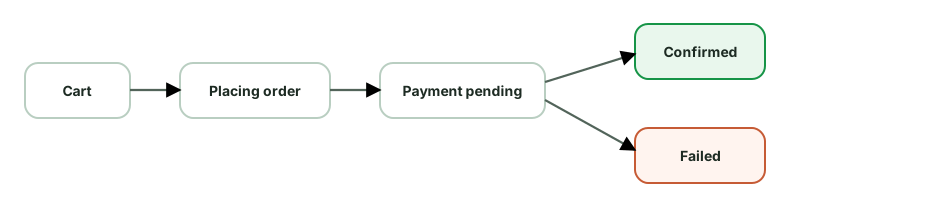
Payment security:
Reliability & UX:
Other concerns: cart persistence across devices (synced), address validation, retry on transient failures (idempotent), clear error messaging (declined vs network), analytics on funnel drop-off.
Trade-offs to name: optimistic confirmation vs waiting for server (UX vs correctness - here correctness wins), polling vs push for async payment status, how long to retain in-progress order state.
Robust retry logic distinguishes what to retry, how to space attempts, and when to stop.
Classify the error first:
IOException, 5xx, 429) → retry.CancellationException → never retry; rethrow.Exponential backoff with jitter:
suspend fun <T> retry(maxAttempts: Int = 4, base: Long = 500, block: suspend () -> T): T {
var attempt = 0
while (true) {
try { return block() }
catch (e: IOException) {
if (++attempt >= maxAttempts) throw e
val delayMs = base * (1L shl (attempt - 1)) // 500, 1000, 2000…
val jitter = Random.nextLong(0, delayMs / 2) // avoid thundering herd
delay(delayMs + jitter)
}
}
}Retry-After header on 429/503.Idempotency:
Circuit breaker (for a repeatedly failing dependency):
Surfacing to the user:
Trade-offs to name: retry count/backoff (success rate vs battery/data/latency), at-least-once + idempotency (reliability vs server complexity), circuit breaker (protecting the backend & battery vs delayed recovery), aggressive vs conservative timeouts.
This tests reliability under flaky networks: large transfers, resume after interruption, progress, and background continuation.
Requirements: upload/download large files, survive app kill & network drops, resume (not restart), show progress, retry, respect Wi-Fi/metered preferences.
Resumable transfers - the core:
Content-Range.Range requests (Range: bytes=1024-) to resume from the last byte written to disk.Background execution & reliability:
setForeground expedited work) for large active transfers so the OS doesn’t kill them and the user sees progress.Progress & UX:
setProgress / a Flow → notification + in-app UI.Other concerns:
Trade-offs to name: chunk size (more chunks = more resumable granularity but more overhead), concurrency (speed vs radio/battery), Wi-Fi-only (reliability/cost vs immediacy), foreground service (survivability vs a persistent notification).
Images dominate memory and bandwidth in feed/gallery apps, so the pipeline is a frequent deep-dive. In practice you’d use Coil (Compose) or Glide - and explaining what they do is the answer.
The pipeline stages:

Caching (multi-level):
LruCache of decoded bitmaps keyed by URL+size. Instant re-display; bounded by a fraction of app memory.Decoding & memory safety (critical):
inSampleSize/Coil’s size resolution.RGB_565 when alpha isn’t needed halves memory; hardware bitmaps keep pixels off-heap).Scrolling performance (lists):
Network/quality:
Cache-Control.Other: respect Data Saver (lower quality on cellular), bound caches to storage, clear on logout if private.
Trade-offs to name: memory cache size (instant re-display vs OOM risk), prefetch distance (smoothness vs data/battery/memory), quality/resolution (sharpness vs bandwidth), downsampling (memory vs detail).
Requirements: track the user’s location, show nearby drivers/the trip in real time, update the server with location, work with the screen off, all while not draining the battery.
Location acquisition:
HIGH_ACCURACY during an active trip, BALANCED_POWER while browsing.Background & foreground:
foregroundServiceType="location" and a persistent notification - required for background location and prevents the OS killing it.ACCESS_BACKGROUND_LOCATION) requested separately and justified.Real-time updates:
Map & rendering:
Offline & resilience:
Trade-offs to name: accuracy/frequency vs battery (the big one - HIGH_ACCURACY + 1s updates kills the battery), batching uploads (efficiency vs freshness), foreground service (survivability + permission cost vs a persistent notification), marker interpolation (smoothness vs CPU).
Requirements: stream audio with instant playback, gapless transitions, prefetch the next track, background playback, offline downloads, lock-screen controls.
Playback engine:
MediaSessionService (Media3) so playback runs as a foreground service that survives backgrounding, with MediaSession for lock-screen/notification/Bluetooth/Android Auto controls.Streaming & buffering:
Offline downloads (the key feature):
Range, retry).Data layer:
UX & system integration:
Other concerns: caching recently played for instant replay, battery (efficient codec, screen-off playback), analytics (play/skip/completion), scrobbling offline events to sync later.
Trade-offs to name: prefetch/buffer (instant playback & gapless vs data/battery), download quality (size vs fidelity), cache size (instant replay vs storage), Wi-Fi-only downloads (cost vs availability).
A robust networking layer is built on Retrofit + OkHttp + a serializer, with cross-cutting concerns handled by interceptors.
The stack:
suspend fun getUser(): User), turns HTTP into Kotlin functions.Interceptors do the cross-cutting work (chain-of-responsibility / decorator pattern):
OkHttpClient.Builder()
.addInterceptor(AuthInterceptor(tokenProvider)) // add auth header
.addInterceptor(HttpLoggingInterceptor()) // logging (debug only)
.addInterceptor(BoundedRetryInterceptor()) // only safe transient requests
.addNetworkInterceptor(CacheControlInterceptor()) // tune caching
.authenticator(TokenAuthenticator(refresher)) // 401 → refresh token & retry
.certificatePinner(pinner) // pin certs
.connectTimeout(15, SECONDS).build()Key concerns to cover:
Authenticator transparently refreshes the access token on 401 and retries; serialize concurrent refreshes (mutex) so you refresh once.IOException/timeouts to typed domain results at the repository boundary; expose retry/error to the UI.Cache-Control/ETag; offline-first via Room.REST vs GraphQL - Retrofit for REST; Apollo for GraphQL (one query fetches exactly what the screen needs, reducing over/under-fetching). Mention based on the API.
Requirements: browse a feed of articles, read full content, read offline, sync read/bookmark state, images, periodic refresh.
Offline-first data layer (the centerpiece):
Flows, so the feed and saved articles render instantly and work offline.articles(id, title, summary, body, imageUrl, publishedAt, isRead, isBookmarked, cachedAt).Sync strategy:
Read & bookmark state:
Pagination: cursor-based, load older on scroll, RemoteMediator to page from Room.
Images: Coil with disk cache; prefetch thumbnails with the feed and the hero image for prefetched articles; downsample to view size.
UX: “saved for offline” indicator, last-updated time, pull-to-refresh, graceful offline banner.
Other concerns: cache eviction (cap stored articles / TTL cleanup of old cached bodies to bound storage), content formatting (sanitized HTML/markdown rendering), analytics (reads, dwell time, batched).
Trade-offs to name: how much to prefetch for offline (readability vs storage/data), refresh frequency (freshness vs battery/data), cache retention (offline availability vs storage), eager body prefetch vs on-demand.
You can’t fix what you can’t see, and you don’t control users’ devices - so observability is essential.
Crash & error reporting:
mapping.txt so obfuscated stacks are deobfuscated - without it, production traces are unreadable.Stability metrics:
Performance monitoring:
JankStats, FrameMetrics), network latency, screen-load times.reportFullyDrawn, custom spans).Analytics & business events - funnels, feature adoption, drop-off (batched pipeline; see analytics design).
Logging:
Release safety:
Privacy: consent, no PII in logs/analytics, respect opt-out and platform policies.
Trade-offs to name: logging verbosity (diagnosability vs noise/PII/size), sampling performance traces (cost vs fidelity), rollout speed (velocity vs risk).
This problem is really about sync and conflict resolution - the interviewer will push hard there.
Requirements: create/edit/delete notes offline, sync across devices, handle conflicts (edited on two devices), eventual consistency.
Local model (source of truth = local DB):
notes(id, content, updatedAt, version, syncStatus, isDeleted)
syncStatus: SYNCED | PENDING | CONFLICTisDeleted) so deletions propagate (you can’t sync the absence of a row reliably).Sync engine:
PENDING changes. Avoids re-downloading everything.PENDING), sync in the background.Conflict resolution:
updatedAt/version, newest wins. Risks silent data loss.version counter - detect that both sides changed since the common ancestor → a real conflict.State your choice and why: “For simple notes, LWW with a version check and a ‘conflict copy’ fallback; for collaborative editing, CRDTs.”
Other concerns: idempotent sync (replaying a push is safe), tombstones with cleanup, partial sync failure handling (per-note status), and encryption at rest if sensitive.
Trade-offs to name: LWW simplicity vs data-loss risk; delta sync efficiency vs complexity; how aggressively to sync (battery/data) vs freshness.
Pagination loads a large list in chunks. The main strategies:
Offset/limit (page-based) - ?offset=40&limit=20 (or ?page=3).
Cursor/keyset-based - ?after=<cursor>&limit=20, where the cursor encodes the last item’s stable position (e.g. createdAt + id).
Why cursor wins for feeds: social/chat/activity feeds change constantly at the head. Cursor pagination is the standard because it’s consistent during live updates - exactly the mobile reality.
Mobile client implementation (Paging 3):
PagingSource loads pages by cursor; RemoteMediator writes pages into Room for offline-first paging.cachedIn(scope) to survive config changes.Other approaches: keyset with timestamp for chat history (before=<seq>), bidirectional paging (load older and newer), and infinite scroll vs explicit “load more” as UX choices.
Trade-offs to name: cursor’s consistency vs loss of random-access/total-count; prefetch distance (smoothness vs memory/data); page size (fewer requests vs larger payloads).
Requirements: browse thousands of local + cloud photos in a fast grid, view full-res, auto-backup to cloud, work offline.
Browsing performance (huge lists):
LazyVerticalGrid with stable keys and contentType.MediaStore (local) + a Room cache of cloud photo metadata; merge and sort by date.BitmapRegionDecoder for very large images.Auto-backup (the reliability piece):
MediaStore for new photos and uploads them - constraints: Wi-Fi/unmetered + charging by default (user-configurable).Data model:
Other concerns: permissions - Android 13+ granular media permissions or the Photo Picker (no permission) if you only need user-selected photos; scoped storage (content URIs, not file paths); EXIF/orientation handling; cache eviction to bound storage; battery/data awareness.
Trade-offs to name: thumbnail cache size (scroll smoothness vs memory/OOM), prefetch depth (smoothness vs memory/battery), backup constraints (timeliness vs data/battery - Wi-Fi-only delays backup but saves the user’s plan), local thumbnail generation vs server-side variants.
Treat the network as unreliable by default - this is the defining constraint of mobile vs web. Design so the app stays usable on a flaky train-Wi-Fi connection.
Offline-first foundation:
PENDING), sync in the background; reconcile on success/failure.Queue writes, sync later:
Smart networking:
NetworkCallback (and quality, not just connected - captive portals/validated capability).UX for degraded states:
Resilience details:
Range/resumable uploads).Trade-offs to name: optimistic UI (responsiveness vs reconciling failures), aggressive retry (success vs battery/data), sync frequency (freshness vs cost), cache staleness vs availability.
Prefetching loads data/media before the user asks, so the next screen or item appears instantly. The art is predicting accurately without wasting data/battery.
Where to prefetch:
prefetchDistance does this.Making predictions smart:
Guardrails (so prefetch doesn’t backfire):
Trade-offs to name (this is the crux): instant UX vs wasted data/battery/memory. Over-prefetching a feed the user abandons burns their data plan; under-prefetching causes loading spinners. Tune prefetch depth to confidence in the prediction and the cost of being wrong, and gate it on network/battery.
Flow overview: App registers with FCM → gets a device token → sends it to your backend → backend sends messages to FCM addressed by token → FCM delivers to the device → your app shows a notification or syncs.
Client responsibilities:
1. Token management
onNewToken, upload the token to your backend (associated with the user/device). Tokens rotate (reinstall, restore, refresh) - always sync the latest.2. Message types (the key design choice):
onMessageReceived (foreground; background with caveats), giving you full control to build the notification or trigger a sync.3. Displaying & handling
NotificationCompat on the right channel (user-controlled importance); attach an immutable PendingIntent with a deep link to the relevant screen.POST_NOTIFICATIONS runtime permission (Android 13+).collapseKey).4. Reliability & priority
onMessageReceived, which has a ~10s budget).Trade-offs to name: data vs notification messages (control vs simplicity), high-priority (timeliness vs battery/throttling), push-as-signal vs push-as-payload (reliability vs latency).
All three ideas answer one simple question: how do we avoid doing the same network work too often? They save battery and data while also protecting the server.
Deduplication or coalescing: if several callers request the same resource at the same time, make one network call and share its result. A production single-flight implementation needs more than a mutable map:
Mutex or another concurrency-safe primitive.Libraries and a shared repository Flow may already provide the required
single-flight behavior. Prefer a tested abstraction over a clever map of
Deferred values.
shareIn or stateIn can coalesce collectors onto one
upstream, with lifetime controlled by its sharing policy.Caching: keep a recent result for a short time so repeated reads do not need another request. TTL means “time to live,” or how long that result is considered fresh.
Client-side rate limiting / throttling:
Semaphore / OkHttp dispatcher maxRequests) so you don’t open 50 sockets at once.Respect server rate limits:
429 Too Many Requests + Retry-After; back off rather than retry-storm.Cancellation - cancel obsolete requests (screen left, query changed via flatMapLatest) so you don’t waste a response no one needs.
Why it matters on mobile: every redundant request costs battery (radio), data, and server load, and can trigger rate limits. Dedup + coalescing + caching collapse N requests into 1.
Trade-offs to name: dedup window/cache TTL (freshness vs request savings), throttle/debounce timing (responsiveness vs request volume), concurrency cap (throughput vs resource use), aggressive coalescing (efficiency vs slight staleness).
Each mechanism trades latency, battery, and complexity differently.
Short polling - client requests every N seconds.
Long polling - request stays open until the server has data, then the client immediately re-requests.
SSE (Server-Sent Events) - a one-way server→client stream over HTTP.
WebSocket - full-duplex persistent connection.
FCM (push) - server sends a push via Google’s infrastructure.
A practical mobile approach: combine them by app state. Use a WebSocket while foregrounded for instant bidirectional updates, and FCM when backgrounded to wake/notify (since you can’t keep a socket open in the background). Plus reconnect-with-backoff and a sync-on-reconnect to fill gaps.
Decision factors: update frequency, latency requirement, direction (one-way vs two-way), foreground vs background, battery/data budget, and server complexity.
Security on the client spans storage, transport, and code.
Credentials and keys:
BiometricPrompt can authorize use of a key for sensitive local actions. It
does not make an otherwise insecure protocol safe.Transport security:
android:usesCleartextTraffic="false", network security config).Data at rest:
Code & runtime hardening:
PendingIntent immutability).Authentication:
Authenticator on 401), serialized to refresh once.Also review exported components, mutable PendingIntent use, deep-link input,
WebView bridges, backup policy, screenshots on sensitive screens, dependency
supply chain, and redaction of telemetry.
Trade-offs to name: cert pinning (MITM protection vs rotation/ops risk), encryption (security vs minor perf), root detection (security vs false positives/UX), strictness vs developer/QA friction.
Stories test media prefetching, smooth transitions, and ephemeral state.
Requirements: horizontal tray of users with stories; tap to view full-screen; auto-advance through a user’s segments; swipe to next user; images + videos; seen/unseen state; expire after 24h.
Data model:
stories(userId, segments[], expiresAt)
segment(id, type=IMAGE|VIDEO, url, duration, seenAt?)The make-or-break: prefetching for instant playback.
Playback & UX:
HorizontalPager) of users; within a user, a segment progress indicator that auto-advances on a timer (images) or on video completion.Media handling:
Lifecycle & ephemerality:
repeatOnLifecycle); resume position.Trade-offs to name: prefetch depth (instant UX vs data/battery/memory - prefetching everyone’s stories wastes data), buffer size for video, cache retention vs storage, eager vs lazy seen-sync.
The client cares about smooth playback under variable networks, not transcoding (that’s backend).
Requirements: play video, minimal buffering, adapt to changing bandwidth, scrubbing, prefetch, maybe offline downloads.
Adaptive Bitrate Streaming (ABR) - the core concept:
.m3u8 or DASH .mpd.Buffering strategy:
Performance & UX:
SurfaceView for rendering.Offline downloads: download selected quality segments to disk (ExoPlayer DownloadManager), DRM license handling, expiry; resume via Range.
Other concerns: DRM (Widevine) for protected content, CDN selection, analytics (startup time, rebuffer ratio, bitrate - key quality metrics), battery/data (Wi-Fi-only downloads, data-saver capping resolution).
Trade-offs to name: buffer size (smoothness vs wasted data), aggressive quality (sharpness vs rebuffering), prefetch (instant start vs data/battery), startup quality (fast start vs initial blurriness).
Requirements: suggestions as the user types, fast, tolerant of slow networks, no wasted requests, no stale results.
The client pipeline (this is also a coroutines/Flow question):
queryFlow
.debounce(300) // wait for a typing pause
.filter { it.length >= 2 } // skip tiny queries
.distinctUntilChanged() // skip duplicate queries
.flatMapLatest { q -> // cancel the previous in-flight search
searchRepository.search(q)
.onStart { emit(Loading) }
.catch { emit(Error) }
}
.collect { render(it) }Why each operator:
debounce - don’t fire on every keystroke; one request per typing pause. Saves network/battery.distinctUntilChanged - type then backspace to the same text → no repeat search.flatMapLatest - cancel the stale search when a newer query arrives. Fixes the classic race: a slow response for “ja” must not overwrite results for “java”.Caching & performance:
Ranking & UX:
Backend-ish considerations (mention briefly): server-side prefix index (trie/Elasticsearch) - but the client focus is debounce, cancellation, caching, and merging local+remote.
Trade-offs to name: debounce delay (responsiveness vs request count), min query length, local vs remote suggestions (instant/offline vs coverage), cache size, prefetch popular queries (instant vs wasted work).
Accessibility needs automated checks, focused interaction tests, and manual assistive-technology testing. No single layer catches everything.
Automated checks: enable Accessibility Test Framework checks in View-based tests where appropriate, run Android lint, and inspect Compose semantics. Catch missing labels, tiny touch targets, duplicate descriptions, low contrast, and invalid traversal relationships early.
UI behavior tests: find controls by role, label, text, or content description rather than visual coordinates. Assert important semantics such as selected, disabled, heading, state description, and custom actions. Test large font scale, right-to-left layout, keyboard or switch navigation, and dynamic announcements.
Manual checks: complete critical flows with TalkBack and keyboard or switch access. Check focus order, whether focus is lost after navigation or updates, whether errors are announced, and whether gestures have accessible alternatives.
Use testTag for test plumbing only when no user-facing semantic exists. A test
that can find a button only through a private tag may pass while a screen reader
cannot identify it.
Include accessibility in component APIs and design-system tests. It is much cheaper to make one shared button correct than to repair the same issue across every feature.
Optimize for fast, trustworthy feedback first, then broader confidence.
On every pull request: run formatting, static analysis, compilation, and local tests for affected modules. Add component or feature tests for changed boundaries. Cache dependencies and build outputs carefully, and shard large test sets using historical timing rather than file count.
Before merge: run a small emulator matrix and critical feature flows. Use a known device image, disable animations where the test does not cover them, keep fixtures isolated, and publish logs, screenshots, video, and test reports on failure.
After merge or nightly: run application journeys, migration tests, broader API levels and form factors, accessibility checks, screenshots, and performance benchmarks. Reserve the widest device-farm matrix for release candidates.
Track suite health as a product:
Retries can expose whether a failure is flaky, but a green retry must not erase the signal. Fix or quarantine the test with a deadline. Avoid a single giant end-to-end stage that blocks every change for an hour. A test suite that teams stop trusting has almost no protective value.
Coverage answers which code executed, not whether the assertions proved the right behavior. A test can execute every line and assert nothing useful.
Use coverage as a diagnostic tool:
Avoid treating one repository-wide percentage as a target. It encourages tests for easy lines, discourages refactoring, and says little about database schemas, navigation graphs, resources, manifests, accessibility, or device behavior.
Branch coverage is often more informative than line coverage for state transitions and error handling. Mutation testing goes further by changing conditions or values and checking whether tests fail. Surviving mutations can reveal weak assertions, but mutation runs are expensive and should focus on critical pure logic.
A strong answer pairs modest coverage visibility with risk-based test design, escaped-defect analysis, flake rate, and feedback time. The goal is confidence and useful failures, not a decorative number.
A flaky test passes and fails without a relevant code change. Common causes are real time, uncontrolled dispatchers, shared state, network calls, animations, device differences, and assertions that run before the UI or background work is idle.
Start by reproducing the failure repeatedly and recording the seed, device, and logs. Then remove the uncontrolled dependency:
delay or Thread.sleep.Retries may reduce CI noise, but they do not fix the test. Quarantine can be a short-term containment step only when the failure has an owner and a deadline.
Use the production graph for wiring, but replace external boundaries with deterministic test implementations.
For Hilt instrumented tests:
@HiltAndroidTest.HiltAndroidRule and call inject() after any rule that prepares the
Activity or Compose host.@TestInstallIn when the fake should be
shared by many tests.@UninstallModules for a one-off replacement, or @BindValue for a fake
owned by one test class.@Module
@TestInstallIn(
components = [SingletonComponent::class],
replaces = [NetworkModule::class],
)
object FakeNetworkModule {
@Provides @Singleton
fun api(): UserApi = FakeUserApi()
}Replace the narrowest boundary that gives the test control. A UI integration test may use the real ViewModel, repository, Room database, and navigation while replacing only the remote API and clock. Replacing every class with a mock proves very little about the graph.
Watch scope and state leakage. A singleton fake is shared for the component’s lifetime, so reset it between tests or provide a fresh graph. Also keep local ViewModel and use-case tests independent of Hilt. DI-framework tests are useful for graph integration, not for every branch of business logic.
Use two complementary test levels.
Unit-test policy and mapping with a fake API. This is where you cover retry decisions, DTO-to-domain mapping, cache behavior, and error classification.
Contract-test the HTTP client against a local server such as OkHttp
MockWebServer. It exercises the real Retrofit service, converter, headers,
interceptors, request body, and response parsing without depending on the
internet or a shared test environment.
@Test fun sendsCursorAndParsesNextPage() = runTest {
server.enqueue(MockResponse().setBody(
"""{"items":[{"id":"42"}],"nextCursor":"abc"}"""
))
val page = api.feed(cursor = "old")
val request = server.takeRequest()
assertEquals("/feed?cursor=old", request.path)
assertEquals("42", page.items.single().id)
assertEquals("abc", page.nextCursor)
}High-value cases include malformed JSON, missing optional fields, unknown enum values, empty bodies, non-2xx errors, timeouts, cancellation, authentication headers, and error-body parsing. Keep JSON fixtures small and readable, and add a regression fixture whenever a real backend response breaks the app.
Mocks that return already-parsed DTOs cannot catch a wrong field name, converter configuration, or interceptor bug. A local HTTP test can. It still does not prove that the deployed backend honors the contract, so mature teams also validate an OpenAPI or GraphQL schema in CI and run a small number of staging smoke tests.
Local tests run on the JVM on your development machine. They are fast and work well for business logic, mappers, reducers, and ViewModels whose Android dependencies have been kept behind interfaces.
Instrumented tests run on an Android device or emulator. Use them when the behavior depends on the framework, such as navigation, permissions, resources, Room integration, or a complete UI flow. They provide more realism but are slower and need more setup.
Robolectric sits between the two: it runs Android-like behavior on the JVM. It can be useful, but it is not a replacement for every device test.
A good default is to keep most tests local, add integration tests at important boundaries, and reserve device tests for behavior that genuinely requires Android.
Test navigation at three seams instead of asserting every internal call.
Destination UI: render the screen with state and callbacks. Click the UI and
assert that the navigation callback receives the correct typed ID or route. The
screen test should not need a real NavController.
Graph integration: attach a test navigation controller to the graph, perform an action, and assert the current destination plus decoded arguments. Cover back-stack behavior, nested graphs, saved state, and invalid or missing input.
Deep-link entry: launch the public URI through the actual Activity or navigation graph. Verify the destination, authentication redirect, argument validation, and back behavior. Include a cold start and an already-running app.
Prefer typed routes or a small navigator interface over building route strings throughout the UI. That makes encoding and argument validation testable in one place.
Do not stop at “the destination ID changed.” A useful test also proves that the destination received the right data and that Up or Back returns the user to the expected place. Use a device-level test when App Links verification, another app, or system intent resolution is part of the behavior.
Performance tests need a measurable user journey, a stable environment, and a release-like build. Timing a debug build inside a unit test is not useful.
Use Macrobenchmark from a separate test module for whole-app journeys such as cold startup, opening a heavy screen, or scrolling a feed. Measure startup timing, frame timing, and traces while driving the app as a user would. Test cold, warm, or hot startup deliberately rather than mixing them.
Use Microbenchmark for a small hot code path such as parsing, layout logic,
or a data transformation. It handles warmup and repeated measurement more
carefully than measureTimeMillis.
Good practice:
Baseline Profiles are an optimization, not the measurement itself. Generate or ship them for critical journeys, then use Macrobenchmark to verify their effect. CI can run a smaller regression set regularly, while broader device coverage runs nightly or before release. Production Android vitals and field telemetry remain necessary because a lab cannot represent every device.
Test the repository as a unit by giving it controlled dependencies: a fake API, a fake or in-memory data source, and a test dispatcher. Verify behavior rather than implementation details.
Useful cases include:
Add a smaller Room integration test with an in-memory database when queries, transactions, migrations, or conflict rules are important. There is usually no value in mocking every DAO call and then asserting that each mock was invoked. That only repeats the implementation in the test.
DAO tests verify your real SQL, entities, converters, transactions, and conflict rules. Use an in-memory Room database on an Android device or emulator, give each test a fresh database, and close it afterward.
@RunWith(AndroidJUnit4::class)
class UserDaoTest {
private lateinit var db: AppDatabase
@Before fun createDb() {
db = Room.inMemoryDatabaseBuilder(
ApplicationProvider.getApplicationContext(),
AppDatabase::class.java,
).build()
}
@After fun closeDb() = db.close()
@Test fun activeUsers_areOrderedByName() = runTest {
db.userDao().insertAll(zara, inactiveBen, ada)
assertEquals(listOf(ada, zara), db.userDao().activeUsers().first())
}
}Test query behavior that can actually break: empty results, ordering, joins, nulls, uniqueness, replacement rules, transactions, and Flow invalidation. Do not mock a DAO when the purpose is to verify SQL.
Migration tests protect user data across app updates:
MigrationTestHelper to create a database at an old version.Test each individual migration and the full path from every supported starting version. Schema validation alone is not enough when data must be backfilled, split, merged, or normalized. Never use destructive migration for user-owned data unless losing it is an explicit product decision.
Screenshot tests render a component or screen and compare the pixels with an approved baseline. They catch visual regressions that semantics assertions miss: spacing, clipping, colors, typography, icon alignment, and unexpected wrapping.
They are most useful for a design system and a deliberate state matrix:
Host-side tools can render quickly in CI, while device screenshots provide more platform fidelity at greater cost. Whichever tool you choose, pin fonts, locale, density, theme, animation state, clock, and random data. Compare only after the UI is idle.
Do not record a baseline automatically after every failure. A human should review the diff and decide whether it is an intentional design change. Store baselines in version control or a reviewable artifact system, and make the CI failure show expected, actual, and difference images.
Screenshot tests complement semantics tests. They can prove that a button looks right, but not that it has an accessible role, can be clicked, or triggers the correct behavior.
Rotation and process death are different failures and need different tests.
Configuration change: ActivityScenario.recreate() or host recreation can
verify that the ViewModel survives, the UI is rebuilt, collectors do not
duplicate, and transient UI state behaves as intended. This does not simulate
process death because the same process and retained state can remain available.
Saveable Compose state: StateRestorationTester can emulate saving and
restoring the hierarchy around a composable. Verify values backed by
rememberSaveable and custom Saver implementations.
ViewModel restoration: construct the ViewModel with a SavedStateHandle,
drive changes, capture the keys that are meant to survive, then create a new
ViewModel from restored values. Keep the saved data small and serializable.
Real process recreation: for a critical flow, use an instrumented or device-level test that backgrounds the app, kills its process, and relaunches through the supported entry point. Assert from user-visible state or durable storage, not from object identity.
Test the product contract:
The key interview distinction is that a ViewModel handles configuration
changes, SavedStateHandle handles small restorable state, and persistent
storage handles durable user data.
Choose the smallest environment that can prove the behavior.
| Tool or environment | Best fit | What it does not prove |
|---|---|---|
| Local JUnit test | Pure Kotlin logic, reducers, ViewModels, use cases, mappers | Android framework and real-device behavior |
| Robolectric | Framework-dependent code that benefits from fast JVM execution | Every device, rendering, and platform integration detail |
| Compose UI test | Semantics, actions, state rendering, and Compose navigation flows | Visual pixel accuracy unless paired with screenshots |
| Espresso | View-based UI inside your app process | Interactions with other apps or system UI |
| UI Automator | Permissions, notifications, settings, app-to-app, and full device flows | Fast, isolated feedback |
This is not a ladder where every unit test must be repeated at every level. A date formatter needs a local test. A Room query needs a database integration test. A permission flow may require UI Automator because the permission dialog belongs to the system.
A healthy suite uses fast tests for most behavioral combinations and a smaller number of device tests for framework integration and critical journeys. If a test requires a device only because the production class directly creates an Android dependency, first ask whether the design can expose a smaller seam.
Separate the worker’s business operation from WorkManager scheduling. A thin
CoroutineWorker should parse input, call an injected use case, and translate
the result to Result.success(), retry(), or failure(). Unit-test the use
case normally, then test the worker contract with work-testing.
class SyncWorker(
appContext: Context,
params: WorkerParameters,
private val sync: SyncPendingChanges,
) : CoroutineWorker(appContext, params) {
override suspend fun doWork(): Result = when (sync()) {
SyncResult.Done -> Result.success()
SyncResult.TransientFailure -> Result.retry()
SyncResult.PermanentFailure -> Result.failure()
}
}Use TestListenableWorkerBuilder or the appropriate worker test builder to run
the implementation with controlled inputs and dependencies. Verify output data
and each result class. For scheduling integration, initialize WorkManager in
test mode with WorkManagerTestInitHelper and use its TestDriver to mark
constraints, initial delays, or periodic intervals as satisfied. Do not wait for
real time or network state.
Important cases include duplicate execution, cancellation, retryable versus permanent errors, input validation, backoff policy, unique-work behavior, and process restart. Workers may run more than once, so the underlying operation must be idempotent. A test that runs the same worker twice is often more valuable than another happy-path assertion.