UI state and UI models
Model what a screen can show before wiring network calls or rendering components.
A screen is easiest to build when you can describe its state before writing widgets or firing network calls. Avoid several unrelated flags such as isLoading, hasError, and showContent. Those flags can contradict one another: is the screen loading and showing content? Is the error blocking, or a small refresh warning over cached data?
UI models are the data the UI needs to render - not the Retrofit DTO, not the Room entity, not the domain object with twenty unused fields. Mapping into UI models forces you to decide what the user actually sees.
This is the last junior lesson before mid-level async and architecture work. Master it here; everything later assumes it.
Learning goals
- Replace boolean soup with explicit, valid states.
- Separate state (what is true now) from events (one-off things that must happen once).
- Design
*UiModel/*UiStatetypes the UI can render without guessing. - Place state in the right owner (composable memory, ViewModel, disk).
Make valid states explicit
The boolean trap
// Easy to create impossible combinations
data class BadFeedState(
    val isLoading: Boolean,
    val items: List<Item>?,
    val error: String?,
)
// isLoading=true, error!=null, items!=null - what do we show?
Sealed screen state
sealed interface FeedUiState {
    data object Loading : FeedUiState

    data class Content(
        val items: List<FeedItemUi>,
        val isRefreshing: Boolean = false,
    ) : FeedUiState

    data class Error(
        val message: String,
        val canRetry: Boolean,
    ) : FeedUiState
}
Now the renderer is exhaustive:
@Composable
fun FeedScreen(state: FeedUiState, onRetry: () -> Unit) {
    when (state) {
        FeedUiState.Loading -> FullScreenSpinner()
        is FeedUiState.Content -> FeedList(
            items = state.items,
            refreshing = state.isRefreshing,
        )
        is FeedUiState.Error -> ErrorPanel(
            message = state.message,
            onRetry = onRetry.takeIf { state.canRetry },
        )
    }
}
Partial content + error
Real apps often show cached content with a non-blocking error. Model that on purpose:
data class FeedUiState(
    val items: List<FeedItemUi>,
    val load: LoadState,
)

sealed interface LoadState {
    data object Idle : LoadState
    data object Loading : LoadState
    data class Failed(val message: String) : LoadState
}
There is no single correct shape for every screen. The rule is: impossible combinations should be unrepresentable (or at least obvious).
UI models vs other models
| Layer | Example | Purpose |
|---|---|---|
| Network DTO | ArticleDto | Serialize JSON |
| Entity | ArticleEntity | Room schema |
| Domain | Article | Business rules |
| UI model | ArticleUi | Ready to bind |
data class ArticleDto(
    val id: String,
    val title: String,
    val published_at: String,
    val body_markdown: String,
    val author_id: String,
)

data class ArticleUi(
    val id: String,
    val title: String,
    val publishedLabel: String, // already formatted for the user
    val preview: String,        // truncated plain text
)

fun ArticleDto.toUi(clock: Clock, locale: Locale): ArticleUi =
    ArticleUi(
        id = id,
        title = title,
        publishedLabel = formatRelative(published_at, clock, locale),
        preview = body_markdown.toPlainText().take(140),
    )
Why map?
- Formatting belongs once, testable, not scattered in XML binders.
- Backend renames / extra fields do not thrash the UI.
- The UI never needs
author_idif it does not display it. - You can add UI-only fields (
isSelected,showDivider) without polluting network models.
State versus event
State
State is durable for as long as the screen cares: the current text of a field, the list contents, whether a dialog flag is on.
Drive UI from state. Recomposition / onCreate rebinding should rediscover the truth from state.
Events (one-off effects)
Events happen once: navigate to detail, show a Snackbar, clear a text field after submit, play a haptics tick.
If you put “show snackbar” as a boolean in state and never clear it carefully, rotation or recomposition reshows it. Prefer a channel / SharedFlow of events, or consume-once designs:
sealed interface FeedEvent {
    data class ShowMessage(val text: String) : FeedEvent
    data class OpenArticle(val id: String) : FeedEvent
}

// ViewModel
private val _events = Channel<FeedEvent>(Channel.BUFFERED)
val events = _events.receiveAsFlow()

fun onArticleClick(id: String) {
    viewModelScope.launch { _events.send(FeedEvent.OpenArticle(id)) }
}

// UI
LaunchedEffect(Unit) {
    viewModel.events.collect { event ->
        when (event) {
            is FeedEvent.ShowMessage -> snackbarHost.showSnackbar(event.text)
            is FeedEvent.OpenArticle -> navController.navigate("article/${event.id}")
        }
    }
}
Interview phrase: state is what to render; events are what to do once.
Unidirectional data flow (junior version)
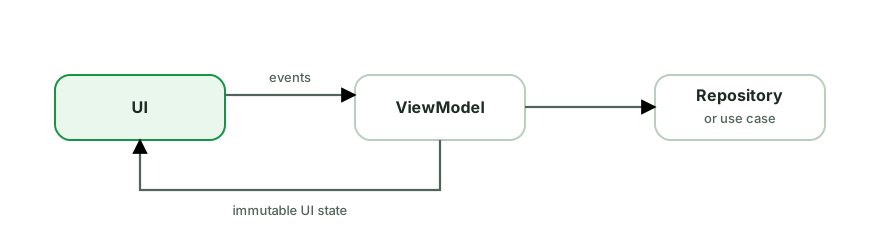
class LoginViewModel : ViewModel() {
    private val _state = MutableStateFlow(LoginUiState())
    val state = _state.asStateFlow()

    fun onEmailChange(value: String) {
        _state.update { it.copy(email = value, emailError = null) }
    }

    fun onSubmit() {
        val current = _state.value
        if (!current.email.contains("@")) {
            _state.update { it.copy(emailError = "Enter a valid email") }
            return
        }
        _state.update { it.copy(isSubmitting = true, emailError = null) }
        // launch auth...
    }
}

data class LoginUiState(
    val email: String = "",
    val password: String = "",
    val emailError: String? = null,
    val isSubmitting: Boolean = false,
)
The UI does not decide validation policy; it displays state and emits intents (onEmailChange, onSubmit).
Where state lives
| Kind of state | Typical home | Survives rotation? | Survives process death? |
|---|---|---|---|
| Animating dropdown open | Composable remember | No | No |
| Search query in text field | rememberSaveable or ViewModel | Yes / Yes | With saveable / handle |
| Loaded feed list | ViewModel (and ideally disk cache) | Yes | Only if persisted |
| Auth session | Encrypted storage / DataStore | Yes | Yes |
| Scroll position | rememberSaveable / SavedStateHandle | Yes | With save |
// Ephemeral UI chrome
var expanded by remember { mutableStateOf(false) }

// Cheap UI that should survive rotation
var query by rememberSaveable { mutableStateOf("") }

// Screen business state
val state by viewModel.uiState.collectAsStateWithLifecycle()
Rule of thumb: if the user would be angry that it disappeared after a phone call killed the process, it is not only remember.
Rendering is a pure-ish function of state
Aim for:
UI = f(state)Side effects (navigation, toasts, analytics) live in effect handlers keyed correctly, not sprinkled inside list item composition without control.
In View-based UI, the same idea is bind(state):
private fun bind(state: FeedUiState) {
    when (state) {
        FeedUiState.Loading -> {
            binding.spinner.isVisible = true
            binding.list.isVisible = false
            binding.error.isVisible = false
        }
        is FeedUiState.Content -> {
            binding.spinner.isVisible = false
            binding.error.isVisible = false
            binding.list.isVisible = true
            adapter.submitList(state.items)
        }
        is FeedUiState.Error -> {
            binding.spinner.isVisible = false
            binding.list.isVisible = false
            binding.error.isVisible = true
            binding.error.text = state.message
        }
    }
}
Idempotent binding means recreation after rotation just calls bind again.
Empty, loading, error: product decisions
Technical modeling forces product questions:
- Do we show a skeleton or a spinner?
- If cache exists, do we show it while refreshing?
- Is error retryable?
- Is empty a success (zero items) or a failure (could not load)?
sealed interface SearchUiState {
    data object Idle : SearchUiState
    data object Loading : SearchUiState
    data class Results(val items: List<ItemUi>) : SearchUiState
    data object Empty : SearchUiState
    data class Error(val message: String) : SearchUiState
}
Empty vs Results(emptyList()) is a product choice - pick one convention and stick to it.
Common pitfalls
- DTO-in-the-UI - formatting dates in three adapters differently.
- Events as uncleared state - Snackbar storms after rotation.
- God state objects shared across unrelated screens.
- Mutating lists in place inside StateFlow without new emissions (
list.addon the same instance). - Loading flags that never reset on error paths.
// Broken: same list instance, collectors may not see change
val list = _state.value.items as MutableList
list.add(newItem)

// Better: immutable update
_state.update { it.copy(items = it.items + newItem) }
How interviewers probe this
- “How do you model loading / content / error?”
- “Difference between UI state and one-off events?”
- “Why not pass the Retrofit model to the RecyclerView?”
- “Where does search query state live?”
- Whiteboard a checkout screen’s states including payment failure with retry.
Strong answers show exhaustive states, mapping boundaries, and lifecycle survival awareness.
Practice checklist
- Redesign a screen you know that uses three booleans into a sealed hierarchy.
- Write
toUi()mappers with unit tests for date formatting and truncation. - Implement a one-off navigation event without a sticky boolean.
- List every piece of state on a settings screen and place each in remember / ViewModel / disk.
What you should be able to explain
- Why invalid states should be hard to represent.
- UI model vs DTO vs entity.
- State vs event, with a Snackbar example.
- Layered state placement across process death.
Next: Context, resources, and the Android process, where UI state meets configuration, platform services, and object lifetimes.
Discussion
Comments are powered by GitHub Discussions. Sign in with GitHub to join in.