Lifecycle, configuration change, and process death
Know what Android preserves, what it recreates, and where important state belongs.
Lifecycle is the contract between your UI and Android. The system can pause your app when another window appears, stop it when it is no longer visible, destroy an Activity for a configuration change, or kill the whole process to reclaim memory. Correct Android code treats these as normal events, not exceptional failures.
Juniors who only memorize callback names struggle. Juniors who ask “what ownership changes here?” and “what state still exists?” do well in interviews and in production.
Learning goals
- Trace Activity lifecycle callbacks and what each implies for resources and UI.
- Distinguish configuration change from process death.
- Place state in the right store: UI widget, ViewModel, SavedStateHandle, or durable storage.
- Collect flows and start work in a lifecycle-aware way (
repeatOnLifecycle,WhenStarted, etc.).
The core Activity callbacks
| Callback | Rough meaning | Typical work |
|---|---|---|
onCreate | Instance created | Inflate UI, obtain ViewModels, restore cheap UI state |
onStart | Visible (maybe not interactive) | Register visible-only listeners |
onResume | Foreground, interactive | Resume camera preview, active animations |
onPause | Losing interactivity | Pause exclusive resources; not guaranteed last call before kill |
onStop | No longer visible | Stop heavy visible-only work |
onDestroy | Instance going away | Release instance resources; not reliable for critical persistence |
onSaveInstanceState | System may kill process later | Save small UI state to the bundle |
override fun onCreate(savedInstanceState: Bundle?) {
    super.onCreate(savedInstanceState)
    // savedInstanceState non-null ⇒ recreation after config change or process death
}
Mental model
Do not memorize as trivia. Ask:
- Is the UI visible?
- Is the UI interactive?
- Is this instance about to die while the process might live?
- Might the process die without more callbacks?
A camera preview belongs to a visible, interactive screen. A database write that must not be lost does not belong solely in onDestroy.
Configuration change vs process death
These are the two recreation stories interviewers love to mix up.
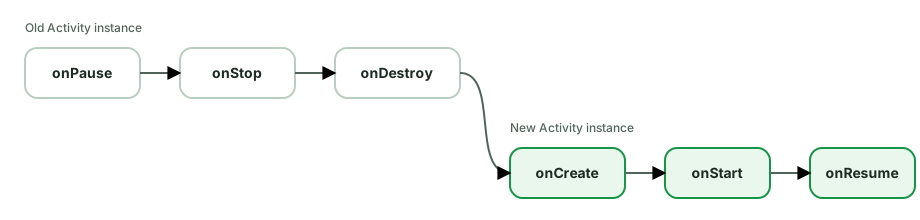
Configuration change (e.g. rotation, dark mode, size class - depending on manifest)
- System calls
onSaveInstanceState(often). - Old Activity / Fragment views are destroyed.
- New Activity instance is created;
onCreate(savedInstanceState)runs. - ViewModel instances scoped to the Activity/Fragment survive (same
ViewModelStore). - Views are brand new and must rebind from state.
class CounterViewModel : ViewModel() {
    var count: Int = 0  // survives rotation
}

// Activity field does NOT survive rotation
// private var count = 0
Process death
The system kills your process while the app is in the background (memory pressure). Later the user returns:
- Process starts cold.
- Activity is recreated.
- ViewModels are new (in-memory state is gone).
savedInstanceState/SavedStateHandlemay restore small state you saved.- Everything else must reload from disk / network.
class FormViewModel(
    private val savedStateHandle: SavedStateHandle,
) : ViewModel() {
    var draft: String
        get() = savedStateHandle["draft"] ?: ""
        set(value) { savedStateHandle["draft"] = value }
}
SavedStateHandle is backed by the same saved-state infrastructure as onSaveInstanceState. It is for small, parcelable data (ids, query strings, scroll indices) - not full image bitmaps or large lists. Large data belongs in Room / files / DataStore.
Comparison table
| Concern | Config change | Process death |
|---|---|---|
| New Activity instance | Yes | Yes |
| ViewModel in-memory fields | Survive | Lost |
SavedStateHandle / bundle | Usually available | Restored if saved |
| Room / DataStore | Survive (disk) | Survive (disk) |
| In-flight network without persistence | Often cancelled / must restart | Lost |
ViewModel and lifecycle
ViewModel is designed to outlive configuration changes of its scope (Activity or Navigation back-stack entry). It is cleared in onCleared() when the scope is finished for good (user left the screen / back stack popped).
class FeedViewModel(
    private val repo: FeedRepository,
) : ViewModel() {

    private val _state = MutableStateFlow<FeedUiState>(FeedUiState.Loading)
    val state: StateFlow<FeedUiState> = _state.asStateFlow()

    init {
        refresh()
    }

    fun refresh() {
        viewModelScope.launch {
            _state.value = FeedUiState.Loading
            _state.value = runCatching { repo.load() }
                .fold(
                    onSuccess = { FeedUiState.Content(it) },
                    onFailure = { FeedUiState.Error(canRetry = true) },
                )
        }
    }
}
viewModelScope cancels when the ViewModel is cleared - correct ownership for “work that produces screen state.”
Lifecycle-aware collection
Why not collect forever in onCreate?
A hot StateFlow collector that updates views while the UI is stopped wastes work and can crash if it touches views incorrectly. Lifecycle-aware APIs pause or cancel work when the UI is not active.
repeatOnLifecycle (recommended for Flow)
lifecycleScope.launch {
    repeatOnLifecycle(Lifecycle.State.STARTED) {
        viewModel.state.collect { state ->
            render(state)
        }
    }
}
When lifecycle falls below STARTED, the block cancels; when it returns, the block restarts. For Fragments, use viewLifecycleOwner.lifecycleScope + viewLifecycleOwner.repeatOnLifecycle.
LiveData
LiveData is lifecycle-aware by default when observed with a LifecycleOwner:
viewModel.state.observe(this) { render(it) }Compose
val state by viewModel.state.collectAsStateWithLifecycle()collectAsStateWithLifecycle (lifecycle-runtime-compose) mirrors the same idea: collection respects the lifecycle, not just composition.
onSaveInstanceState limits
override fun onSaveInstanceState(outState: Bundle) {
    super.onSaveInstanceState(outState)
    outState.putString("query", binding.search.text.toString())
}
Constraints:
- Must be fast (main thread, system may be under pressure).
- Must stay small (TransactionTooLargeException risk with huge bundles).
- Is for transient UI state, not your entire offline database.
LifecycleOwner and LifecycleObserver
Components can observe lifecycle without subclassing Activities:
class PlayerController(
    private val player: Player,
) : DefaultLifecycleObserver {
    override fun onStart(owner: LifecycleOwner) = player.play()
    override fun onStop(owner: LifecycleOwner) = player.pause()
}

// in Activity/Fragment
lifecycle.addObserver(PlayerController(player))
This is the pattern behind lifecycle-aware libraries (and a good interview talking point: composition over god-Activity).
Foreground, background, and “my onDestroy didn’t run”
If the process is killed for memory:
- You might not see
onDestroy. - You might only have had
onStop+ earlieronSaveInstanceState. - Critical writes must have already happened (or be safe to redo with idempotency).
Never rely on onDestroy as the only place to persist user data.
Common pitfalls
- Confusing rotation with process death - ViewModel “magically” works for one but not the other.
- Saving megabytes in the Bundle - crashes / silent truncation issues.
- Starting work in
onResumewithout stopping inonPause/onStop- duplicate listeners, battery drain. - Updating UI after
onDestroyView/ destroyed lifecycle. - Assuming
initin ViewModel runs once per app - it runs once per ViewModel instance; process death creates a new one.
How interviewers probe this
- Walk through rotation with a form draft in different storage locations.
- “Does ViewModel survive process death?” - No (in-memory); SavedStateHandle can restore small keys.
- “Where do you put scroll position? auth token? downloaded images?” - different answers for each.
- “Why
repeatOnLifecycle?” - cancel UI collection when stopped; restart when started. - Debug a bug: “counter resets sometimes but not on rotation” - process death path.
Practice checklist
- Build a one-field form; store the text in (a) Activity field, (b) ViewModel, (c) SavedStateHandle. Force rotation and process death (
Developer options → Don’t keep activities/ kill process) and record what survives. - Collect a ticking flow with and without
repeatOnLifecycle; observe battery/log differences when backgrounded. - Draw the lifecycle timeline for: open screen → answer phone call → return → rotate → leave screen.
What you should be able to explain
- Each major callback’s ownership change in plain language.
- Config change vs process death with a state-placement matrix.
- Why ViewModel + SavedStateHandle + disk is a layered strategy, not three synonyms.
- Lifecycle-aware collection for LiveData, Flow, and Compose.
Next: UI state and UI models - how to describe what a screen shows so lifecycle recreation becomes rebinding, not guesswork.
Discussion
Comments are powered by GitHub Discussions. Sign in with GitHub to join in.