Storage, networking, and runtime permissions
Build a reliable data path with Room, DataStore, HTTP clients, scoped storage, and permission flows that handle denial correctly.
Most Android screens are projections of data from memory, disk, a remote service, or a device capability. The important junior-level skill is not memorizing library annotations. It is tracing where data comes from, where it becomes durable, which thread does the work, and what the UI shows when access fails.
Learning goals
- Choose Room, DataStore, files, or cache based on the shape and lifetime of data.
- Explain an HTTP request from UI action to parsed response.
- Keep disk and network work off the main thread.
- Request runtime permissions as part of a user action and handle every result.
- Distinguish private app storage, shared media, and document-provider access.
Choose storage by data shape
| Need | Typical API | Important property |
|---|---|---|
| Relational or queryable records | Room | Schema, SQL queries, transactions, migrations |
| Small preference-like values | DataStore | Asynchronous transactional updates |
| App-private byte or text files | filesDir | Removed on uninstall, private to app |
| Re-creatable temporary files | cacheDir | System may delete under storage pressure |
| User-selected document | Storage Access Framework | Access by URI grant |
| Shared photos and video | MediaStore / Photo Picker | Scoped access to shared media |
Do not use DataStore as a relational database or Room for a single theme preference. Choose the simplest store whose guarantees match the data.
Room: a typed boundary over SQLite
Room has three central pieces:
@Entity(tableName = "articles")
data class ArticleEntity(
    @PrimaryKey val id: String,
    val title: String,
    val body: String,
    val updatedAtEpochMillis: Long,
)

@Dao
interface ArticleDao {
    @Query("SELECT * FROM articles ORDER BY updatedAtEpochMillis DESC")
    fun observeAll(): Flow<List<ArticleEntity>>

    @Insert(onConflict = OnConflictStrategy.REPLACE)
    suspend fun upsertAll(items: List<ArticleEntity>)

    @Query("DELETE FROM articles")
    suspend fun deleteAll()
}

@Database(entities = [ArticleEntity::class], version = 1)
abstract class AppDatabase : RoomDatabase() {
    abstract fun articleDao(): ArticleDao
}
Room validates SQL at compile time and generates database plumbing. It does not decide your product’s conflict rules, cache freshness, or mapping boundaries.
Transactions preserve multi-step invariants
If readers must never observe a half-applied change, run the related writes in one transaction:
@Dao
interface FeedDao {
    @Transaction
    suspend fun replaceFeed(items: List<ArticleEntity>) {
        deleteAll()
        upsertAll(items)
    }
}
If insertion fails, Room rolls the transaction back rather than committing only the delete.
Schema changes need migrations
Increasing the database version without a migration causes Room to fail opening the database unless destructive migration was explicitly configured. Destructive migration loses stored data and should be a deliberate product decision, not a development shortcut carried into production.
Test migrations using exported schemas and Room migration test helpers.
DataStore for preferences and small typed state
Preferences DataStore stores key-value pairs. Proto DataStore stores a typed serialized message. Both expose data as Flow and update transactionally.
val Context.settingsDataStore by preferencesDataStore(name = "settings")

val theme: Flow<ThemeMode> = context.settingsDataStore.data
    .map { prefs ->
        when (prefs[THEME_KEY]) {
            "dark" -> ThemeMode.Dark
            "light" -> ThemeMode.Light
            else -> ThemeMode.System
        }
    }

suspend fun setTheme(mode: ThemeMode) {
    context.settingsDataStore.edit { prefs ->
        prefs[THEME_KEY] = mode.serializedName
    }
}
DataStore is asynchronous. Do not block startup with runBlocking to read it. Expose a loading or default state until the value arrives.
The network path
A typical request crosses several boundaries and returns through model mapping before it becomes UI state:
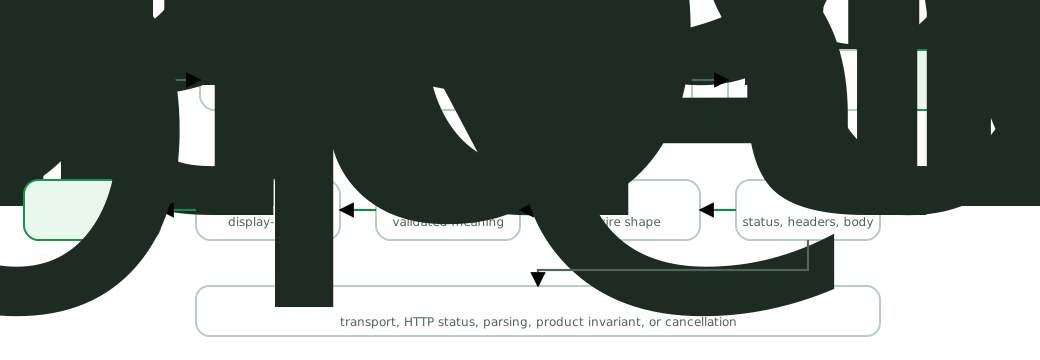
Retrofit can turn an annotated interface into calls. OkHttp performs HTTP work underneath. A serialization library maps response bytes into DTOs.
interface ArticleApi {
    @GET("v1/articles")
    suspend fun articles(
        @Query("cursor") cursor: String?,
    ): ArticlePageDto
}
A successful TCP connection is not the same as a successful product operation. Model at least these failure categories:
- DNS, connection, timeout, and TLS failure.
- HTTP non-success response such as 401, 404, 409, 429, or 500.
- Successful HTTP status with malformed or incompatible body.
- Valid response that violates a product invariant.
- Cancellation because the owner no longer needs the result.
Do not convert every exception into “No internet.” An HTTP 401 needs authentication recovery, a 409 may need conflict handling, and a parsing error is usually not fixed by retrying.
DTOs are transport shapes
Network models should reflect the wire contract, including nullable and optional fields. Map them at the data boundary so UI code does not learn API field names or timestamp formats.
@Serializable
data class ArticleDto(
    val id: String,
    val headline: String?,
    val updated_at: String,
)

fun ArticleDto.toEntity(clock: Clock): ArticleEntity = ArticleEntity(
    id = id,
    title = headline.orEmpty(),
    body = "",
    updatedAtEpochMillis = parseInstant(updated_at, clock).toEpochMilli(),
)
Decide what missing fields mean. Silently replacing every missing value with an empty string can hide a server contract problem.
Cache for a reason
A cache needs a freshness and invalidation policy:
- Time-based: accept data younger than a threshold.
- Event-based: invalidate after a mutation or account change.
- Server-validated: use ETag or last-modified conditions.
- Offline-first: display local data immediately, then synchronize.
“Cache it” is not a complete design. State where the cache lives, what its key is, when it expires, and what the UI shows while refreshing.
Private storage, shared media, and documents
App-private storage
Files in filesDir and internal database storage are private to the app under normal platform isolation. They are removed when the app is uninstalled. Cache files may disappear earlier.
Shared media
Use the system Photo Picker when the user selects images or video. It provides selected-media access without broad library permission on supported devices and has a compatibility path through AndroidX.
Use MediaStore when your app creates or manages shared media. Exact permission requirements depend on the OS version and operation.
User-selected documents
Use ACTION_OPEN_DOCUMENT, ACTION_CREATE_DOCUMENT, or the Activity Result contracts that wrap them. Treat the returned URI as the handle.
Runtime permissions are a state machine
A dangerous permission declared in the manifest may also require runtime approval. The complete flow has more than allow and deny:
- Feature unavailable because permission is not granted.
- Explain why access is needed when appropriate.
- Launch the permission request from a user-driven action.
- Handle grant.
- Handle denial without breaking the app.
- Handle permanent denial by offering settings only when the feature justifies it.
val requestCamera = registerForActivityResult(
    ActivityResultContracts.RequestPermission(),
) { granted ->
    if (granted) openCamera()
    else showCameraUnavailableState()
}
shouldShowRequestPermissionRationale() indicates whether an educational explanation may help before another request. It is not a durable “permanently denied” flag and returns false in more than one situation, including the first request.
Ask at the moment of need. A user understands a camera request after tapping “Scan document” better than during app startup.
Secrets and trust boundaries
Anything shipped in the APK can be extracted by a determined attacker. Do not embed server master secrets, private signing material, or credentials that grant broad backend access.
- Keep authoritative authorization on the server.
- Use short-lived user tokens where possible.
- Store cryptographic keys with Android Keystore when device-bound key protection is needed.
- Use TLS for network traffic.
- Redact tokens, passwords, and personal data from logs.
Encrypted local storage reduces exposure in some device-compromise and backup scenarios. It does not turn the client into a trusted authority.
Common pitfalls
- Performing disk or network I/O on the main thread.
- Exposing Room entities or network DTOs directly to every UI.
- Replacing a production database destructively because a migration is missing.
- Calling every failure “offline.”
- Treating cache entries as fresh forever.
- Requesting all permissions at startup.
- Treating
shouldShowRequestPermissionRationale()as a permanent-denial detector. - Embedding a secret in
BuildConfigand assuming obfuscation protects it.
How interviewers probe this
- “Room vs DataStore?”
- “Why use a transaction?”
- “What happens if you change a Room schema without a migration?”
- “How would you model network failures?”
- “Where should DTO-to-domain mapping happen?”
- “How does scoped storage change file access?”
- “Walk me through a permission denial flow.”
- “Can an API key be hidden in an APK?”
Practice checklist
- Build a Room-backed list that still renders after airplane mode is enabled.
- Add a tested migration that introduces a non-null column safely.
- Separate timeout, unauthorized, rate-limited, parsing, and cancellation results.
- Select an image with Photo Picker and persist only the access your feature needs.
- Test permission grant, denial, and settings-return paths.
What you should be able to explain
- Storage selection based on shape, lifetime, and query needs.
- Room transactions and migrations.
- Network failure categories and model boundaries.
- Permission flow as user-visible state.
Junior path complete. The mid-level path starts with coroutines and Flow, the tools used to connect these data sources to lifecycle-aware UI.
Discussion
Comments are powered by GitHub Discussions. Sign in with GitHub to join in.