Architecture & Patterns
MVVM/MVI, Clean Architecture, repositories, dependency injection, modularization, design patterns, and structuring an app that scales and is testable.
All done - nice work.
Architecture rounds test whether you can make a codebase easy to change, test, and operate as the product and team grow. The names of patterns matter less than ownership, data flow, boundaries, and the trade-offs behind each decision. Expect open-ended prompts, code-review discussions, and follow-up questions that remove one of your original assumptions.
A simple study path
Start with the starred questions. Learn the recommended UI and data layers, repositories, unidirectional data flow, and dependency injection. Then practise explaining one feature from user action to storage and back to rendered state. Add Clean Architecture, offline-first data, modularization, and detailed DI scopes only after that basic flow is clear.
A reliable way to answer
For any architecture prompt, cover five things in order:
- Responsibilities: What owns UI state, business rules, and data policy?
- Data flow: Where do events enter, where is state produced, and what is the single source of truth?
- Boundaries: Which details are hidden behind an interface or module?
- Failure and lifetime: What happens on process death, offline, cancellation, or partial failure?
- Proof: How will you test, measure, and evolve the design?
What gets tested
- Presentation patterns - MVC → MVP → MVVM → MVI, and why the field evolved; unidirectional data flow.
- Clean Architecture - layers, dependency direction, use cases, and when separate models or interfaces earn their cost.
- Data layer - repository pattern, single source of truth, offline-first (NetworkBoundResource), caching, Paging 3.
- Dependency injection - DI vs service locator, Hilt/Dagger vs Koin, components & scoping, assisted injection, dispatcher injection.
- Design patterns - Observer, Factory, Builder, Singleton, Strategy, Adapter/Decorator, Facade - with real Android examples.
- Modularization - by feature vs layer,
api/implsplits, inter-feature navigation, build-speed and encapsulation wins. - State & events - modeling immutable
UiState, one-off events,SavedStateHandle, error handling across layers. - Engineering judgment - SOLID, coupling and cohesion, feature flags, error boundaries, and recognizing over-engineering.
How interviewers ask
Common prompts include “walk me through this feature”, “review this ViewModel”, and comparisons such as MVVM vs MVI or Hilt vs Koin. Strong answers state assumptions, draw the dependency and data-flow directions, and explain when a simpler design is enough. A pattern without a problem is just ceremony.
Prep tip: design one feature end to end out loud, including layers, data flow, DI, failures, and tests. Finish with what you deliberately did not add.
Frequently asked. Prioritize these in your first pass.
Start here
Core ideas you should be able to explain in plain language.
Architecture foundations
What are coupling and cohesion, and why do they matter?
Two measures of code quality that good architecture optimizes in opposite directions: low coupling, high cohesion.
Coupling - how much one module depends on another. Low (loose) coupling is the goal: modules interact through small, stable interfaces, so a change in one doesn’t ripple into many others.
- Tightly coupled: a ViewModel directly instantiating
RetrofitClientandRoomDatabase- changing either breaks the ViewModel. - Loosely coupled: the ViewModel depends on a
Repositoryinterface, injected. Swap the implementation freely.
Cohesion - how focused a module is; how strongly its parts relate to a single purpose. High cohesion is the goal: a class does one well-defined job.
- Low cohesion: a
Utilsclass with networking, date formatting, and bitmap helpers thrown together. - High cohesion: a
DateFormatterthat only formats dates; aFeedRepositorythat only handles feed data.
Why they matter:
- Maintainability - loosely coupled, highly cohesive code is easier to change: edits stay local, and each class is easy to understand.
- Testability - low coupling lets you inject fakes; high cohesion means small, focused units to test.
- Reusability - focused modules are reusable; tangled ones aren’t.
How Android practices achieve them:
- DI + interfaces → low coupling (depend on abstractions).
- Single Responsibility / layering → high cohesion (each class/layer one job).
- Modularization → enforces boundaries (low coupling between features).
- UDF → the UI depends on state, not on the ViewModel’s internals.
These two are the why behind SOLID, Clean Architecture, and DI - interviewers like seeing you connect the principle to the practice.
What is the Repository pattern, and what problem does it solve?
A Repository is the public entry point to a type of application data. It coordinates data sources such as network, Room, DataStore, sensors, or memory, and owns the policy for reading, refreshing, and mutating that data.
class UserRepository(
    private val api: UserApi,
    private val dao: UserDao,
) {
    fun observeUser(id: String): Flow<User> =
        dao.observe(id).map { it.toModel() }

    suspend fun refreshUser(id: String) {
        val remote = api.fetch(id)
        dao.upsert(remote.toEntity())
    }
}
What it solves:
- Single source of truth - the repository identifies the authoritative source for the data it exposes. Offline-first data commonly comes from Room, while a login session might be owned by memory plus secure persistent storage.
- Abstraction - ViewModels depend on the repository, not on Retrofit or Room. Swapping the network library or adding a cache doesn’t ripple into the UI.
- Testability - a ViewModel test can use a fake repository; a repository test can use controlled data sources.
- Centralized data policy - mapping, refresh, conflict resolution, and offline behavior do not leak into every ViewModel.
Design choices:
- Repositories expose models that make sense to their consumers and keep data-source types such as DTOs or entities private.
- An interface is useful when it creates a real boundary, supports multiple implementations, or allows a consumer module to avoid the implementation. Do not create one mechanically for every class.
- One repository per data type/feature (UserRepository, FeedRepository), not one giant “DataRepository.”
- The data layer owns business rules about its data, such as freshness and conflict resolution. Cross-repository or presentation-specific rules may fit a use case or state holder instead.
What is dependency injection, and why use it on Android?
Dependency injection (DI) means a class receives its dependencies from outside rather than creating them itself. “Inversion of control” - something else (a framework or the caller) is responsible for constructing and wiring objects.
// Without DI: the class creates and is coupled to concrete dependencies
class UserViewModel {
    private val repo = UserRepository(RetrofitClient.create(), AppDatabase.dao())
}

// With DI: dependencies are injected and the class depends on abstractions
class UserViewModel(private val repo: UserRepository)
Why it matters:
- Testability - inject a fake/mock repository in tests instead of hitting the real network/DB. This is the #1 reason.
- Decoupling - a class depends on an interface, not a concrete implementation; swap implementations (debug vs prod, different backends) without changing the class.
- Single responsibility - classes focus on using dependencies, not constructing them (and their dependencies, and their dependencies…).
- Lifecycle & scoping - a DI framework can provide singletons, per-Activity, or per-ViewModel instances correctly.
On Android specifically:
- Manual DI works but becomes painful as the graph grows (constructing a ViewModel might require a repo, which needs an API, a DB, an OkHttp client, …).
- Hilt (built on Dagger) generates this wiring at compile time - type-safe, no reflection - and integrates with Android components (Activity, ViewModel, WorkManager).
- Koin is a lighter, runtime service locator-style alternative (simpler, but resolution errors surface at runtime).
Forms of DI: constructor injection (preferred - explicit, testable), field injection (for framework-created objects like Activities), and method injection.
Presentation and state
Walk through MVVM data flow in a modern Android app.
MVVM separates rendering, screen state, and application data. On modern Android, it usually works as a unidirectional loop rather than two-way data binding.
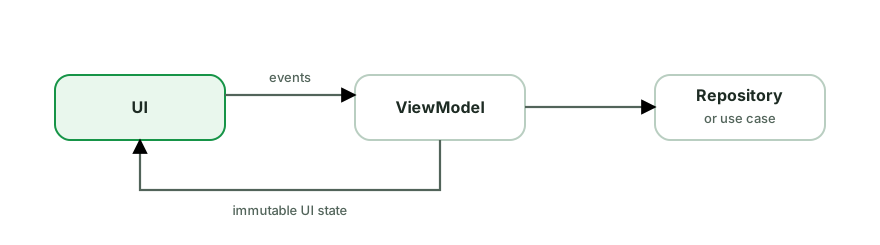
View: a composable, Activity, or Fragment renders UiState and forwards user
actions. It owns UI-only behavior such as focus, animation, and executing
navigation.
ViewModel: a screen-level state holder. It accepts actions, coordinates use
cases or repositories, and exposes immutable observable state. It must not hold
a View, Activity, Fragment, or Activity-scoped Context.
Model: not one class. It is the application data and rules exposed through repositories or use cases. Network DTOs and Room entities are data-source details, not the ViewModel’s public model by default.
A typical refresh follows this sequence:
- The user pulls to refresh and the UI calls
viewModel.refresh(). - The ViewModel marks refresh as active and calls the repository.
- The repository fetches or synchronizes data and updates its source of truth.
- Repository data emits again.
- The ViewModel combines that data with screen inputs to produce a new
immutable
UiState. - The UI renders the state.
MVVM does not automatically guarantee good architecture. A ViewModel that owns Retrofit, SQL, navigation, and fifty mutable fields is still tightly coupled. The useful properties are clear ownership, one source of truth, lifecycle-aware collection, and state that can be tested without constructing the UI.
A ViewModel survives configuration changes. It does not survive process death.
Use SavedStateHandle for small restorable inputs and persistent storage for
durable user data.
Design principles and patterns
Explain the Observer pattern and where it appears in Android.
The Observer pattern defines a one-to-many dependency: a subject maintains a list of observers and notifies them automatically when its state changes. It decouples the producer of data from its consumers.
// The essence: subscribe, get notified on change
interface Observer<T> { fun onChanged(value: T) }
class Subject<T>(initial: T) {
    private val observers = mutableListOf<Observer<T>>()
    var value: T = initial
        set(v) { field = v; observers.forEach { it.onChanged(v) } }
    fun observe(o: Observer<T>) { observers += o }
}
Where it’s everywhere in Android:
LiveData- observe and get lifecycle-aware updates.Flow/StateFlow/SharedFlow- the coroutine-based reactive streams;collectis observing.- Compose state - reading a
Statesubscribes the composable; writes notify readers (recomposition). RecyclerView.AdapterDataObserver, click listeners,ViewTreeObserver,LifecycleObserver.- RxJava
Observable/Observer- the pattern in its named form.
Why it matters architecturally: it’s the backbone of reactive, UDF apps - the UI observes state from the ViewModel and updates automatically, instead of the ViewModel reaching into the UI. This inverts the dependency (UI depends on data, not vice versa).
Trade-offs to mention:
- Lifecycle leaks - observers not unregistered (or not lifecycle-aware) leak or update dead UI.
LiveData/repeatOnLifecyclesolve this. - Notification storms / ordering - too many fine-grained updates can cause churn (hence
distinctUntilChanged, conflation,derivedStateOf).
Explain the Builder pattern. Is it still needed in Kotlin?
The Builder pattern constructs a complex object step by step, avoiding telescoping constructors (many overloads) and making optional parameters readable.
// Java: classic builder
Notification n = new NotificationCompat.Builder(context, channelId)
    .setContentTitle("Hi")
    .setContentText("Body")
    .setSmallIcon(R.drawable.ic)
    .setAutoCancel(true)
    .build();
Where it appears in Android: NotificationCompat.Builder, AlertDialog.Builder, Retrofit.Builder, OkHttpClient.Builder, Room.databaseBuilder, WorkRequest.Builder, Intent (chained putExtra). These predate Kotlin or come from Java APIs.
Is it still needed in Kotlin? Often not - Kotlin’s default and named arguments replace most builders:
data class RequestConfig(
    val url: String,
    val timeout: Long = 30_000,
    val retries: Int = 3,
    val headers: Map<String, String> = emptyMap(),
)
RequestConfig(url = "...", retries = 5)   // no builder needed
For more builder-like ergonomics, Kotlin uses:
apply { }to configure an object fluently.- Type-safe DSL builders - a lambda with receiver (
buildString { },Modifierchains, Gradle Kotlin DSL) - the idiomatic Kotlin “builder.”
When a builder still earns its place in Kotlin:
- Java interop - your API is consumed from Java (no default args there).
- Step-by-step validation or enforcing a build order / required-before-optional sequencing.
- Mirroring an established API style for familiarity.
Explain the Facade pattern and how it relates to the Repository.
A Facade provides a simple, unified interface over a complex subsystem, hiding its internal parts from callers.
// Facade over several subsystems
class MediaFacade(
    private val downloader: Downloader,
    private val decoder: Decoder,
    private val cache: MediaCache,
) {
    suspend fun play(url: String) {          // one simple call...
        val bytes = cache.get(url) ?: downloader.fetch(url).also { cache.put(url, it) }
        val media = decoder.decode(bytes)    // ...hides downloader + decoder + cache
        player.start(media)
    }
}
The caller uses play(url) and never touches the downloader, decoder, or cache directly.
Why use it:
- Simplifies usage - clients deal with one entry point instead of orchestrating many classes.
- Decouples clients from subsystem internals - you can restructure the subsystem without breaking callers.
- Reduces coupling and centralizes a workflow.
How it relates to the Repository: a Repository is essentially a Facade over data sources - it hides the network client, database, cache, and the coordination logic behind a clean API (observeUser()), so the ViewModel doesn’t know whether data came from Room or Retrofit. Many Android “manager”/“controller” classes are facades too.
Other Android examples: a SessionManager wrapping token storage + refresh + auth headers; an AnalyticsFacade over multiple analytics SDKs; Retrofit itself is a facade over OkHttp + converters + call adapters.
Caution: a facade can grow into a God object if it accumulates too many responsibilities - keep it focused on simplifying access, not doing everything.
Use it in practice
Common implementation choices, debugging, and trade-offs.
Architecture foundations
Describe Google's recommended app architecture.
Google’s current guidance starts with at least two layers and adds a third only when it earns its place.
Layers:
- UI layer - UI elements plus state holders such as
ViewModel. The UI renders observable state and relays user actions. UI-specific logic can stay close to the UI; application data and business rules should not live in an Activity, Fragment, or composable. - Data layer - repositories expose application data and coordinate data sources such as network, Room, DataStore, Bluetooth, or location. Each repository defines a single source of truth and is main-safe.
- Domain layer (optional) - use cases simplify complex ViewModels or reuse business logic across multiple consumers. It is useful in larger apps, not a required wrapper around every repository method.
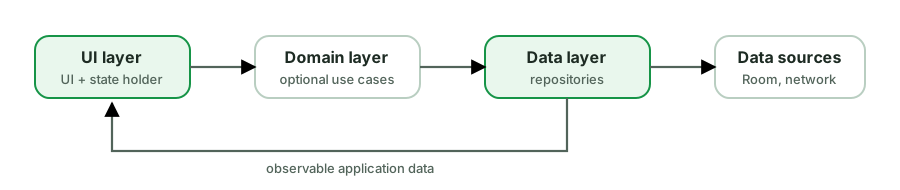
The core principles Google emphasizes:
- Separation of concerns - responsibilities follow ownership and lifetime.
- Drive UI from data models - expose immutable state and use unidirectional data flow: state down, events up.
- Single source of truth - the owner of a data type is the only place that mutates it. For offline-first data this is often Room, but it can also be a network or in-memory source.
- Coroutines and Flow between layers - expose observable streams and make blocking work safe to call from the main thread.
Practical specifics:
- A ViewModel commonly exposes
StateFlow<UiState>and collects repository data. - Room can be the source of truth for offline-first data, with network refreshes updating Room instead of bypassing it.
- Dependency injection keeps construction separate and lets tests provide fakes.
- Modularization is a scaling tool, not a requirement for a small app.
This is guidance, not a fixed folder template. A direct ViewModel-to-repository dependency is valid. Add layers and abstractions in response to complexity, reuse, ownership, or team boundaries.
Walk me through how you'd structure a new feature end to end.
A common open-ended interview question. Structure the answer by layers + data flow, and mention testing and trade-offs. Example: a “Saved articles” feature.
1. Data layer
- Models:
ArticleDto(network),ArticleEntity(Room),Article(domain) with mappers. - Data sources:
ArticleApi(Retrofit),ArticleDao(Room). - Repository:
ArticleRepositoryinterface (domain) + impl (data). ExposesobserveSaved(): Flow<List<Article>>from Room (single source of truth), with network refresh writing into Room (offline-first).
2. Domain layer (if warranted)
ToggleSaveArticleUseCase,GetSavedArticlesUseCase- only if logic is reused/complex; otherwise the ViewModel calls the repository directly.
3. UI layer
SavedViewModelexposes immutableStateFlow<SavedUiState>, handles user actions such asonToggleSave, and represents user-visible outcomes in state. The UI can acknowledge a handled message or navigation result.SavedScreen(Compose) collects state withcollectAsStateWithLifecycle(), renders, sends events up (UDF).
4. Wiring
- Hilt provides the API, DAO, repository (
@Bindsinterface→impl), scoped appropriately (@Singletonfor DB/network,@HiltViewModelfor the VM). - Navigation destination/route; nav args via
SavedStateHandle.
5. Cross-cutting
- Error handling → typed results mapped to UI state.
- Testing → unit-test the ViewModel (fake repo + test dispatcher), DAO (in-memory Room), mappers; a Compose UI test for the critical flow.
- Paging if the list is large (Paging 3 + RemoteMediator).
Then state the trade-offs: “I’d skip the domain layer and separate models if it’s simple, and add them if logic is shared or the API is messy - matching the architecture to the feature’s complexity.”
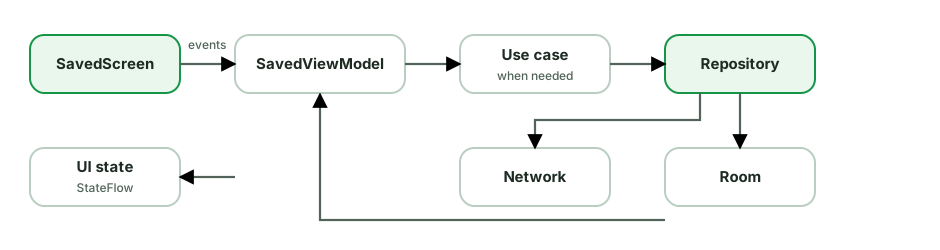
This answer demonstrates layers, UDF, a single source of truth, DI, testing, and judgment about how much architecture the feature actually needs.
Explain Clean Architecture on Android. What are the layers and the dependency rule?
Clean Architecture protects high-level policy from volatile details. The useful idea is the dependency rule: source-code dependencies point toward stable business rules, while UI, database, and network code remain replaceable details.
A strict Android interpretation often uses:
- Domain - business entities, use cases, and ports such as repository interfaces. It is plain Kotlin and does not know about Android, Retrofit, or Room.
- Data - implements domain ports using network, database, cache, and mappers.
- Presentation - ViewModels and UI translate user actions and domain results into UI state.
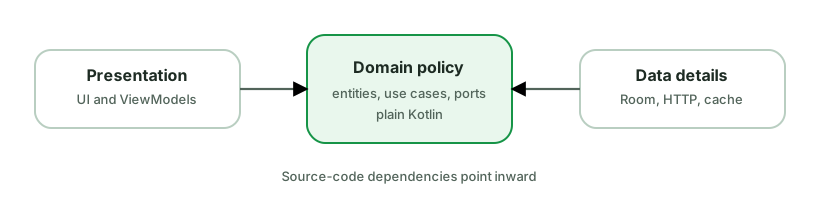
For example, the domain can define UserRepository, and the data module can
implement it. Business logic knows that users can be loaded but does not know
whether the implementation uses Room, HTTP, or a test fake. DI wires the
implementation at the application boundary.
Why teams use it:
- Testability - business rules can run without Android or I/O.
- Replaceability - volatile details can change behind stable ports.
- Independent evolution - teams can enforce boundaries with Gradle modules.
Keep it practical:
- Google’s recommended layered architecture and strict Clean Architecture are compatible in goals, but they are not identical dependency diagrams. Google’s guidance does not require repository interfaces to live in a domain module.
- For a simple app, ViewModel to repository is often enough. A use case that only forwards one call adds a name but no policy.
- Separate models when they protect a meaningful boundary. Mapping every field through several identical models is not automatically cleaner.
A strong answer names which business rules need protection, which details are likely to change, and why the extra boundaries are worth their maintenance cost.
How do the classic Clean Architecture layers map to Android?
The classic circles describe dependency direction, not mandatory package names. A practical Android mapping is:
Entities or enterprise rules: stable business concepts and invariants, such
as Money, Order, or eligibility rules. They should not depend on Android,
Room, Retrofit, or UI models.
Use cases or application rules: operations the application supports, such as
PlaceOrder, ObserveFeed, or ChangeSubscription. They coordinate domain
rules and ports, and expose an API suitable for presentation or other entry
points.
Interface adapters: ViewModels, presenters, repository implementations, and mappers. They translate between the shapes expected by inner policy and outer frameworks.
Frameworks and drivers: Compose, Activities, Room, Retrofit, WorkManager, FCM, and the Android framework. These are replaceable details at the outside.
The dependency rule says outer code can depend inward. Inner policy must not import an outer framework. Data may implement an interface owned by domain, and DI connects that implementation at the application boundary.
Not every app needs all four circles as Gradle modules. Small applications can keep UI and data packages in one module while following the same dependency discipline. Create a module boundary when independent compilation, encapsulation, ownership, or reuse pays for the extra wiring.
Also distinguish this from Google’s recommended architecture. Both encourage separation and testability, but Google’s guidance does not require every repository interface to be owned by a domain module.
In Clean Architecture, where should a repository interface live?
Place an abstraction with the policy that owns the contract, not automatically next to its implementation.
In strict Clean Architecture, a domain or application module defines the port it needs:
// :domain
interface Orders {
    fun observeOrder(id: OrderId): Flow<Order>
    suspend fun submit(command: SubmitOrder): OrderId
}

// :data
class OfflineFirstOrders(
    private val api: OrdersApi,
    private val dao: OrdersDao,
) : Orders {
    // Network and Room details stay outside the domain contract.
}
The data module depends on the domain contract and implements it. The use case
depends only on Orders. Hilt or a manual composition root binds
OfflineFirstOrders to that contract.
This inversion is useful when:
- Domain rules must compile without data frameworks.
- Multiple implementations exist or are expected.
- The contract is shared across entry points or platforms.
- A module boundary must prevent data-source types from leaking inward.
It can be unnecessary when the repository itself is already the stable public API of a small data layer and no independent domain module exists. In Google’s recommended architecture, UI or use cases can depend on a repository class from the data layer. That is still a valid layered design.
Do not shape the interface around Retrofit endpoints or DAO methods. Shape it around application operations and domain types. Otherwise the abstraction only hides a class name while leaking the same volatile details.
What is a UseCase (Interactor), and when do you actually need one?
A UseCase (a.k.a. Interactor) encapsulates a single piece of business logic in the domain layer. It typically depends on repositories and is consumed by ViewModels. Convention: name it as a verb and expose a single invoke operator.
class GetVisibleFeedUseCase(
    private val feedRepo: FeedRepository,
    private val settingsRepo: SettingsRepository,
) {
    operator fun invoke(): Flow<List<Post>> =
        combine(feedRepo.observeFeed(), settingsRepo.blockedAuthors()) { posts, blocked ->
            posts.filterNot { it.author in blocked }   // the business rule
        }
}

// In the ViewModel:
val feed = getVisibleFeed().stateIn(...)
When you NEED one:
- Logic reused across multiple ViewModels - put it in one place instead of duplicating.
- Combining multiple repositories / non-trivial rules - orchestration that doesn’t belong in a repository (which does data access) or a ViewModel (which does UI state).
- Complex domains where you want pure, independently testable business logic with no Android deps.
When you DON’T (the pragmatic point interviewers reward):
- Pass-through use cases that just call
repository.getX()add a layer for no value - boilerplate. If a ViewModel can call the repository directly with no extra logic, skip the use case. - Simple CRUD apps rarely need a full domain layer.
Design conventions:
- One use case = one responsibility (single public method, often
operator fun invoke). - No Android dependencies - pure Kotlin, trivially unit-tested.
- Inject the dispatcher if it does CPU work (
withContext(defaultDispatcher)), keeping it off the main thread and testable.
Presentation and state
MVC vs MVP vs MVVM - how did Android presentation patterns evolve?
All separate UI from logic; they differ in how the logic talks to the view.
MVC (Model-View-Controller) - on Android, the Activity/Fragment often ended up as both View and Controller (“Massive View Controller”). Poor separation; hard to test because logic was tangled with framework classes.
MVP (Model-View-Presenter):
- The View (Activity/Fragment) implements a
Viewinterface and is passive. - The Presenter holds the logic, calls back into the view through that interface (
view.showLoading(),view.showError()). - Strengths: clear separation and a presenter that can be tested through a view interface.
- Costs: verbose view contracts, manual attach and detach handling, and no built-in survival across configuration changes.
MVVM (Model-View-ViewModel):
- The ViewModel exposes observable state (
StateFlow/LiveData); it does not reference the view. - The View observes state and renders it (reactive, UDF).
- Strengths: a Jetpack
ViewModeldoes not hold the view, survives configuration changes, and exposes observable state naturally to Compose or Views. Modern Android guidance favors this state-holder approach.
The key shift: MVP pushes to the view via an interface (imperative, two-way coupling); MVVM has the view pull/observe state (reactive, one-way). MVVM’s lack of a view reference is what fixes MVP’s leak and lifecycle pain.

How would you implement an MVVM screen with StateFlow?
Expose one immutable state model, accept user actions through methods, and keep data policy behind a repository.
data class FeedUiState(
    val items: List<Post> = emptyList(),
    val loading: Boolean = true,
    val refreshing: Boolean = false,
    val message: UserMessage? = null,
)

class FeedViewModel(
    private val repository: FeedRepository,
) : ViewModel() {
    private val refreshing = MutableStateFlow(false)
    private val message = MutableStateFlow<UserMessage?>(null)

    val uiState: StateFlow<FeedUiState> = combine(
        repository.observeFeed(), refreshing, message,
    ) { posts, isRefreshing, userMessage ->
        FeedUiState(
            items = posts,
            loading = false,
            refreshing = isRefreshing,
            message = userMessage,
        )
    }.stateIn(
        scope = viewModelScope,
        started = SharingStarted.WhileSubscribed(5_000),
        initialValue = FeedUiState(),
    )

    fun refresh() = viewModelScope.launch {
        refreshing.value = true
        try {
            repository.refresh()
        } catch (e: IOException) {
            message.value = UserMessage.NetworkUnavailable
        } finally {
            refreshing.value = false
        }
    }

    fun messageShown(messageId: String) {
        message.update { current -> current?.takeUnless { it.id == messageId } }
    }
}
In Compose, collect with lifecycle awareness:
@Composable
fun FeedRoute(viewModel: FeedViewModel = viewModel()) {
    val state by viewModel.uiState.collectAsStateWithLifecycle()
    FeedScreen(state = state, onRefresh = viewModel::refresh)
}
Important details:
- Expose
StateFlow, notMutableStateFlow. - Keep state immutable and derive values that can be calculated reliably.
- Catch expected failures narrowly. Do not convert coroutine cancellation into a normal error.
- Use
WhileSubscribedwhen upstream work should stop without collectors. The timeout avoids restarting immediately across brief configuration changes. - Render stale content and refresh status together when both can be true.
- Acknowledge user messages by ID so handling an older message cannot clear a newer one.
The exact operators are less important than clear ownership and deterministic state transitions.
MVVM vs MVI - when would you pick one over the other?
Both put a state holder between UI and data; they differ in how state changes flow.
MVVM - the ViewModel exposes several observable properties; the UI observes them and calls methods to mutate them. Simple and familiar, but state can become fragmented across multiple LiveData/StateFlow fields that can drift out of sync.
MVI - there’s a single immutable UiState, and the UI sends intents/events that the ViewModel reduces into the next state. Strictly unidirectional: Intent → reduce → new State → render.
data class UiState(
    val isLoading: Boolean = false,
    val items: List<Item> = emptyList(),
    val error: String? = null,
)

fun onIntent(intent: Intent) = when (intent) {
    is Intent.Load -> reduce { copy(isLoading = true) }
    // ...
}
Pick MVI when: the screen has complex, interdependent state; you want every UI state reproducible from a single object (great for testing and time-travel debugging); or a team needs a strict, predictable pattern.
Pick MVVM when: the screen is simple - MVI’s boilerplate (intents, reducers, single state) isn’t worth it for a form with two fields.
Senior-level nuance to raise: they’re not opposites. A clean “MVVM with a single immutable StateFlow<UiState> and event functions” is effectively MVI-lite. What interviewers actually care about is unidirectional data flow and a single source of truth, not the acronym. Also mention how you model one-off events (navigation, toasts) separately from state so they don’t replay on rotation.
What is Unidirectional Data Flow (UDF), and why is it the foundation of modern Android architecture?
Unidirectional Data Flow means state flows down and events flow up - in one direction, forming a loop:
- The ViewModel owns the state (a single, immutable
UiState) and exposes it as a read-onlyStateFlow. - The UI is a function of that state - it renders whatever the state says.
- The UI sends events up (button clicks, text input) as method calls/intents; it never mutates state directly.
- The ViewModel processes the event, produces a new immutable state, and the cycle repeats.
private val _state = MutableStateFlow(UiState())
val state: StateFlow<UiState> = _state.asStateFlow()   // down (read-only)

fun onRefresh() {                                       // up (event)
    viewModelScope.launch { _state.update { it.copy(loading = true) } }
}
Why it’s foundational:
- Single source of truth - state lives in one place; the UI can’t drift out of sync.
- Predictable & debuggable - every UI state is reproducible from one object; you can log/replay state transitions.
- Testable - feed events, assert on emitted states; no UI needed.
- Thread-safe updates via immutable
copy()+ atomicupdate {}. - It’s the principle behind MVI, Compose (
UI = f(state)), and Google’s recommended architecture - the acronym matters less than the one-directional discipline.
Related practices: keep UiState immutable. Model business outcomes as
state and let the UI react with navigation or messages. Use an ephemeral stream
only when its best-effort delivery semantics are acceptable.
What belongs in a ViewModel, and what should stay out of it?
A ViewModel is a screen-level state holder. It turns application data and
user events into UI state, and it survives configuration changes. It is not a
place for every piece of code that does not fit in the Activity.
Good ViewModel responsibilities:
- Expose immutable
UiState, usually asStateFlow. - Accept user events such as refresh, retry, or item selection.
- Coordinate repositories or use cases needed by that screen.
- Apply presentation decisions that do not require UI objects, such as deciding whether an empty state or retry action should be visible.
- Save small, restorable screen inputs in
SavedStateHandle, such as an item ID, query, or selected tab.
Keep these outside:
- Composables, Views,
Activity,Fragment, or an Activity-scopedContext. - Navigation execution, showing a toast, requesting focus, and other UI actions. The ViewModel can expose the decision; the UI performs it.
- Network, SQL, cache, and sync policies. Repositories own data orchestration.
- Reusable business rules. Put substantial or shared rules in a use case or the data layer, depending on ownership.
- Large mutable graphs or data that should be restored after process death.
data class CheckoutUiState(
    val items: List<CartItem> = emptyList(),
    val isSubmitting: Boolean = false,
    val error: UserMessage? = null,
)

class CheckoutViewModel(
    private val checkout: SubmitOrder,
    savedStateHandle: SavedStateHandle,
) : ViewModel() {
    val cartId: String = checkNotNull(savedStateHandle["cartId"])
    // State production and user-event handling live here.
}
A useful review question is: could this ViewModel be tested with plain inputs and fake dependencies, without constructing UI objects? If not, a boundary is probably misplaced. Also remember that a ViewModel survives rotation, not process death. Durable data belongs in storage, and restorable inputs belong in saved state.
How do you model UI state well, including single-state versus multiple flows and sealed versus data classes?
Two common approaches, each with a place:
1. Single immutable data class of nullable/boolean fields - flexible; can represent overlapping conditions (loading while showing stale content).
data class FeedUiState(
    val isLoading: Boolean = false,
    val items: List<Post> = emptyList(),
    val errorMessage: String? = null,
    val isRefreshing: Boolean = false,
)
2. Sealed hierarchy of mutually-exclusive states - clearer when the screen is in exactly one state at a time, with exhaustive when.
sealed interface FeedUiState {
    data object Loading : FeedUiState
    data class Success(val items: List<Post>, val refreshing: Boolean) : FeedUiState
    data class Error(val message: String) : FeedUiState
}
How to choose:
- States are truly exclusive (can’t be loading and error at once) → sealed. Forces you to handle every case.
- States overlap (refreshing while content is visible, partial errors) → a single data class with flags is more honest than contorting a sealed hierarchy.
- A common hybrid: a
data classwhose fields include a sealedcontent: ContentState.
Principles regardless of shape:
- Immutable - expose a single
StateFlow<UiState>; update withcopy()/update {}. Never let the UI mutate it. - Single source of truth - one state object the UI renders, not five separate
StateFlows that can drift out of sync. - Derive, don’t duplicate - compute
showEmptyStatefrom existing fields rather than storing a redundant flag that can desync. - Model business outcomes as state and let the UI react with navigation or a message. Acknowledge handled effects when needed instead of relying on an untracked fire-and-forget event.
How should a ViewModel represent UI state and one-time events?
Start by separating input events from state changes. A tap is an event. Submitting an order is an action. “Order submitted” is a fact that should be represented in state or durable data. Navigation and a snackbar are UI reactions to those facts.
For navigation caused entirely by a UI action, the UI can often navigate directly. If navigation depends on business work, let the ViewModel expose the result as state and let the UI react:
data class CheckoutUiState(
    val submitting: Boolean = false,
    val completedOrderId: String? = null,
    val userMessage: UserMessage? = null,
)

// UI
LaunchedEffect(state.completedOrderId) {
    state.completedOrderId?.let { id ->
        navigateToConfirmation(id)
        viewModel.onOrderNavigationHandled(id)
    }
}
The acknowledgement should include the value or ID being handled so it cannot accidentally clear a newer result. Model a queue in state if several user messages can be pending. Persist the underlying fact when it must survive process death, rather than trying to make UI delivery itself durable.
Channel and SharedFlow(replay = 0) remain useful for best-effort signals, but
know their contract:
- A zero-replay
SharedFlowcan drop an emission when there is no subscriber. - A buffered
Channelcan retain a limited number of elements for one receiver, but it does not survive process death. - Neither creates end-to-end exactly-once behavior across lifecycle changes.
Use them only when losing the signal while the UI is absent is acceptable, or when the surrounding design supplies acknowledgement and durability.
What to avoid:
- Treating navigation as a fire-and-forget ViewModel command with no state or acknowledgement.
SingleLiveEventand generic event-wrapper types that hide delivery semantics.- Storing a lambda,
NavController,Context, or UI object in the ViewModel.
The strongest interview answer defines the required delivery semantics first. User-visible business outcomes belong in state or storage. Ephemeral UI effects are reactions to those outcomes, not a second source of truth.
What is SavedStateHandle, and how does it fit the architecture?
SavedStateHandle is a key-value state container provided to a ViewModel.
It keeps values across configuration changes and can restore them after
system-initiated process death while the navigation entry or task is retained.
It is for the small amount of transient state needed to reconstruct a screen,
not for state that must outlive task dismissal or a force-stop.
Two main jobs:
1. Receive navigation arguments - Hilt/Navigation populate it from the back stack, so a ViewModel reads its args without the UI passing them in:
@HiltViewModel
class DetailViewModel @Inject constructor(
    handle: SavedStateHandle,
    repo: ItemRepository,
) : ViewModel() {
    private val itemId: String = requireNotNull(handle["itemId"]) {
        "Detail requires an itemId navigation argument"
    }
    val item = repo.observe(itemId).stateIn(...)
}
2. Persist transient UI state across process death - query text, selected tab, scroll target:
val query: StateFlow<String> = handle.getStateFlow("query", "")
fun setQuery(q: String) { handle["query"] = q }
Where it fits:
- It bridges the gap the ViewModel can’t cover (process death). The ViewModel handles config changes;
SavedStateHandleextends that to process death for the few keys that matter. - It replaces much of the manual
onSaveInstanceStateplumbing for state used by ViewModel logic. Purely visual element state can still belong in the UI’s own saveable-state mechanism. - Values must be
Bundle-able (primitives,Parcelable) and kept small - it’s for identifiers and UI state, not large data (re-fetch big data from the repository on restore).
Why it’s preferred over assisted injection for nav args: Navigation already serializes args into the saved state, so Hilt can populate SavedStateHandle automatically - no custom @AssistedFactory needed.
What are the most common MVVM mistakes in Android apps?
Common MVVM failures come from unclear ownership, not from the acronym itself.
- God ViewModel: it performs network calls, SQL, mapping, validation, analytics, and navigation. Move data policy to repositories and extract reusable or substantial rules when that creates a meaningful boundary.
- UI objects in the ViewModel: storing an Activity, Fragment, View,
NavController, or Activity context creates leaks and mixes lifetimes. - Many unrelated observable fields: loading, data, and error can emit in
impossible combinations. Prefer a coherent immutable
UiStatewhen values describe one screen state. - Exposing mutable state: the UI can bypass the ViewModel and create a second writer. Keep mutable flows private.
- Cold Flow recreated by a getter: every access builds a new pipeline and may repeat expensive work. Build the stream once and share it with an explicit lifetime when needed.
- Network response as UI truth: the screen becomes inconsistent with local writes or cached data. Let the repository define a source of truth.
- Fire-and-forget navigation events: a zero-replay stream can lose them while the UI is stopped. Represent business outcomes as state and define acknowledgement or durability where required.
- Collecting without lifecycle awareness: work continues while the screen is stopped or multiple collectors are created accidentally.
- Using ViewModel as process storage: it survives rotation, not process death. Persist durable state and save only small restorable inputs.
- A repository interface for every class: testability comes from useful seams, not an automatic interface plus implementation pair.
When reviewing an MVVM feature, trace one user action from the UI to the data owner and back to rendered state. At every step, ask who can write the value, which lifetime owns it, and what happens after failure or recreation.
Data and offline
How do you design an app that works offline?
For data that must work offline, make a local source such as Room the single source of truth. The UI observes local data. Network work updates that source instead of returning a second competing copy directly to the screen.
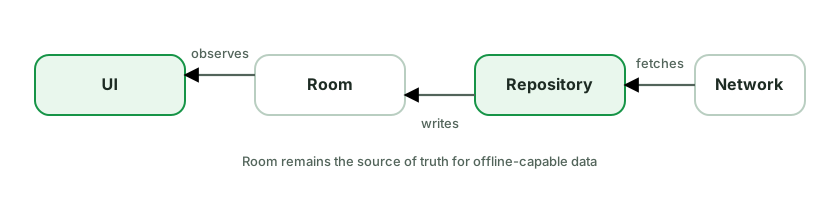
A common read flow:
- UI observes a Room
Flowand shows cached data immediately. - Repository decides whether to refresh (stale? forced?).
- If refreshing, fetch from network → write into Room.
- Room emits the new data and the UI updates automatically.
fun observeArticles(): Flow<List<Article>> =
    dao.observeArticles().map { rows -> rows.map(ArticleEntity::toModel) }

suspend fun refreshArticles() {
    try {
        val fresh = api.getArticles()
        db.withTransaction { dao.replaceAll(fresh.map(ArticleDto::toEntity)) }
    } catch (e: IOException) {
        // Keep cached data visible and expose refresh status separately.
    }
}
Key design decisions interviewers probe:
- Source of truth - choose it per repository. Room is the usual choice for offline-capable structured data.
- Freshness policy - cache-then-network, TTL-based invalidation, or pull-to-refresh forcing a fetch.
- Writes and sync - commit local mutations and an outbox entry atomically, update the UI optimistically, then sync durable work. Use WorkManager when the work must survive the process. Define idempotency and conflict handling.
- Pagination - Paging 3 +
RemoteMediatorimplements offline-first paging: pages are written to Room, the UI pages from Room. - Cancellation and errors - never turn
CancellationExceptioninto a normal failure. Catch expected I/O errors narrowly and expose cached-data plus refresh status separately. - Conflict resolution, deletion tombstones, schema migration, and partial failure are the senior details.
The trade-off is additional schema, sync, and conflict complexity. Use this design when offline access, fast startup, or resilient writes justify that cost.
What caching strategies would you use in an Android app?
Caching is layered; pick per data type and freshness need.
Cache tiers (fastest → most durable):
- In-memory - a
MutableStateFlow/LruCachein a repository or singleton. Fastest, lost on process death, bounded by size. Good for hot data within a session. - Disk / database - Room (structured), DataStore (key-value), files. Survives process death; the basis of offline-first (DB as single source of truth).
- HTTP cache - OkHttp’s disk cache honoring
Cache-Control/ETagfor network responses. - Image cache - Coil/Glide’s memory + disk LRU.
Read strategies:
- Cache-then-network - show cached data instantly, fetch in background, update. Best UX for feeds.
- Cache-aside (lazy) - check cache; on miss, fetch and populate.
- Network-first with cache fallback - fresh when possible, cache when offline.
- Read-through - the cache layer fetches on miss transparently.
Invalidation (the hard part - “two hard things in CS”):
- TTL / expiry - store a timestamp; refetch when stale.
- ETag / Last-Modified - conditional requests; server returns
304 Not Modifiedto save bandwidth. - Event/push-based - invalidate on a known mutation (user edited data) or a server push.
- Manual - pull-to-refresh forces a fetch.
Decisions to make:
- Single source of truth - write network results into the DB and have the UI observe the DB, rather than caching in multiple places that drift.
- Eviction - bound caches (
LruCache, Room cleanup) so they don’t grow unbounded. - Consistency vs freshness vs cost - name the trade-off: a longer TTL saves data/battery but risks staleness.
- Stale-while-revalidate - serve stale immediately, refresh in the background.
How does Paging 3 fit into an Android app's architecture?
Paging 3 is the Jetpack solution for incrementally loading large lists, integrated across all three layers.
The pieces:
PagingSource- loads one page from a single source (e.g. network only). Defines how to fetch a page and the keys for next/prev.RemoteMediator- coordinates network + database for offline-first paging: it fetches pages from the network and writes them into Room, while a Room-backedPagingSourceserves the UI from the DB.Pager- config (page size, prefetch) that produces aFlow<PagingData<T>>.PagingData- a stream of paged items the UI consumes.
Layered flow (network + DB, the recommended setup):
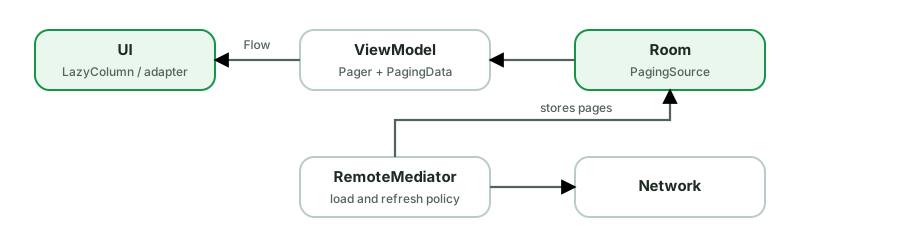
val items: Flow<PagingData<Article>> = Pager(
    config = PagingConfig(pageSize = 20),
    remoteMediator = ArticleRemoteMediator(api, db),
) { db.articleDao().pagingSource() }
    .flow
    .cachedIn(viewModelScope)     // survive config changes
What Paging handles for you: page requests on scroll, prefetch distance, deduplication, placeholders, retries, and exposing LoadState (loading/error for refresh/append/prepend) so the UI can show spinners/retry footers. UI side: collectAsLazyPagingItems() (Compose) or PagingDataAdapter + DiffUtil (Views).
Why architecturally clean:
- Single source of truth - with
RemoteMediator, the database can own the paged data and the UI reads from it. This enables offline reads, but freshness, writes, errors, and conflicts still require explicit policies. cachedIn(scope)keeps paged data across recreation so scroll position/data isn’t lost on rotation.- Each layer keeps its role: data fetches/stores, ViewModel configures the Pager, UI renders
PagingData.
How should errors move through an app's layers?
Rather than letting exceptions leak everywhere, model expected failures as values that flow through the layers and end as UI state.
A domain Result wrapper (your own sealed type or Kotlin’s Result):
sealed interface DataResult<out T> {
    data class Success<T>(val data: T) : DataResult<T>
    data class Failure(val error: AppError) : DataResult<Nothing>
}

sealed interface AppError {
    data object Network : AppError
    data object Unauthorized : AppError
    data class Unknown(val cause: Throwable) : AppError
}
Repository converts exceptions → typed results at the boundary:
suspend fun getUser(id: String): DataResult<User> = try {
    DataResult.Success(api.getUser(id).toDomain())
} catch (e: IOException) { DataResult.Failure(AppError.Network) }
  catch (e: HttpException) {
      DataResult.Failure(if (e.code() == 401) AppError.Unauthorized else AppError.Unknown(e))
  }
ViewModel maps the result into UI state:
when (val r = getUser(id)) {
    is DataResult.Success -> _state.update { it.copy(user = r.data) }
    is DataResult.Failure -> _state.update { it.copy(error = r.error.toMessage()) }
}
Principles:
- Distinguish expected vs unexpected failures. Expected (network down, validation, 404) → modeled as
Result/sealed errors and shown to the user. Unexpected (programming bugs) → let them crash/report; don’t swallow. - Translate at the boundary - convert framework exceptions (
IOException,HttpException,SQLException) into domain errors in the data layer so upper layers don’t depend on Retrofit/Room types. - Exhaustive handling - a sealed
AppErrorforces the UI to handle each case (retry, re-login, generic message). - For Flow, surface errors via a result-emitting flow or the
catchoperator mapping to an error state - never an unhandled throw incollect. - Never catch
CancellationExceptionin a blanket catch - rethrow it.
Dependency injection
Hilt/Dagger vs Koin - what's the trade-off?
The core distinction: Dagger/Hilt resolve the graph at compile time; Koin resolves it at runtime.
Dagger / Hilt - compile-time, code-generated DI.
- Strengths: type-safe graph validation at build time, generated code with low runtime overhead, and standard Android lifecycle components and scopes.
- Costs: a steeper learning curve, more annotations, code-generation build cost, and sometimes difficult compiler diagnostics.
Koin - runtime service locator (a DSL that registers and resolves dependencies).
- Strengths: readable Kotlin DSL, little setup, no generated graph, and a lower initial learning cost. It can also fit shared KMP code.
- Costs: graph errors generally surface at runtime, and dependency resolution has runtime work with less compile-time safety.
How to choose (the balanced interview answer):
- Large, multi-module, performance-sensitive apps / teams that value compile-time safety → Hilt (Google’s recommended default on Android).
- Smaller apps, rapid prototyping, KMP, or teams prioritizing simplicity and build speed → Koin.
Note: Koin is technically closer to a service locator than “true” DI, and that distinction (compile-time safety vs runtime flexibility) is the real heart of the question - not which is “better.”
Why should you inject coroutine dispatchers instead of hardcoding them?
Hardcoding Dispatchers.IO/Default couples your code to real threads, which makes it non-deterministic in tests. Injecting dispatchers makes threading configurable and testable.
The problem with hardcoding:
class Repo(private val api: Api) {
    suspend fun load() = withContext(Dispatchers.IO) { api.fetch() }  // Real I/O leaks into tests
}
In tests you can’t control this - runTest’s virtual clock doesn’t govern a real Dispatchers.IO, so timing is unpredictable and tests can be flaky.
The fix - inject the dispatcher:
class Repo(
    private val api: Api,
    private val ioDispatcher: CoroutineDispatcher = Dispatchers.IO,
) {
    suspend fun load() = withContext(ioDispatcher) { api.fetch() }
}

// Test: pass a TestDispatcher
val repo = Repo(fakeApi, UnconfinedTestDispatcher())
Provide them via DI with qualifiers so the right one is injected everywhere:
@Qualifier annotation class IoDispatcher
@Qualifier annotation class DefaultDispatcher

@Provides @IoDispatcher fun io(): CoroutineDispatcher = Dispatchers.IO
A common pattern is a DispatcherProvider interface (io, default, main) injected into repositories/use cases, with a test implementation returning a single TestDispatcher.
Benefits:
- Deterministic tests -
runTestcontrols the virtual clock;advanceUntilIdle()works; no flakiness. - Flexibility - swap dispatchers per environment without touching logic.
- Honors structured concurrency -
viewModelScopealready usesMain; you only switch for blocking/CPU work, and now that switch is testable.
Design principles and patterns
Explain the SOLID principles with Android examples.
Five object-oriented design principles for maintainable code:
S - Single Responsibility. A class should have one reason to change.
Android: a ViewModel manages UI state; it shouldn’t also parse JSON or do networking. A God-Activity doing UI + networking + persistence violates this.
O - Open/Closed. Open for extension, closed for modification.
Android: add a new
RecyclerViewview type or a newPaymentMethodby adding a class, not editing a giantwheneverywhere. A sealed hierarchy + polymorphism extends behavior without rewriting existing code.
L - Liskov Substitution. Subtypes must be usable wherever the base type is, without breaking expectations.
Android: a
FakeRepositorymust honor theRepositorycontract so it can replace the real one in tests. A subclass that throws on a method the base supports breaks LSP.
I - Interface Segregation. Prefer small, focused interfaces over fat ones.
Android: don’t force a class to implement a 10-method
Callback; split intoOnClick,OnLongClick. Clients depend only on what they use.
D - Dependency Inversion. Depend on abstractions, not concretions; high-level modules shouldn’t depend on low-level details.
Android: the ViewModel depends on a
UserRepositoryinterface, notRetrofitUserRepository. This is exactly what DI (Hilt) and Clean Architecture’s “domain defines interfaces, data implements them” enforce.
Why this matters: SOLID underpins why we use repositories, interfaces, DI, and layered architecture. The strongest answers tie each principle to a concrete Android decision (the examples above), not just recite definitions.
Explain the Factory pattern and where you use it on Android.
A Factory centralizes object creation, hiding the construction logic and the concrete type behind a method. Callers ask the factory for an object instead of calling a constructor directly.
// Factory method: decide the concrete type from input
object PaymentProcessorFactory {
    fun create(type: PaymentType): PaymentProcessor = when (type) {
        PaymentType.CARD   -> CardProcessor()
        PaymentType.UPI    -> UpiProcessor()
        PaymentType.WALLET -> WalletProcessor()
    }
}
Why use it:
- Encapsulates creation - complex/conditional construction lives in one place, not scattered across call sites.
- Decouples callers from concrete classes (they depend on the
PaymentProcessorinterface). - Open/Closed - add a new type by extending the factory, not editing every caller.
Where it appears in Android:
ViewModelProvider.Factory- the common example. ViewModels need constructor args (a repository), but the framework creates them, so you provide a factory that knows how to build it:
class FeedVMFactory(private val repo: FeedRepository) : ViewModelProvider.Factory {
    override fun <T : ViewModel> create(c: Class<T>): T = FeedViewModel(repo) as T
}
(Hilt’s @HiltViewModel generates this for you.)
Fragment.instantiate/ newInstance pattern,RecyclerView.ViewHoldercreation inonCreateViewHolder,LayoutInflater.Factory, Retrofit/OkHttp builders internally, and DI@Providesmethods are factories.
Variants: Factory Method (a method returns a type), Abstract Factory (a family of related objects), and DI frameworks are essentially generalized factories.
Explain the Strategy pattern with an Android example.
The Strategy pattern defines a family of interchangeable algorithms behind a common interface, so you can swap behavior at runtime without changing the code that uses it.
fun interface SortStrategy {
    fun sort(items: List<Post>): List<Post>
}

val byDate    = SortStrategy { it.sortedByDescending(Post::date) }
val byPopular = SortStrategy { it.sortedByDescending(Post::likes) }

class FeedViewModel(private var strategy: SortStrategy = byDate) {
    fun setStrategy(s: SortStrategy) { strategy = s }
    fun display(posts: List<Post>) = strategy.sort(posts)   // behavior swappable
}
Why use it:
- Open/Closed - add a new strategy (a new sort/validation/formatting rule) without touching existing code or growing a giant
when. - Runtime flexibility - switch algorithms based on user choice, config, or A/B flags.
- Testable - each strategy is isolated and unit-testable.
Where it shows up in Android:
RecyclerView.LayoutManager-LinearLayoutManager/GridLayoutManagerare interchangeable layout strategies.Interpolator(animations),ItemAnimator,DiffUtil.ItemCallback.- Image-loading, caching, or retry policies injected into a repository.
- Validation strategies, sort/filter options, payment processors, ad providers behind an interface.
- In Kotlin it’s often just a function type /
fun interfacepassed in - a lightweight strategy without ceremony.
Relation to DI: injecting different implementations of an interface is the Strategy pattern applied via dependency injection (debug vs prod logger, fake vs real repo).
Explain the Adapter and Decorator patterns with Android examples.
Two structural patterns that are easy to confuse.
Adapter - converts one interface into another the client expects. It wraps an incompatible type to make it usable.
// Adapt a domain list to what RecyclerView expects
class UserAdapter(val users: List<User>) : RecyclerView.Adapter<UserVH>() { ... }
Android examples: RecyclerView.Adapter (the name says it - adapts data to view-holders), PagerAdapter, wrapping a third-party SDK’s interface behind your own (AnalyticsClient interface adapting Firebase/Amplitude), or a Retrofit CallAdapter. Use it to make incompatible interfaces work together, especially to wrap libraries you don’t control behind your own abstraction (an anti-corruption layer).
Decorator - adds behavior to an object dynamically by wrapping it in another object with the same interface, without changing the original.
interface DataSource { suspend fun load(key: String): String }

class CachingDataSource(private val wrapped: DataSource) : DataSource {
    private val cache = mutableMapOf<String, String>()
    override suspend fun load(key: String) =
        cache.getOrPut(key) { wrapped.load(key) }   // adds caching, same interface
}

class LoggingDataSource(private val wrapped: DataSource) : DataSource {
    override suspend fun load(key: String): String {
        Log.d("DS", "load $key"); return wrapped.load(key)
    }
}
Android examples: OkHttp Interceptors (each wraps the chain, adding logging/auth/caching), ContextWrapper (and ContextThemeWrapper), input stream wrappers (BufferedInputStream). You can stack decorators (Logging(Caching(real))) to compose behavior.
The distinction:
- Adapter = change the interface (make B usable as A).
- Decorator = same interface, add responsibilities (wrap to enhance).
How do you implement a Singleton in Kotlin, and what are the pitfalls?
A Singleton ensures a class has one instance with a global access point. In Kotlin it’s trivial - object gives you a thread-safe, lazily-initialized singleton:
object AnalyticsTracker {
    fun track(event: String) { /* ... */ }
}
AnalyticsTracker.track("open")   // single instance, created on first use
The compiler handles thread-safe lazy init - no double-checked-locking boilerplate like Java.
Common pitfalls:
- Holding a
Context/Viewleaks it. Anobjectlives for the whole process. If it stores an Activity context, that Activity can never be GC’d. StoreapplicationContextonly, or don’t hold context at all.object Bad { lateinit var ctx: Context } // if assigned an Activity → permanent leak - Global mutable state - singletons holding mutable state create hidden coupling, make code hard to test (shared state bleeds across tests), and cause race conditions if not synchronized.
- Testability - a hard-coded
objectdependency can’t be swapped for a fake. This is the big one: prefer DI with@Singletonscope over a manualobject, so the single instance is provided and replaceable in tests. - Initialization order / parameters - an
objectcan’t take constructor parameters; if it needs config, you end up with aninit(context)method and ordering hazards.
The recommended approach: use a normal class and let Hilt/Dagger provide it as @Singleton. You get one instance and testability/injectability - the benefits without the global-state/leak downsides.
Architecture judgment
How would you architect feature flags / remote config?
Feature flags let you toggle features without shipping a new build - for gradual rollouts, A/B tests, kill switches, and per-segment targeting.
Architecture - wrap the source behind your own abstraction:
interface FeatureFlags {
    fun isEnabled(flag: Flag): Boolean
    fun <T> value(flag: Flag, default: T): T
}

enum class Flag(val key: String, val default: Boolean) {
    NEW_CHECKOUT("new_checkout", false),
    DARK_MODE_V2("dark_mode_v2", false),
}
Implement it over Firebase Remote Config (or LaunchDarkly, Statsig, your own backend). The rest of the app depends on the FeatureFlags interface, not the vendor SDK.
Why the abstraction matters:
- Decoupling / swappability - switch providers without touching feature code (anti-corruption layer).
- Testability - inject a fake
FeatureFlagsto test both branches. - Type safety - an
enum/sealed set of flags beats scattered magic strings.
Design considerations:
- Fetch & cache - remote config is fetched async and cached locally; provide sensible defaults so the app works on first launch / offline. Don’t block startup on a fetch.
- Consistency within a session - usually snapshot values at app start / screen entry so a flag doesn’t flip mid-flow; apply new values on next launch.
- Kill switch - flags let you disable a broken feature server-side without a release - pair with a forced refresh for emergencies.
- Clean up stale flags - old flags rot; track and remove them.
- A/B testing - flags carry experiment assignments; log exposure to analytics for analysis.
- Layering - the flag check usually lives in the domain/data layer (or a config module), surfaced to the UI via state, not scattered
ifchecks everywhere.
What are common Android architecture anti-patterns?
The ones interviewers love to hear you call out:
God Activity/Fragment - an Activity doing UI, networking, persistence, and business logic. Violates SRP, untestable, unmaintainable. Fix: move logic to ViewModel/use cases/repositories; keep the UI thin.
God ViewModel - a 1000-line ViewModel handling many unrelated features. Fix: split by responsibility, extract use cases.
Leaking Context/View in singletons, ViewModels, static fields, or long-running coroutines. Fix: app context only, lifecycle scoping, weak refs.
Business logic in the UI - validation, formatting, or decisions in composables/Activities. Fix: push into ViewModel/domain; keep UI a function of state.
Mutable shared state without a single source of truth - multiple components caching/mutating the same data, drifting out of sync. Fix: one owner (repository/DB), observe it.
Two-way / circular data flow - UI mutating ViewModel state directly, or ViewModel referencing the View. Fix: UDF (state down, events up); expose read-only state.
Overusing GlobalScope - unscoped coroutines that leak and aren’t cancelled. Fix: lifecycle scopes.
Event bus everywhere (EventBus, LocalBroadcastManager) - implicit, hard-to-trace global messaging. Fix: explicit Flow/callbacks, scoped state.
Over-engineering - three model layers + a use case per trivial call + five modules for a tiny app. Fix: match architecture to complexity; YAGNI.
Stringly-typed everything - string keys for navigation/args, magic strings. Fix: type-safe routes, sealed types, constants.
Mock-heavy tests mirroring implementation - brittle, break on refactor. Fix: prefer fakes, test behavior.
The meta-point: most anti-patterns are violations of separation of concerns, single source of truth, UDF, or lifecycle correctness - or the opposite sin, over-engineering. Naming the underlying principle is what impresses.
When does Clean Architecture become over-engineering?
Clean Architecture becomes over-engineering when its ceremony costs more than the volatility or complexity it protects against.
Warning signs include:
- One-line use cases that only forward every repository call.
- Identical DTO, entity, domain, and UI models with mechanical mapping at every layer.
- An interface and implementation for every class without multiple consumers, ownership boundaries, or substitution needs.
- Dozens of tiny Gradle modules that increase configuration and navigation wiring without improving build isolation or team ownership.
- Business rules spread across mappers and wrappers because code must pass through a prescribed number of layers.
- Developers cannot trace a simple user action without opening many files.
Start with clear UI and data layers, immutable state, repositories, and explicit construction. Add a use case when it coordinates repositories, is reused, owns an important rule, or makes a state holder materially simpler. Split models when their meanings, lifetimes, trust boundaries, or rates of change differ. Add a module when it provides measurable encapsulation, ownership, reuse, or build benefit.
Removing a layer is not abandoning architecture. Good architecture minimizes the cost of change. Sometimes the cleanest design is a ViewModel calling a well-designed repository directly.
In an interview, state the current constraints and the trigger that would make you add the next boundary. That shows more judgment than drawing the maximum number of layers from the start.
How should you approach an Android machine-coding or take-home round?
The goal is not to build the largest app. It is to deliver a small, working slice that is easy to explain, test, and extend.
Before coding: clarify required screens, data source, offline behavior, loading and error states, time limit, allowed libraries, and what reviewers will run. Write assumptions in the README if the prompt is ambiguous.
Build in vertical slices: get one end-to-end path working first.

Start with the simplest architecture that provides clear ownership. A single app module, one repository, immutable UI state, and dependency injection at a small composition root may be enough. Add Room, pagination, use cases, or more modules only when the requirements need them.
A practical order under time pressure:
- Make the project compile and run.
- Implement the happy path from data to rendered UI.
- Add loading, empty, error, and retry behavior.
- Handle rotation and any required persistence.
- Add a few high-value tests around state and data policy.
- Polish accessibility, cancellation, and edge cases.
- Document trade-offs and what you would do next.
Reviewers look for readable naming, lifecycle-safe collection, no main-thread I/O, cancellation, stable list identity, test seams, and sensible Git history. They also notice whether the app works after a clean clone.
Avoid speculative abstraction, copied boilerplate, a framework for every layer, and spending half the exercise on visual polish while failure states are broken. If time expires, a working narrow solution with explicit next steps is stronger than an unfinished grand architecture.
During review, explain why each boundary exists and be ready to change a requirement. The best signal is not perfection. It is controlled scope and sound engineering judgment.
Optional deep dives
Internals and broader design questions to study after the core material.
Dependency injection
How does Hilt work? Explain components, scopes, modules, and bindings.
Optional deep dive: This is useful after you are comfortable with the everyday version of the topic. Focus on the main idea first; the implementation details are a senior-level follow-up.
Hilt is a DI framework built on Dagger that standardizes DI on Android with predefined components tied to Android lifecycles.
Setup: annotate the Application with @HiltAndroidApp (creates the app-level component), and inject into Android classes with @AndroidEntryPoint.
Components & scopes - Hilt generates a component hierarchy mirroring Android lifecycles; each has a scope annotation:
| Component | Scope | Lifetime |
|---|---|---|
SingletonComponent | @Singleton | Application |
ActivityRetainedComponent | @ActivityRetainedScoped | across config changes |
ViewModelComponent | @ViewModelScoped | a ViewModel |
ActivityComponent | @ActivityScoped | an Activity |
FragmentComponent | @FragmentScoped | a Fragment |
A scoped binding returns the same instance within that component’s lifetime; unscoped returns a new instance each request.
Providing dependencies:
- Constructor injection -
@Inject constructor(...); Hilt knows how to build it. - Modules (
@Module @InstallIn(SomeComponent::class)) - for types you can’t annotate (interfaces, third-party classes):
@Module
@InstallIn(SingletonComponent::class)
object NetworkModule {
    @Provides @Singleton
    fun provideRetrofit(): Retrofit = Retrofit.Builder()...build()
}@Binds- bind an interface to its implementation efficiently:
@Binds abstract fun bindRepo(impl: UserRepositoryImpl): UserRepositoryViewModels: annotate with @HiltViewModel + @Inject constructor; retrieve with hiltViewModel() (Compose) or by viewModels().
What to remember:
- Hilt is compile-time and type-safe (Dagger codegen) - errors surface at build time, no reflection, good performance.
@Qualifierdisambiguates two bindings of the same type (@AuthClientvs@PublicClientOkHttp).- Assisted injection (
@AssistedInject) for objects needing both DI-provided and runtime params. - Match scope to lifecycle - over-scoping (
@Singletoneverything) causes leaks/stale state; under-scoping recreates expensive objects.
How do you choose the right dependency injection scope?
Optional deep dive: This is useful after you are comfortable with the everyday version of the topic. Focus on the main idea first; the implementation details are a senior-level follow-up.
A scope controls how long a single instance lives and how widely it’s shared. With Hilt:
| Scope | One instance per | Use for |
|---|---|---|
@Singleton | application | DB, Retrofit, OkHttp, app-wide repos |
@ActivityRetainedScoped | survives config change | shared across an Activity + its ViewModels |
@ViewModelScoped | a ViewModel | use cases/helpers tied to one screen’s VM |
@ActivityScoped | an Activity | Activity-bound helpers |
@FragmentScoped | a Fragment | fragment-bound helpers |
| (unscoped) | every injection | stateless, cheap objects |
Matching scope to lifetime is the whole game:
Over-scoping (e.g. @Singleton on everything):
- Memory leaks / bloat - objects live forever even when only needed briefly.
- Stale state - a singleton holding screen-specific or user-specific state persists across screens/logins when it shouldn’t (e.g. caching the wrong user’s data after re-login).
- Hidden coupling and harder reasoning about lifecycle.
Under-scoping (unscoped where you needed sharing):
- Multiple instances when you expected one - e.g. two ViewModels each get a different “session cache,” so they don’t share data.
- Wasted work - recreating expensive objects (an OkHttp client) on every injection.
Guidance:
- Expensive, stateless, app-wide (network/DB clients) →
@Singleton. - Stateless, cheap → leave unscoped (a new instance is fine and avoids retention).
- State tied to a lifecycle → scope to that lifecycle (
@ViewModelScoped,@ActivityRetainedScoped). - User/session state → a custom scope or a singleton you explicitly clear on logout (otherwise it leaks the previous session).
What is assisted injection, and when do you need it?
Optional deep dive: This is useful after you are comfortable with the everyday version of the topic. Focus on the main idea first; the implementation details are a senior-level follow-up.
Assisted injection is for objects that need both DI-provided dependencies and runtime parameters only known at the call site (an item id, a config object). DI provides some constructor args; the caller “assists” with the rest.
class DetailViewModel @AssistedInject constructor(
    private val repo: ItemRepository,      // provided by DI
    @Assisted private val itemId: String,  // provided at runtime
) : ViewModel() {

    @AssistedFactory
    interface Factory {
        fun create(itemId: String): DetailViewModel
    }
}
The @AssistedFactory interface is what you inject; you call factory.create(itemId) with the runtime value.
Why you need it: Dagger/Hilt can only provide what’s in the graph. A pure @Inject constructor can’t have a parameter the graph doesn’t know (itemId). Without assisted injection you’d resort to ugly workarounds (passing the id through a setter after creation, or a manual factory).
Common Android use cases:
- A ViewModel that needs a runtime argument (though
SavedStateHandleoften covers nav args - Hilt populates it from the back stack, so preferSavedStateHandlewhen the value is a navigation argument). - A WorkManager
Workerneeding injected deps + runtimeWorkerParameters- Hilt’s@HiltWorker+@AssistedInjecthandle exactly this. - A presenter/use case parameterized by a runtime id or callback.
@HiltWorker
class SyncWorker @AssistedInject constructor(
    @Assisted ctx: Context,
    @Assisted params: WorkerParameters,
    private val repo: SyncRepository,        // injected
) : CoroutineWorker(ctx, params)
Service Locator vs Dependency Injection - what's the difference?
Optional deep dive: This is useful after you are comfortable with the everyday version of the topic. Focus on the main idea first; the implementation details are a senior-level follow-up.
Both manage dependencies, but the direction of control differs.
Dependency Injection - dependencies are pushed in from outside (usually the constructor). The class declares what it needs and receives it; it never asks for anything.
class FeedViewModel(private val repo: FeedRepository) // dependencies are explicitService Locator - the class pulls dependencies from a central registry on demand.
class FeedViewModel {
    private val repo = ServiceLocator.get<FeedRepository>()   // class asks the locator
}
Why DI is generally preferred:
- Explicit dependencies - the constructor signature documents exactly what the class needs. A service locator hides dependencies inside the body, so you can’t tell what a class requires without reading its implementation.
- Testability - with DI you just pass a fake in the constructor. With a locator you must configure global state before each test (and reset it after), which is brittle and order-dependent.
- Compile-time safety - frameworks like Dagger/Hilt verify the graph at build time; a locator typically fails at runtime when a dependency is missing.
- No hidden global state - the locator is global mutable state, with all the coupling/testing problems that implies.
Where it’s nuanced:
- Koin is technically closer to a service locator (you call
get()/by inject()), though it presents a DI-like DSL - that’s a common interview “gotcha.” - Service locators are simpler to set up and can be pragmatic for small apps or to bootstrap before a full DI framework.
Modularization and boundaries
Why modularize an Android app, and how do you structure modules?
Optional deep dive: This is useful after you are comfortable with the everyday version of the topic. Focus on the main idea first; the implementation details are a senior-level follow-up.
Splitting a single :app module into many Gradle modules pays off as a codebase/team grows.
Benefits:
- Build speed - Gradle builds modules in parallel and only recompiles changed modules (incremental builds). A one-line change doesn’t rebuild the world.
- Separation & encapsulation - a module exposes a small
apisurface and hides internals (internal+implementationdeps), enforcing boundaries the compiler checks. - Team scalability - teams own modules with fewer merge conflicts.
- Reusability - share modules across apps (e.g. a design-system module).
- Dynamic delivery - feature modules can be downloaded on demand.
Common structures:
- By layer (
:data,:domain,:ui) - simple, but every feature touches every module → poor parallelism and ownership at scale. - By feature (
:feature:feed,:feature:profile) - preferred for larger apps; each feature is independent and can itself be layered internally. - Hybrid (recommended) - feature modules + shared
:coremodules (:core:network,:core:database,:core:designsystem,:core:common). This is the Now in Android sample’s approach.
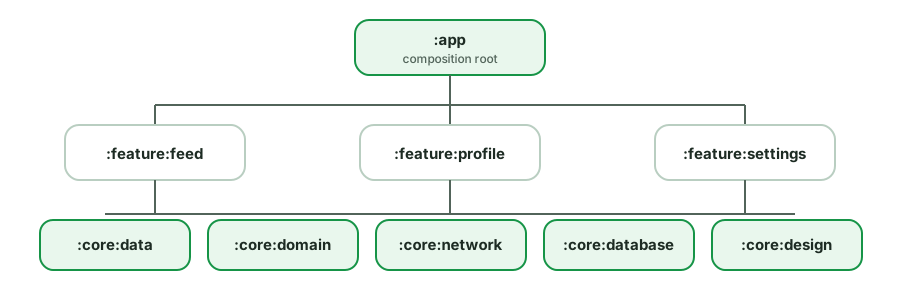
Useful design rules:
apivsimplementation- useimplementationto keep a dependency off the consuming module’s compile classpath (faster builds, real encapsulation); useapionly when a type leaks into your public API.- Avoid cyclic dependencies - features shouldn’t depend on each other directly; route through a navigation/abstraction module or
:core. - Feature modules depend on core, not vice versa (dependency rule).
- Convention plugins (
build-logic) to share Gradle config and avoid copy-paste.
Trade-offs: more boilerplate (Gradle files), a steeper setup, and cross-module navigation/DI wiring complexity. Worth it for medium/large apps; overkill for a tiny one.
Should the network, database, domain, and UI use separate models?
Optional deep dive: This is useful after you are comfortable with the everyday version of the topic. Focus on the main idea first; the implementation details are a senior-level follow-up.
In a layered architecture, the same concept (“User”) often has separate models per layer, with mappers at the boundaries:
- DTO (network) - shape of the API response. Has serialization annotations (
@SerializedName), nullable fields, server quirks. - Entity (database) - Room
@Entity; has DB concerns (@PrimaryKey, column info, denormalization). - Domain model - clean Kotlin used by use cases/business logic. No framework annotations.
- UI model - pre-formatted for display (e.g.
"3h ago"instead of a timestamp, a resolved color/label).
fun UserDto.toDomain() = User(id = id, name = name ?: "Unknown")
fun User.toUi() = UserUiModel(name = name, initials = name.take(2).uppercase())
Why separate them:
- Decoupling - a backend field rename only touches the DTO + its mapper, not the whole app. The UI doesn’t break because the API changed.
- Each layer models its own concerns - nullability/serialization at the edge, clean types in the middle, display-ready in the UI.
- Testability & clarity - domain logic works on clean models without server cruft.
The pragmatic counterpoint (interviewers reward this balance):
- For a simple app, three or four models plus mappers per entity can create disproportionate boilerplate. Sharing a model across layers can be reasonable when the app is small and the API maps cleanly to the UI.
- Introduce separate models where the friction is real - e.g. when the API is messy, when one screen aggregates several sources, or when domain logic shouldn’t see serialization details. Don’t apply it dogmatically everywhere.
Where mapping lives: typically in the data layer (DTO/Entity → Domain) and presentation layer (Domain → UI), often as extension functions or dedicated Mapper classes (easy to unit-test).
How do you architect a Kotlin Multiplatform (KMP) app? What's shared and what isn't?
Optional deep dive: This is useful after you are comfortable with the everyday version of the topic. Focus on the main idea first; the implementation details are a senior-level follow-up.
Kotlin Multiplatform lets you share business logic across Android, iOS (and more) while keeping UI native (or shared via Compose Multiplatform).
What’s typically shared (commonMain):
- Data layer - repositories, networking (Ktor), local storage (SQLDelight / Room KMP), DTOs, mappers.
- Domain layer - use cases, business rules, domain models.
- Presentation logic - ViewModels/state holders (with libraries like Decompose, Voyager, or KMP-ViewModel) and
StateFlow-based state. - Shared coroutines/Flow code, serialization (kotlinx.serialization).
What stays platform-specific:
- UI - Jetpack Compose on Android, SwiftUI on iOS (or Compose Multiplatform to share UI too).
- Platform APIs - camera, sensors, permissions, push, secure storage - accessed via the
expect/actualmechanism.
// commonMain
expect class PlatformContext
expect fun httpClientEngine(): HttpClientEngine

// androidMain / iosMain provide the `actual` implementations
Key architecture decisions interviewers probe:
expect/actualfor platform differences - declare the contract in common, implement per platform.- Source sets -
commonMain,androidMain,iosMain; common code can’t touch Android/iOS APIs directly. - DI - Koin is popular for KMP (Hilt is Android-only); or constructor DI in common code.
- How much to share - sharing the data + domain + presentation layers maximizes reuse with the least friction; sharing UI (Compose Multiplatform) is increasingly viable but more involved on iOS.
- iOS interop - shared code is exposed to Swift via an Obj-C/Swift framework;
suspend/Flowneed bridging (SKIE, callbacks) for ergonomic Swift consumption.
Trade-offs: shared logic and consistency vs. tooling maturity, iOS interop friction, and a steeper build setup. Sweet spot for many teams: share logic, keep UI native.
Discussion
Comments are powered by GitHub Discussions. Sign in with GitHub to join in.