Security, privacy, and client trust boundaries
Threat-model Android entry points, credentials, storage, networking, WebView, logs, and dependencies without pretending the client can keep server secrets.
Security answers become credible when they name an asset, attacker, entry point, control, and residual risk. “We encrypt it” is not enough. You need to say what is encrypted, where the key lives, which attack becomes harder, and which attacks remain possible.
Learning goals
- Threat-model exported components, intents, URIs, and pending intents.
- Design authentication and authorization with the server as authority.
- Protect local keys and sensitive data with realistic boundaries.
- Configure network and WebView behavior deliberately.
- Reduce privacy risk in telemetry, backups, screenshots, and logs.
Start with assets and trust boundaries
For a payment feature, assets may include access tokens, payment intent IDs, user identity, order totals, and confirmation state. Attackers may be another app on the device, a network attacker, a malicious link sender, a compromised dependency, or a user modifying their own client.
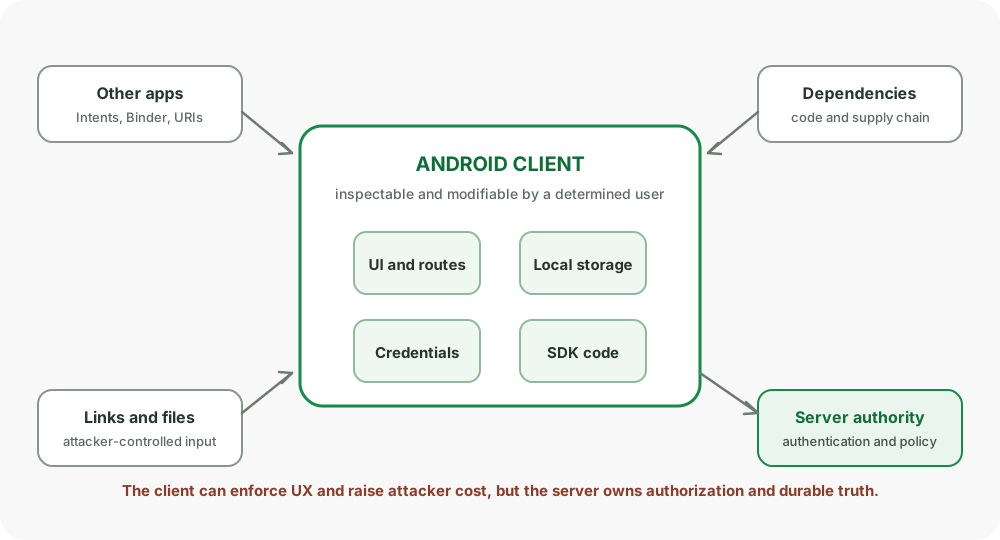
The installed app is outside the trusted server boundary. A determined user can inspect, instrument, or modify it. Therefore:
- Never trust a client-provided price, role, entitlement, or completion flag.
- Never ship a backend master secret.
- Revalidate authorization on every protected server operation.
- Treat client-side validation as UX and defense in depth, not authority.
Exported components are external APIs
Activities, services, receivers, and providers can be invoked across app boundaries when exported and permitted. Review every exported component:
- Does it need to be exported?
- Which callers should reach it?
- Is a signature permission appropriate?
- Are Intent action, data, type, extras, and caller identity validated?
- Can invocation trigger a destructive or privileged operation?
Set android:exported explicitly. Components with intent filters require deliberate exported behavior under modern target SDK requirements.
<activity
    android:name=".DeepLinkActivity"
    android:exported="true">
    <intent-filter android:autoVerify="true">
        <action android:name="android.intent.action.VIEW" />
        <category android:name="android.intent.category.DEFAULT" />
        <category android:name="android.intent.category.BROWSABLE" />
        <data android:scheme="https" android:host="example.com" />
    </intent-filter>
</activity>
An exported deep-link Activity should parse into a narrow internal route, authenticate, authorize, and ask for confirmation before sensitive actions.
Intent injection and unsafe forwarding
Do not accept a nested Intent from an untrusted caller and launch it blindly:
// Dangerous if sourceIntent is externally controlled.
startActivity(intent.getParcelableExtra("next_intent"))
This can expose unexported components or grant URI access unexpectedly. Allowlist destination and fields, construct a fresh explicit Intent, and avoid forwarding grants you do not understand.
PendingIntent is delegated identity
Another process can trigger a PendingIntent as your app. Use:
- Explicit destination components.
FLAG_IMMUTABLEunless mutation is required.- Unique identity for distinct actions.
- Narrow Intent fields and URI grants.
- One-shot behavior when reuse is not needed.
A mutable pending intent can be filled in by its recipient, which is necessary for a few platform patterns but expands the attack surface.
Content providers and URI grants
Prefer FileProvider or a purpose-built provider over file:// URIs. Grant only read or write access needed for a specific content URI and time window.
Path traversal bugs appear when untrusted path segments are concatenated into filesystem paths. Canonicalize and validate against an allowed root, or avoid exposing raw path construction entirely.
For a custom provider:
- Validate projection, selection, sort, and IDs.
- Use parameter binding for SQL values.
- Enforce read and write permissions.
- Do not expose sensitive columns accidentally.
- Consider caller identity when behavior differs by client.
Authentication tokens
Use short-lived access tokens with a defined refresh or reauthentication path. The exact protocol belongs to the identity system, but the mobile client needs:
- A single serialized refresh operation.
- Loop prevention if refresh is rejected.
- Atomic credential replacement.
- Account-scoped data clearing on logout.
- No token values in logs, analytics, or crash breadcrumbs.
Refresh tokens are high-value credentials. Store them according to the product’s threat model. Hardware-backed Android Keystore can protect cryptographic key material from direct extraction on supported devices, but it does not make an unlocked, compromised process trustworthy.
Android Keystore boundaries
Keystore can generate or import keys and restrict their use. Depending on device support and configuration, key material may be hardware-backed and non-exportable.
Use it when:
- Encrypting a local secret with a device-bound key.
- Signing a server challenge with a non-exportable private key.
- Requiring user authentication for key use when product friction allows it.
Plan for invalidation and loss. Keys can become unusable after secure-lock changes, biometric enrollment changes for some configurations, app data clearing, or device restore behavior. Recovery may require server reauthentication, not a crash loop.
Encryption at rest does not stop:
- A compromised process from requesting decryption while authorized.
- Sensitive data from appearing in logs or screenshots.
- The server from receiving or mishandling plaintext.
- An attacker from modifying untrusted client state.
Network security
Use TLS and Network Security Configuration to define trust behavior declaratively:
<network-security-config>
    <base-config cleartextTrafficPermitted="false">
        <trust-anchors>
            <certificates src="system" />
        </trust-anchors>
    </base-config>
    <debug-overrides>
        <trust-anchors>
            <certificates src="user" />
        </trust-anchors>
    </debug-overrides>
</network-security-config>
Do not ship debug trust anchors or hostname-verifier bypasses in release.
Certificate pinning tradeoff
Pinning can reduce trust in compromised or misissued certificate authorities, but it adds operational risk. A certificate or key rotation mistake can lock every pinned client out until an app update reaches users. If pinning is justified, pin backup keys, define overlap and expiry, monitor failure, and maintain an emergency recovery plan.
Pinning is not a substitute for TLS, server authorization, or safe token handling.
WebView is a browser boundary
WebView can expose app capabilities to remote content. Minimize it and configure only what the content needs:
- Keep JavaScript disabled unless required.
- Do not expose broad
addJavascriptInterfaceobjects to untrusted pages. - Restrict navigation to allowlisted origins.
- Open unknown external URLs in an appropriate browser flow.
- Disable file and content access unless required.
- Handle TLS errors by canceling, not proceeding.
- Keep Safe Browsing enabled where supported.
- Avoid mixing trusted app HTML with attacker-controlled strings.
Any JavaScript bridge method is an API exposed to loaded content. Treat its inputs like exported component inputs.
Storage, backups, and screenshots
Data classification should drive storage:
| Data | Typical handling |
|---|---|
| Public cache | App cache with eviction |
| User content | Private storage or scoped system location |
| Access token | Private storage with threat-model appropriate protection |
| Cryptographic private key | Android Keystore |
| Password | Do not persist unless protocol explicitly requires it |
| Server authority such as entitlement | Never trust local copy as authoritative |
Review backup rules so tokens, regulated data, and device-specific state are not restored unexpectedly. Consider FLAG_SECURE for screens where screenshot and non-secure display protection is required, while acknowledging accessibility and support tradeoffs.
Clipboard contents can be observed or previewed depending on OS behavior. Avoid copying secrets automatically and clear or expire sensitive clipboard actions when practical.
Privacy and observability
Collect the minimum data needed for a named purpose. Define:
- Event schema and owner.
- Retention period.
- Access control.
- User consent or opt-out where required.
- Deletion behavior.
- Redaction at collection time.
Do not put email, phone, tokens, message bodies, precise location, or full URLs with secret query parameters into generic logs.
Use random event or operation identifiers rather than personal identifiers when correlation is enough.
Dependency and supply-chain risk
Every SDK adds code, permissions, startup cost, network behavior, and update obligations.
- Pin and review dependency versions through the chosen version policy.
- Inspect manifest merges and newly added permissions.
- Generate a software bill of materials when organizational policy requires it.
- Monitor known vulnerabilities and maintain upgrade ownership.
- Remove abandoned dependencies.
- Restrict CI credentials and signing access.
- Verify release provenance and artifacts.
An analytics SDK should not receive data merely because integration is convenient.
Root, tamper, and integrity signals
Device and app-integrity signals can raise attacker cost and inform server risk decisions. They are not perfect proof. False positives, unavailable services, accessibility tools, custom devices, and replay must be considered.
Use integrity as one risk input for high-value operations, with server-side nonce binding and expiration. Do not place all authorization behind a client-side root check that can be patched out.
Security review framework
For each feature:
- Name assets and sensitivity.
- Draw process, device, network, and server boundaries.
- List entry points and attacker-controlled inputs.
- Define authentication and authorization checks.
- Minimize stored data and permissions.
- Plan failure, revocation, and recovery.
- Add safe observability.
- Test abuse cases, not only happy paths.
Common pitfalls
- Calling the APK a trusted environment.
- Relying on obfuscation to hide secrets.
- Exporting a component without validating callers and inputs.
- Forwarding an attacker-controlled nested Intent.
- Using mutable pending intents by default.
- Proceeding after a WebView TLS error.
- Pinning one certificate without backup and rotation policy.
- Logging credentials while debugging an auth problem.
- Treating root detection as authorization.
How interviewers probe this
- “Can you hide a secret in an APK?”
- “How would you secure an exported Activity?”
- “Why is an unsafe Intent forward dangerous?”
- “What does immutable PendingIntent protect?”
- “What does Android Keystore guarantee and not guarantee?”
- “Would you use certificate pinning?”
- “How do you secure a WebView bridge?”
- “How do you prevent analytics from becoming a privacy leak?”
- “How would you threat-model checkout?”
Practice checklist
- Enumerate every exported component and justify it.
- Attempt malformed and unauthorized deep links against a debug build.
- Rotate or invalidate a Keystore key and test recovery.
- Search release logs and analytics schemas for sensitive fields.
- Inspect the merged release manifest after adding a dependency.
- Write a one-page threat model for authentication or payment.
What you should be able to explain
- Client and server trust boundaries.
- Exported-component, Intent, URI, and PendingIntent risks.
- Keystore, TLS, pinning, and WebView tradeoffs.
- Privacy minimization and dependency risk.
Next: the mobile system design interview, where requirements, state, failure, and rollout must form one coherent answer.
Discussion
Comments are powered by GitHub Discussions. Sign in with GitHub to join in.