Background work, services, and notifications
Choose coroutines, WorkManager, foreground services, and alarms by guarantee instead of reaching for whichever API is familiar.
Android limits background execution to protect battery, memory, privacy, and performance. “Run this in the background” is therefore incomplete. You must define when work should start, how long it runs, whether it must survive process death, whether timing is exact, and how visible it is to the user.
Learning goals
- Select a scheduling API from product requirements.
- Explain the guarantees and limits of WorkManager.
- Make workers idempotent, cancellable, and observable.
- Distinguish started, bound, and foreground services.
- Build notification channels and
PendingIntentobjects safely.
Make the decision from requirements
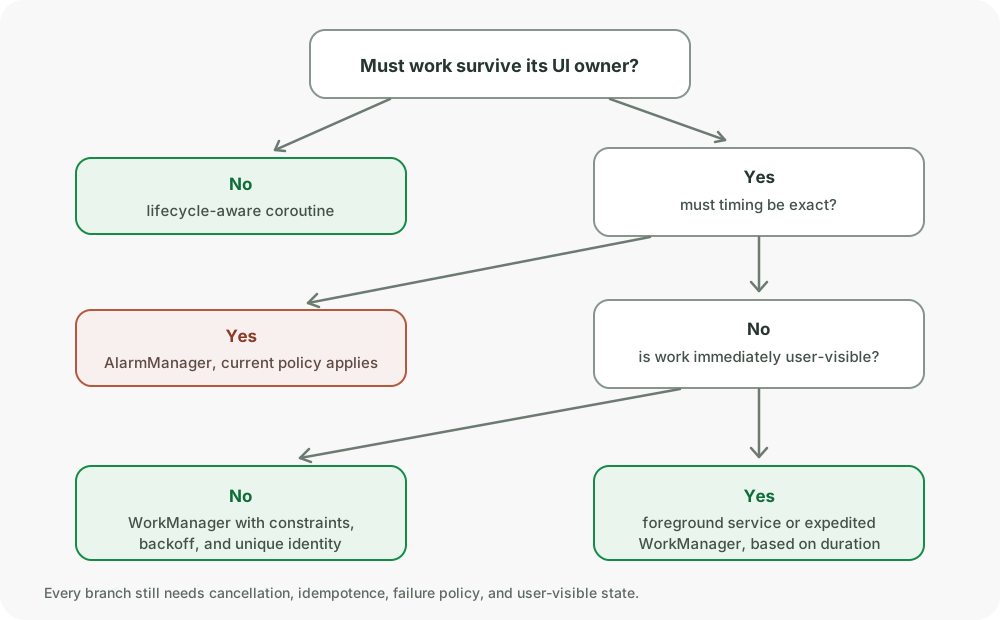
| Requirement | Typical mechanism |
|---|---|
| Work needed only while a visible screen owns it | Lifecycle-aware coroutine |
| Deferrable work that should survive process recreation | WorkManager |
| User-visible ongoing work that must run immediately | Foreground service or expedited WorkManager, depending on task |
| Exact user-facing time such as an alarm | AlarmManager, subject to exact-alarm rules |
| Work triggered while app is active and process lifetime is enough | Application-scoped coroutine with explicit ownership |
| Server can notify the device | Push message followed by minimal appropriate work |
No API guarantees execution forever. The system can stop work, revoke constraints, kill the process, or restrict abusive background behavior.
WorkManager contract
WorkManager is for persistent, deferrable work. It stores work specifications and uses platform schedulers underneath. It can reschedule eligible work after process death and device restart.
It does not promise an exact start time. Constraints, backoff, quotas, battery optimizations, standby state, and system load affect execution.
class SyncWorker(
    appContext: Context,
    params: WorkerParameters,
    private val repository: SyncRepository,
) : CoroutineWorker(appContext, params) {

    override suspend fun doWork(): Result = try {
        repository.sync()
        Result.success()
    } catch (error: AuthenticationException) {
        Result.failure()
    } catch (error: IOException) {
        Result.retry()
    }
}
Return values have exact meaning:
Result.success()marks the attempt successful and can pass small output data.Result.failure()marks permanent failure for this request.Result.retry()asks WorkManager to reschedule using backoff.
Do not retry invalid input, a revoked account, or a permanent 4xx response forever.
Constraints are eligibility, not a lock
val constraints = Constraints.Builder()
    .setRequiredNetworkType(NetworkType.CONNECTED)
    .setRequiresBatteryNotLow(true)
    .build()

val request = OneTimeWorkRequestBuilder<SyncWorker>()
    .setConstraints(constraints)
    .setBackoffCriteria(
        BackoffPolicy.EXPONENTIAL,
        30,
        TimeUnit.SECONDS,
    )
    .build()
If a constraint becomes unmet while a worker runs, WorkManager can stop it and run it again when constraints are met. Therefore work must tolerate interruption and repeated execution.
Idempotence and checkpoints
Assume doWork() can run more than once. A process may die after the server commits but before local success is recorded.
Safe patterns include:
- Upsert by stable server ID.
- Send an operation ID that the server deduplicates.
- Store durable progress after each committed chunk.
- Write the result and completion marker in one local transaction.
- Treat already-applied operations as success.
suspend fun uploadPending(operation: PendingOperation) {
    val result = api.upload(
        idempotencyKey = operation.id,
        payload = operation.payload,
    )
    database.withTransaction {
        resultDao.upsert(result.toEntity())
        pendingDao.markComplete(operation.id)
    }
}
Unique work controls duplicates
Use unique work when several triggers represent one logical job:
WorkManager.getInstance(context).enqueueUniqueWork(
    "account-sync-${account.id}",
    ExistingWorkPolicy.KEEP,
    request,
)
Policy is a product choice:
KEEP: preserve existing pending or running work.REPLACE: cancel existing work and use the new request.APPENDorAPPEND_OR_REPLACE: build a chain with defined failure behavior.
The unique name must include the scope, such as account ID, if jobs for different accounts may coexist.
Periodic work is inexact
PeriodicWorkRequest has a platform-defined minimum repeat interval and is intended for deferrable recurring maintenance. Execution can be delayed and the interval is not a wall-clock appointment.
If a user expects something at a precise time, periodic work is usually the wrong mental model. Consider an alarm or a server notification based on the product requirement and current platform policy.
Expedited work
Expedited WorkManager requests are for short, important, user-initiated work that should begin quickly and continue if the user leaves the app. They are quota-limited and may run as ordinary work when quota is exhausted if you select that policy.
val request = OneTimeWorkRequestBuilder<SendMessageWorker>()
    .setExpedited(OutOfQuotaPolicy.RUN_AS_NON_EXPEDITED_WORK_REQUEST)
    .build()
Expedited does not mean exact or unlimited. Long-running work may need foreground execution with a user-visible notification.
Cancellation is cooperative
CoroutineWorker cancellation propagates to its coroutine. Suspending APIs should cooperate automatically. Blocking libraries need explicit cancellation support.
Do not catch and convert CancellationException to retry:
try {
    repository.sync()
} catch (cancelled: CancellationException) {
    throw cancelled
} catch (offline: IOException) {
    return Result.retry()
}
Use onStopped() only for fast cleanup. It is not a reliable place to persist essential state because the process can disappear.
Services are components, not threads
A Service runs in the app’s main thread by default. Starting a service does not automatically move work to a background thread.
Started service
startService() or a related API asks a service to remain started until it stops itself or another component stops it. Background-start restrictions limit when apps can start services.
Bound service
Clients call bindService() and interact through an IBinder. The service can exist while clients are bound. Binding is useful for an in-process playback controller or cross-process API, but it adds lifecycle and concurrency concerns.
Foreground service
A foreground service performs user-noticeable ongoing work and shows an ongoing notification. Modern Android versions enforce start restrictions, service types, permissions, and time limits for some types. Exact requirements depend on target SDK and OS version, so production implementation must be checked against current platform documentation.
Use a foreground service for work the user can understand as actively happening, such as navigation, media playback, or a visible transfer. It is not an escape hatch for unrestricted background execution.
START_STICKY is not durable state
onStartCommand() returns a restart policy:
START_NOT_STICKY: do not recreate only because the process was killed.START_STICKY: recreate when possible, often with a null Intent.START_REDELIVER_INTENT: recreate and redeliver the last Intent.
These are best-effort process restart policies. Persist essential job state outside the service and design for missing or repeated intents.
Notifications
On Android 8.0 and later, every notification belongs to a channel. Users control channel behavior after creation.
val channel = NotificationChannel(
    SYNC_CHANNEL_ID,
    context.getString(R.string.sync_channel_name),
    NotificationManager.IMPORTANCE_LOW,
)
notificationManager.createNotificationChannel(channel)
Choose channel importance based on interruption value. Creating a high-importance channel for routine background sync damages user trust.
Recent Android versions require runtime notification permission for most non-exempt notifications. A foreground service still needs to provide its notification even when notification presentation rules differ, and product behavior must handle denial.
PendingIntent identity and mutability
A PendingIntent lets another process execute a future operation with your app’s identity. Specify mutability:
val openArticle = PendingIntent.getActivity(
    context,
    article.id.hashCode(),
    ArticleActivity.intent(context, article.id),
    PendingIntent.FLAG_UPDATE_CURRENT or PendingIntent.FLAG_IMMUTABLE,
)
Use immutable unless the receiving framework must fill in fields. Request code, action, data URI, component, and categories contribute to identity. Extras alone do not make two pending intents distinct, so careless identity can update the wrong notification action.
Push messages are not a job queue
Push delivery is best effort and subject to device, network, priority, and vendor behavior. A message handler receives limited execution time. Do minimal parsing and notification work, then schedule longer persistent work appropriately.
The server remains the source of truth. A dropped push should not permanently prevent data from appearing; refresh on app entry or periodic reconciliation when the product requires it.
Common pitfalls
- Using a coroutine tied to a screen for a durable upload.
- Claiming WorkManager runs at an exact time.
- Retrying permanent failures forever.
- Writing a worker that is unsafe when executed twice.
- Assuming a Service has a background thread.
- Using foreground service to avoid background limits without user-visible work.
- Treating
START_STICKYas durable recovery. - Creating notification
PendingIntentobjects whose identities collide.
How interviewers probe this
- “Coroutine vs WorkManager?”
- “What does WorkManager guarantee?”
- “What happens if a constraint becomes false during execution?”
- “How do you make a worker idempotent?”
- “Service vs thread?”
- “Started vs bound vs foreground service?”
- “Why does PendingIntent mutability matter?”
- “Can push delivery be your only synchronization trigger?”
Practice checklist
- Classify five jobs by timing, durability, visibility, and constraints.
- Kill the app process during a worker and verify repeated execution is safe.
- Enqueue the same logical sync five times and prevent duplicates with unique work.
- Build separate notification channels for ongoing transfers and urgent user messages.
- Test a denied notification permission without breaking the underlying operation.
What you should be able to explain
- Background API selection from product guarantees.
- WorkManager persistence, constraints, retries, and uniqueness.
- Service lifecycle and foreground-service boundaries.
- Notification channels and safe
PendingIntentidentity.
Next: navigation, deep links, and adaptive layouts, where entry points and window changes become architectural inputs.
Discussion
Comments are powered by GitHub Discussions. Sign in with GitHub to join in.