Test behavior and diagnose performance
Use tests and traces to protect user behavior rather than implementation details or coverage numbers.
Good Android tests describe an observable behavior: given a repository result, the screen exposes content; given an I/O failure, the screen exposes a retryable error. A test should not fail only because you renamed a private function or reordered internal calls.
Performance work follows the same honesty: measure, classify the bottleneck, then fix. Guessing “maybe Compose is slow” wastes days.
Learning goals
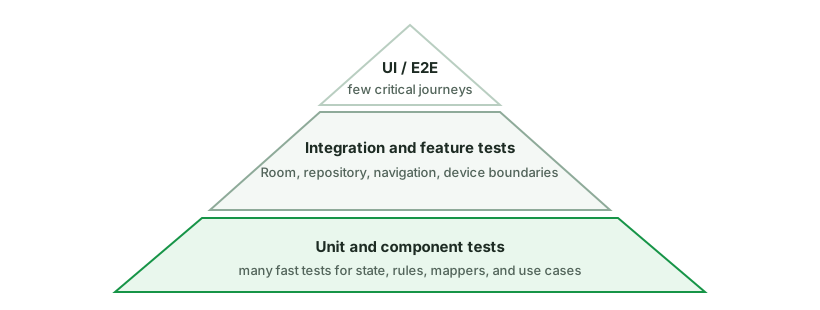
- Pyramid your tests: many fast unit tests, fewer instrumented tests.
- Prefer fakes over heavy mocks for repositories.
- Test coroutines and Flows with controlled time.
- Classify jank (main-thread work, overdraw, allocation, startup) before optimizing.
- Know the basic tooling: unit test runner, Espresso/Compose tests, Systrace/Macrobenchmark awareness.
Start with fast, controlled tests
ViewModel unit test
class ArticleViewModelTest {
    @Test
    fun refresh_success_showsContent() = runTest {
        val repo = FakeArticleRepository(Result.success(listOf(sampleArticle)))
        val vm = ArticleViewModel(repo)

        vm.refresh()
        advanceUntilIdle()

        val state = vm.uiState.value
        assertTrue(state is ArticleUiState.Content)
        assertEquals(1, (state as ArticleUiState.Content).items.size)
    }

    @Test
    fun refresh_failure_showsRetryableError() = runTest {
        val repo = FakeArticleRepository(Result.failure(IOException("offline")))
        val vm = ArticleViewModel(repo)

        vm.refresh()
        advanceUntilIdle()

        val state = vm.uiState.value as ArticleUiState.Error
        assertTrue(state.canRetry)
    }
}
class FakeArticleRepository(
private val result: Result<List<Article>>,
) : ArticleRepository {
override suspend fun load(): List<Article> = result.getOrThrow()
}Why fakes beat mocks for data boundaries:
- You write realistic behavior once.
- Tests read like product scenarios.
- Less brittle than stubbing every method call order.
Controlling dispatchers
Inject dispatchers so tests do not need Thread.sleep:
class ArticleRepository(
    private val api: ArticleApi,
    private val io: CoroutineDispatcher,
) {
    suspend fun load() = withContext(io) { api.fetch() }
}

// test
val dispatcher = StandardTestDispatcher(testScheduler)
val repo = ArticleRepository(api, dispatcher)
runTest + advanceUntilIdle / advanceTimeBy make debounce and delays deterministic.
Testing Flows
@Test
fun observe_emitsMappedUi() = runTest {
    val repo = FakeStreamingRepo(flowOf(listOf(article)))
    val values = repo.observeArticles()
        .map { it.map(Article::toUi) }
        .take(1)
        .toList()
    assertEquals("Hello", values.first().first().title)
}
Turbine is a popular library for richer Flow assertions if the project uses it.
What to test at each layer
| Layer | Test | Tools |
|---|---|---|
| Mappers / pure logic | Unit | JUnit |
| ViewModel state transitions | Unit | runTest, fakes |
| Repository orchestration | Unit with fakes of API/DAO | JUnit |
| Room DAO SQL | Instrumented or in-memory Robolectric (policy varies) | Room testing APIs |
| Compose UI states | JVM Compose UI tests or instrumented | Compose testing |
| Navigation / full flows | Fewer instrumented tests | Espresso / Mavericks / etc. |
Mid-level taste: do not instrument everything. Protect critical paths and pure logic first.
Compose UI tests (sketch)
composeTestRule.setContent {
    FeedScreen(state = FeedUiState.Error("Nope", canRetry = true), onRetry = {})
}
composeTestRule.onNodeWithText("Nope").assertIsDisplayed()
composeTestRule.onNodeWithText("Retry").assertIsDisplayed()
Test state rendering, not private ViewModel fields.
Flaky tests
Common causes:
- Real time sleeps
- Shared mutable static state
- Order-dependent tests
- Uncontrolled concurrency
- Idling resources missing for Espresso
Fix with deterministic schedulers, isolation, and idling. A flaky suite trains the team to ignore red CI - a reliability bug of its own.
Diagnose performance before “optimizing”
Classify the problem
| Symptom | First questions |
|---|---|
| Scroll jank | Main thread work per frame? Bind cost? Image decode? |
| Slow cold start | Application onCreate? ContentProvider? Dex load? |
| ANR | Main thread blocked > ~5s on input/lifecycle |
| High memory | Bitmap sizes? Leaks? Caches without bounds |
| Battery | Wakelocks? GPS? Chatty networking? |
Main thread rules
- No network or large disk I/O on main.
- No giant JSON parse on main.
- No allocating megabytes per frame in scroll paths.
// Bind path should be cheap
override fun onBindViewHolder(holder: VH, position: Int) {
    val item = items[position]
    holder.title.text = item.title // already formatted in UI model
}
Compose-specific performance habits
- Avoid unstable parameters that force wide recomposition.
- Use Lazy list keys.
- Hoist heavy reads; use
derivedStateOffor rarely changing derived UI. - Defer expensive work off the UI frame.
Images
- Size requests to view dimensions.
- Cache thoughtfully (Coil/Glide do much of this).
- Do not load full-resolution camera images into a 48dp avatar without sampling.
Tooling awareness (interview + practice)
- Android Studio Profiler - CPU, memory, energy.
- System Tracing / Perfetto - frame timelines.
- Macrobenchmark / Baseline Profiles - startup and critical journeys (increasingly expected at mid/senior).
- LeakCanary - retained Activities/Fragments/bitmaps.
- StrictMode in debug - catch accidental main-thread disk/network.
You are not expected to recite every API, but you should say: I measure, then fix the dominant cost.
Coverage vs confidence
100% line coverage with tests that assert nothing useful is theater. Prefer:
- Critical user journeys
- Tricky state machines
- Regression tests for bugs you already shipped
Common pitfalls
- Testing implementation details (private methods) instead of behavior.
Thread.sleepin coroutine tests.- Instrumented tests for pure mapping logic.
- Optimizing without a trace (“added caches everywhere”).
- Ignoring flaky CI.
How interviewers probe this
- “How would you test this ViewModel?”
- “Fake vs mock?”
- “How do you test debounce?”
- “App scrolls jankily - what do you do first?”
- “What belongs in unit vs instrumented tests?”
- “How do you prevent regressions on a payment flow?”
Practice checklist
- Add unit tests for a ViewModel success/error/refresh path.
- Replace a mock-heavy repository test with a fake.
- Take a systrace of a janky screen (even a sample app) and identify one main-thread spike.
- Write a Compose test that asserts Loading/Content/Error rendering.
What you should be able to explain
- Behavior-focused tests with fakes and controlled coroutines.
- Test pyramid trade-offs on Android.
- Performance diagnosis loop: measure → classify → fix → remeasure.
- Why flaky tests are a product risk.
Next: production data flows, caching, and Paging, where tests protect a real local source of truth and its network synchronization.
Discussion
Comments are powered by GitHub Discussions. Sign in with GitHub to join in.